Categories
Compare

ExpressVPN vs PIA: Which One is Better?

Two of the most often used VPNs are ExpressVPN and Private Internet Access (PIA). The former is known for having exceptional streaming capabilities, while the latter is popular for having the most extensive server network on the market.

Despite being owned by the same business, Kape Technologies Ltd., we wanted to see if there was a substantial difference between the two VPNs.

Based on our extensive testing process, we compare how ExpressVPN and PIA performed in several testing categories in this VPN comparison.

ExpressVPN vs Private Internet Access: Head to Head Comparison

Before we go into the details, let’s take a look at the fundamentals of each service to see where they lie:

ExpressVPN PIA
Trustpilot Rating: 4.6 4.6
Servers: 3000+ servers in 94 countries 35000+ servers in 80+ countries
Logs policy: No logs No logs
Pricing: Starts from $8.32/month Starts from $2.19/month
VPN protocols: Lightway, OpenVPN, L2TP/IPsec, IKEv2 OpenVPN, L2TP/IPSec, IKEv2
Streaming Compatibility: Netflix, BBC iPlayer, Disney+, Hulu, and more Netflix, YouTube, Amazon Prime, and more
Platforms: Windows, iOS, Firefox, Chrome, Edge, macOS, Linux, and Android iOS, Windows, Mac, and Android
Simultaneous connections: 5 devices 10 devices
Support: 24/7 live chat, knowledge base, FAQs, email support 24/7 live chat, FAQs, knowledge base, email support

ExpressVPN vs PIA speed test: Which one is faster?

ExpressVPN is known for being one of the fastest VPN services available. Lightway, their groundbreaking in-house tunnelling protocol, has proven to be effective in our experience.

We tested a variety of servers and found that the average download speed was over 80 Mbps on our 100 Mbps connection. This is truly fantastic: our internet connection was unaffected whether we were watching videos or playing online games.

It’s a shame we weren’t able to evaluate WireGuard’s speed results when utilizing Private Internet Access VPN. WireGuard is, after all, one of the best tunneling protocols available today, surpassed only by Lightway and NordVPN’s NordLynx. It’s lightning fast, secure, but was incompatible with our Windows operating system using PIA.

Because we couldn’t test PIA VPN’s WireGuard protocol, we decided to examine the second best alternative, OpenVPN.

VPN Protocol ExpressVPN Download Speeds PIA Download Speeds
OpenVPN UDP 82.65 Mbps 64.19
OpenVPN TCP 75 Mbps 40.24

With Private Internet Access, using OpenVPN (TCP/UDP) can be hit or miss. This is because the speeds may vary significantly depending on the country where the server is located.

Our  download speed was around 40 Mbps while connected to the server in India, for example. When we connected to a Swiss server later, though, it jumped to 64 Mbps. This is understandable considering Switzerland is significantly closer to our location.

ExpressVPN had faster speeds on average when utilizing the OpenVPN protocol, as you can see. Furthermore, the speed fluctuations were not as severe as with PIA VPN.

Final Result: ExpressVPN is the Winner!

PIA VPN vs ExpressVPN: Which one has the best features?

ExpressVPN and PIA keep their features simple, which ensures their ease of use. They do, however, have distinguishing characteristics that provide them a competitive advantage over one another. Let’s find out which is better: ExpressVPN vs PIA after reviewing their features:

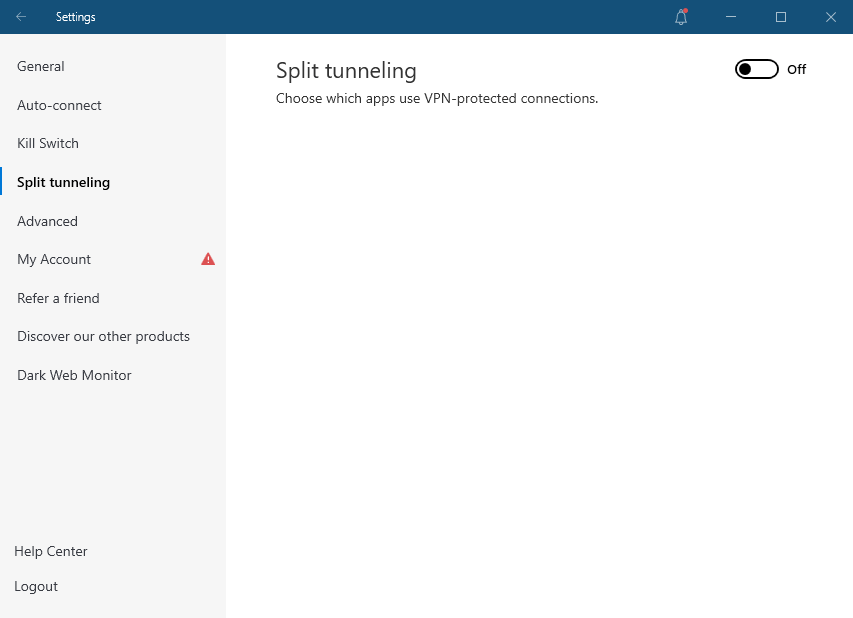
Split tunneling

One of the most helpful VPN features is split tunnelling. It basically allows you to include or remove VPN traffic on applications.

Split tunneling is available in ExpressVPN’s Windows, macOS, and Android apps, and in PIA VPN’s macOS, Android, Windows, and Linux.

Kill Switch

Users can utilize a kill switch with both ExpressVPN and PIA. The kill switch on ExpressVPN is easier than PIA’s, and it can be turned on or off. If the VPN disconnects, it automatically disables all internet traffic.

On the other hand, PIA’s kill switch includes three options. It can be turned off, auto, or always. It blocks outside only traffic while the VPN is running in “auto” mode, and it blocks all traffic if the VPN is turned off in “always” mode. Only the “always” setting ensures that your traffic is blocked if the VPN disconnects abruptly.
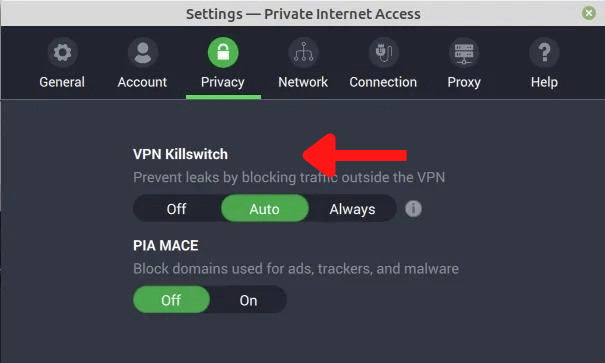
PIA-kill-switch

Truth be told, ExpressVPN’s kill switch has a tiny advantage in terms of usability and security.

Ad-blocker

Private Internet Access offers PIA Mace, which is basically an ad blocker that also stops malware and trackers to help you increase your online privacy. However, please note that ExpressVPN users are deprived of this feature no matter how great the service may be.

Exclusive features

Port forwarding is supported by both Private Internet Access VPN and ExpressVPN, allowing you to access your device from everywhere, operate servers for multiplayer games, and run your own website, among other things. You must use ExpressVPN’s proprietary router application to set up port forwarding, but PIA VPN allows you to do it using one of its mobile or desktop apps.
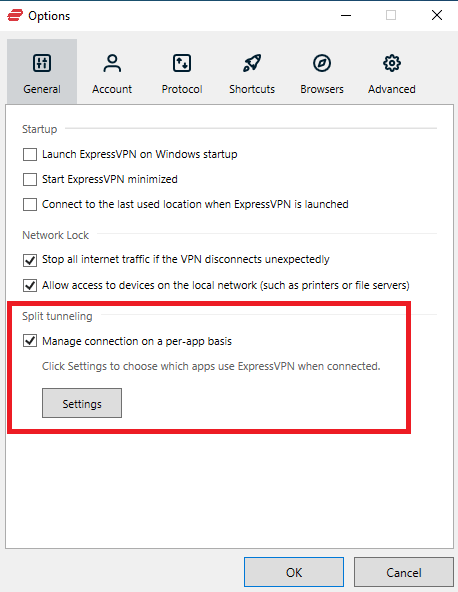
expressvpn-split-tunneling

Private Internet Access VPN, unlike ExpressVPN, includes a SOCKS5 proxy as well as Shadowsocks. When trying to download torrents or trying to get around China’s Great Firewall, using a proxy might be useful. In contrast, ExpressVPN has a way around China’s Firewall. You can use its Stealth server, which means no one will be able to tell you’re using a VPN.

Final Result: It’s a Tie!

ExpressVPN vs PIA VPN: which VPN is more secure?

When looking for a reputable VPN service, security is a major factor to consider. Both ExpressVPN and PIA offer most security features that we expect from any VPN, such as a kill switch and an automated connection option.

However, we still looked into ExpressVPN vs PIA security attributes in detail to check out which is better:

Jurisdiction

We prefer ExpressVPN whenever it comes to jurisdiction. This is due to the fact that it is based in the British Virgin Islands, which is a privacy-friendly jurisdiction.

Private Internet Access VPN, on the other hand, is based in the United States, one of the founding members of the Five Eyes alliance. This country is also notorious for its intrusive government, which has been accused of spying on online businesses.

Logging

As for ExpressVPN vs PIA logging policies, the former is a better option. Its privacy policy is simple to comprehend and lays out all of the information. As a result, ExpressVPN does not keep any connection logs, activity logs, browsing history, or other information. Your email address and payment method are the only things it saves.

Furthermore, ExpressVPN has been audited by PricewaterhouseCoopers, implying that all of its privacy claims are accurate.
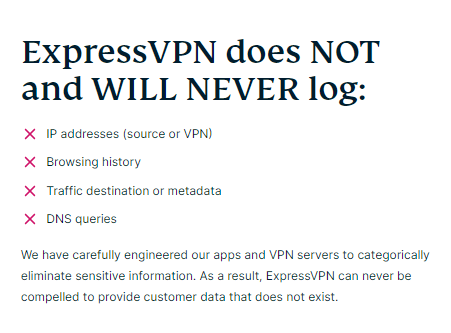
expressvpn-no-logs

Private Internet Access says in its privacy policy that it does not collect any logs other than your username, data use, and IP address. When you close the app, this information is erased.

Your email address, payment information, cookie identifiers, country of origin, and ZIP code will be saved on the VPN’s site. However, if you pay with cryptocurrency, you can prevent this.

Aside from that, PIA VPN’s privacy policy is a little confusing. The VPN “may disclose your Personal Data to any members of [its] group of companies,” according to the policy, which is a little scary.

Encryption Protocols

A VPN’s tunneling protocol selection can make or break the service. A large choice of alternatives will always make things much easier, whether you prefer speed or stability.

As a result, ExpressVPN is compliant with the following tunneling protocols:

  • Lightway – It is a fast and reliable protocol that is available on macOS, Linux, Windows, and Android.
  • OpenVPN (UDP/TCP) – The most widely used tunneling protocol. Its UDP variant is faster, while the TCP variant is more stable.
  • IKEv2/IPsec – It is a suitable option for mobile devices.
  • L2TP/IPsec – ExpressVPN supports the oldest protocol. Only use it if you can’t connect with any other protocol.

You also get the standard protocols with Private Internet Access:

WireGuard – This protocol is similar to ExpressVPN’s Lightway when it comes to security and speed.
OpenVPN (UDP/TCP)

IKEv2/IPsec

In short, Private Internet Access’ protocol selections isn’t far behind ExpressVPN’s.

Final Result: ExpressVPN is the Winner!

ExpressVPN vs PIA streaming capabilities

Each streaming site we tried ExpressVPN on got unblocked instantly, be it BBC iPlayer, Youtube TV, Netflix US, or even DAZN. It’s also important to note that ExpressVPN’s MediaStreamer feature allows you to watch geo-restricted content on a smart TV or virtually on some other device that doesn’t support VPNs.
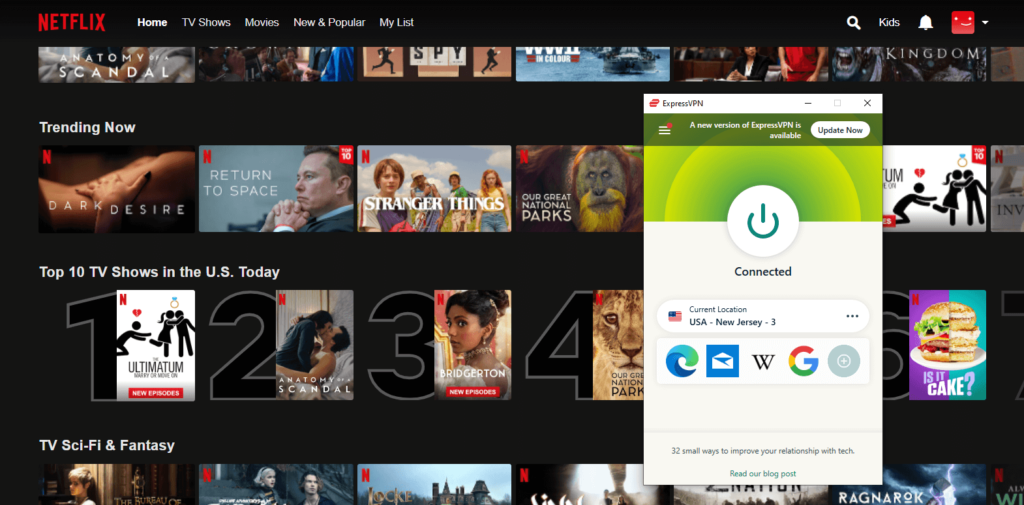
expressvpn-works-with-netflix

Now it’s time to talk about Private Internet Access. The reality is a little more disheartening: it didn’t perform as well as ExpressVPN. Netflix’s libraries in the United States and the United Kingdom were inaccessible to us. Surprisingly, we was able to access Indian Netflix’s geo-blocked content.

In addition, neither DAZN nor BBC iPlayer worked for us. We  could, however, access geo-blocked stuff on Youtube without issue.

Final Result: ExpressVPN is the Winner!

Torrenting and P2P

P2P activity is unrestricted across the whole ExpressVPN and PIA server network. You can torrent from every server with no restrictions on bandwidth or location.

Both VPN services were evaluated using popular torrent clients such as uTorrent, qBitTorrent, and Deluge. We were able to torrent files successfully on every server, and neither VPN caused any IP or DNS leaks.

ExpressVPN and Private Internet Access are equally reliable for anonymous P2P file-sharing when combined with AES-256 encryption, powerful kill switch capabilities, and secure privacy standards.

Final Result: It’s a Tie!

Plans and pricing; Which one is more affordable?

Prices and Plans ExpressVPN PIA
Periods 1 month 1 month
6 months 6 months
1 year 2 years
Special offers and discounts 35% off on 1 year plan 3 Years + 3 Free Months
Lowest price per month $8.32/month $2.03/month
Highest price per month $12.95/mo $9.95/mo

When it comes to cost, Private Internet Access VPN comes out on top. However, don’t make your decision only on the basis of financial concerns. If you want to watch geo-blocked content, for example, you should use ExpressVPN because Private Internet Access can’t unblock many streaming websites.

Final Result: PIA is the Winner!

Server locations

ExpressVPN offers a large server network, with over 3000 servers in 94 countries. But neither does PIA, which boasts a world-record-breaking 30000+ servers in 84 countries.

However, ExpressVPN has an edge that PIA doesn’t: RAM-only server technology. It assures that no information is stored on hard drives, and that all data on the servers is wiped clean when they are rebooted.

Final Result: PIA is the Winner!

ExpressVPN vs PIA device compatibility, interface, and ease of use

App Interface and Usability ExpressVPN PIA
Location selection List form List form
Multi-logins Five Ten
Mobile-friendly apps Yes Yes
Other devices and operating systems iOS, Windows, Android, Linux, and Mac iOS, Windows, Android, and macOS

Compatible apps have a big impact on your VPN selection. We reviewed the desktop and mobile apps, along with browser extensions of both VPNs for our Private Internet Access vs ExpressVPN comparison, and the results are as follows:

Desktop apps

The ExpressVPN and PIA desktop apps have a lot of similarities in our opinion. In addition to a separate tab for the settings menu, both VPNs include a small main window with a large button to establish connection.
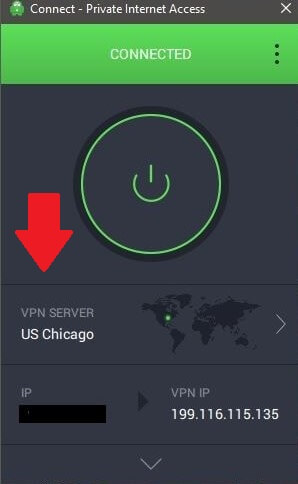
pia-desktop-app

PIA’s Windows and Mac apps, on the other hand, are more convenient. That’s because all kinds of information about the connection, such as the encryption, protocol, and the port in use, is readily available.

Furthermore, we believe that Linux users will prefer PIA’s app because it has a similar user experience to the Windows app, making it far easier to use than ExpressVPN. It’s also worth noting that Private Internet Access’ Linux app supports split tunnelling.

Mobile apps

Private Internet Access’ mobile apps (Android and iOS) are very similar to their desktop versions. Of course, this just applies to the main window; when you access the settings, the tab is sized to accommodate the smartphone’s limited screen.

In comparison to PIA’s desktop versions, there aren’t many differences. Keep in mind that for the time being, the iOS app does not support split tunneling.

ExpressVPN’s mobile apps are currently in a similar scenario. With the exception of the settings menu, they have a design that is nearly identical to the desktop apps.

There are, however, some distinctions between the Android and iOS versions, with the former being superior. That’s because ExpressVPN’s Android app includes split tunneling and a kill switch.

Browser extensions

PIA and ExpressVPN both have Chrome and Firefox extensions. These extensions are quite handy because they only protect your privacy when you browse websites but not the rest of your computer.

Please be aware that Private Internet Access, unlike ExpressVPN, also includes an Opera browser extension.

Final Result: PIA is the Winner!

Support Comparison

Both services have large knowledgebases of information. On the official site of ExpressVPN and PIA VPN, there are plenty of FAQ sections, setup manuals, and troubleshooting guides.

For individuals who want to communicate with a live person, there are email tickets and live chat options. As a result, we put both ExpressVPN and Private Internet Access’ live chat to the test.

While ExpressVPN’s customer service representative was able to assist us, PIA’s customer service representative struggled to resolve our issue.

Final Result: ExpressVPN is the Winner!

ExpressVPN vs PIA: which one wins?

In this ExpressVPN vs. PIA comparison, ExpressVPN comes out on top.

Despite the higher price, we believe it provides superior value. ExpressVPN outperforms PIA in terms of performance, functionality, security, support, and full streaming access, as well as having passed third-party audits.

PIA, on the other hand, is an excellent solution for individuals who require affordable protection against a variety of online threats as well as when torrenting.

Please remember that ExpressVPN has a superior track record and the necessary technical infrastructure to protect your privacy.

FAQs

Is PIA a zero log VPN?

Yes, PIA has a strict no-logs policy, which means that they don’t collect or keep any information about our users’ VPN usage. They also don’t keep track of your surfing activities, connection, bandwidth use, or anything else like that.

Is PIA good for gaming?

Yes! Thanks to its NextGen server architecture, Private Internet Access is a good choice for gaming. Also, with 84 countries on their network, the VPN can provide you with access to a wide range of geo-restricted content, including blocked games.
Read more Comparisons!

Categories
Compare

Surfshark vs IPVanish: Which One is Better?

You may find yourself comparing Surfshark vs IPVanish when looking for a VPN with unlimited simultaneous connections. Of course, this is far from the only function available from these VPN providers.

Surfshark and IPVanish are both lightweight applications with excellent user interfaces that achieve admirable speeds. Both are also reasonably priced in comparison to other brands in the market.

However, the question is, which one should you consider over the other? Continue reading this VPN comparison to find out!

Surfshark vs IPVanish: Head to Head Comparison

Looking for a quick go-through to know which is better: Surfshark vs. IPVanish? Well, this comparison table will help you do so:

Surfshark  IPVanish
Offers 3200+ servers in 65 countries Offers 2000+ servers in 75+ locations
Consistently fast speeds Speeds are above-average
Strong privacy and security Security is impressive
Works with all major streaming services Unblocks most streaming services
No-logging policy

Surfshark vs IPVanish: Speed Test

Surfshark is now one of the fastest VPNs in the world, thanks to their upgrading to the WireGuard VPN protocol. 

Whereas, all of IPVanish’s device apps are in the process of being upgraded to WireGuard. Until then, they continue to use the industry-standard OpenVPN protocol, which is slower than WireGuard.

VPN Provider Download Speeds Upload Speeds Pings
Surfshark 87.32 76.89 111
IPVanish 80.11 71.36 156

You can see that Surfshark overall offers better speeds than IPVanish, thereby being considered a better option when it comes to speeds among Surfshark vs. IPVanish.

Final Result: Surfshark is the Winner!

Which one has the best features?

Many individuals seek a VPN with a diverse set of capabilities for a variety of scenarios. Let’s take a look at how Surfshark and IPVanish perform in this area.

Split tunneling

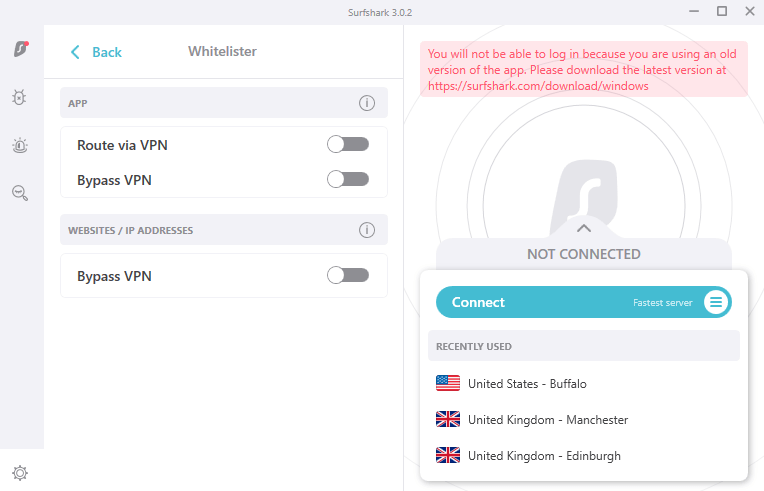
Surfshark’s split tunneling feature is known as Whitelister that allows you to choose which apps should go through the VPN tunnel. As for IPVanish, split tunneling is only available on Android.

surfshark-whitelister

Final Result: Surfshark is the Winner!

Stealth VPN

When you use a public wi-fi network, Surfshark’s stealth mode and function activates the VPN immediately. 

However, when it comes to understanding what it actually is, then it’s basically a feature built around obfuscation technology that conceals your VPN traffic and portrays it as regular traffic.

As for IPVanish, it comes with an OpenVPN Scramble feature that hides users’ OpenVPN traffic.

Final Result: It’s a Tie!

Ad-blocker

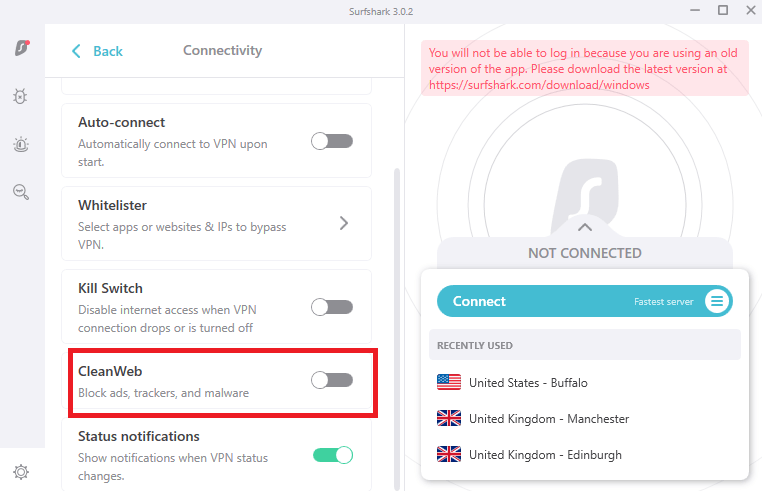
Surfshark provides a variety of services. CleanWeb is a function that prevents advertisements, trackers, and malicious domains from ruining your day or worsening your situation. This feature of Surfshark works perfectly well on multiple sites. We confirmed it through our testing.

surfshark-cleanweb

When it comes to IPVanish, the VPN doesn’t offer an ad-blocker at all, giving Surfshark an edge.

Final Result: Surfshark is the Winner!

Exclusive features (WireGuard, search function, and more)

Surfshark VPN provides a few more advanced capabilities than IPVanish when it comes to advanced features. Surfshark One, Surfshark Search, and Surfshark Alert are a few examples.

IPVanish does not include any additional security features. However, the company now incorporates online backup options with its VPN service thanks to a deal with SugarSync.

Final Result: Surfshark is the Winner!

Surfshark vs IPVanish: which VPN is more secure?

A good VPN should provide excellent internet privacy and security. This implies that the service should use secure VPN protocols and encryption, as well as a no-logs policy.

However, we tested Surfshark vs. IPVanish’s security features and here is all we found out:

Jurisdiction

The Netherlands is where Surfshark is based. While it is in Europe, which isn’t ideal, it isn’t in a 5 Eyes jurisdiction like the United States or the United Kingdom, which should be avoided.

Surfshark has no record of privacy or security issues, according to our analysis, and has a spotless track history since its establishment in 2018.

IPVanish is a member of the Five Eyes monitoring organization and is situated in the United States. Privacy firms situated in the US can be ordered (and have been) to store user data for US authorities.

Final Result: Surfshark is the Winner!

Logging

When it comes to Surfshark vs IPVanish logging policies, Surfshark is a strict no-logs VPN provider that even has a warrant canary in place. A warrant canary is a transparency report that shows whether any government has requested or required data records.

IPVanish has previously been detected collecting data for US authorities, and there is no guarantee that they will not do so again. The IPVanish logging scandal was first exposed in 2018.

This was the point at which IPVanish complied with FBI orders to log user data and provide over the documents. All of this occurred while IPVanish claimed to be a VPN service with “zero logs.”

Final Result: Surfshark is the Winner!

Encryption Protocols

Both of these VPNs are compatible with a variety of connection protocols. OpenVPN and IKEv2 are the most popular, but depending on the provider you choose, there are a few additional possibilities as well.

IPVanish users can use protocols including L2TP, SSTP, and PPTP. However, we would advise against it because these are only useful in certain situations.

Surfshark, on the other hand, collaborates with Shadowsocks, a company well-known for its ability to bypass China’s firewall. It also supports WireGuard, a speedier, security-focused protocol that is projected to become the industry standard in the near future.

Final Result: Surfshark is the Winner!

Surfshark vs. IPVanish: Streaming

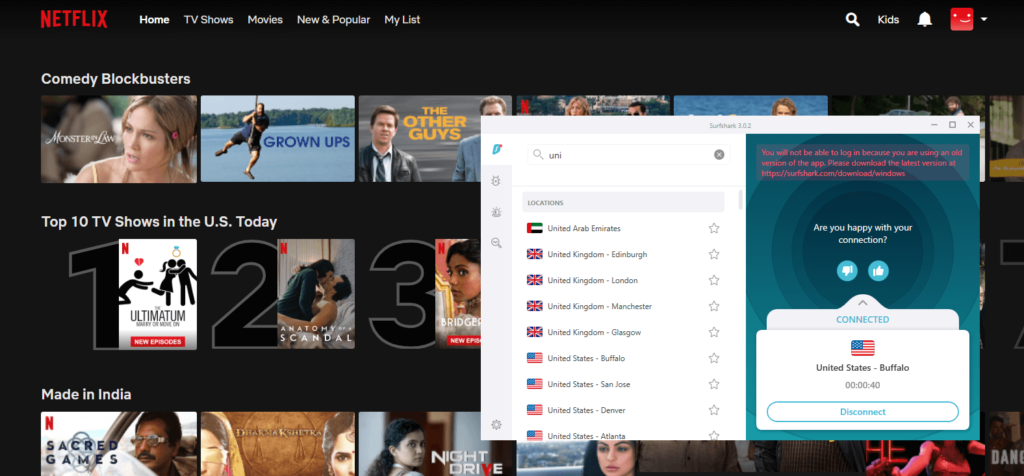
The site of Surfshark is vocal about its unlocking skills, listing the 14 Netflix libraries it can access. We succeeded in unblocking YouTube TV and all of the Netflix servers we attempted.

unblock-netflix-with-surfshark

IPVanish is more coy about this part of its service, although it still unblocks YouTube TV and Netflix.

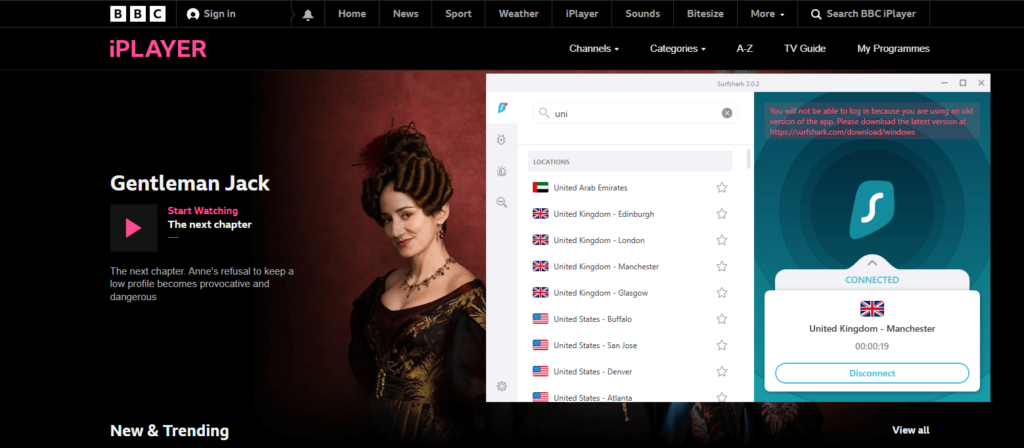
The BBC’s streaming service, however, is the most difficult to access; of the two, only Surfshark was able to provide us with access.

unblock-bbc-iplayer-with-surfshark

Both providers are useful and appear on our top Netflix VPN list if you’re in the UK. However, only Surfshark, can provide you with complete access to everything without lags.

Final Result: Surfshark is the Winner!

Torrenting and P2P

One of the best VPNs for torrenting is Surfshark. Its apps have leak protection and kill switches built in. Surfshark can also guarantee blazing fast speeds for P2P torrenting on all servers thanks to the WireGuard technology.

IPVanish offers strong protection against your IP address being leaked, however server speeds are slow. There are also some issues regarding IPVanish’s location in the United States, which has some of the strictest copyright regulations we’ve encountered.

Final Result: Surfshark is the Winner!

Plans and pricing; Which one is more affordable?

Prices and Plans Surfshark IPVanish
Periods 1 month 1 month
6 months 3 months
2 years 1 year
Special offers and discounts 82% off on 2 years + 2 months plan 65% off on 1-year plan
Lowest price per month $2.30/month $3.75/month
Highest price per month $12.95/mo $10.99/mo

As for pricing, Surfshark is currently the cheapest VPN if you’re all set for a long term commitment, along with 2 months free. And since it is the best VPN we have to offer, we ensure that you would not be disappointed at any cost.

As for IPVanish, its long term plan costs slightly more than Surfshark. While it comes with a shorter period of commitment, its features and jurisdiction make us think twice about it.

All in all, Surfshark has undoubtedly a cheaper subscription plan along with a robust service.

Final Result: Surfshark is the Winner!

Server locations

Surfshark is the obvious winner in terms of server count, with more than 3,200 shared IP servers compared to IPVanish’s 2,000+ servers. Surfshark also offers static IP servers in five countries: Germany, the United States, the United Kingdom, Japan, and Singapore.

IPVanish has server footprints in more than 75+ locations. However, the server count remains less.

Final Result: Surfshark is the Winner!

Apps, interface, and ease of use

App Interface and Usability Surfshark IPVanish
Selection of servers List-based List and Map based
Mobile-friendly apps Available Available
Auto-setup wizard iOS, Windows, Android, Linux, and Mac Windows, iOS, Android, Mac

Here is all the information we received after testing Surfshark vs IPVanish device compatibility:

Desktop apps

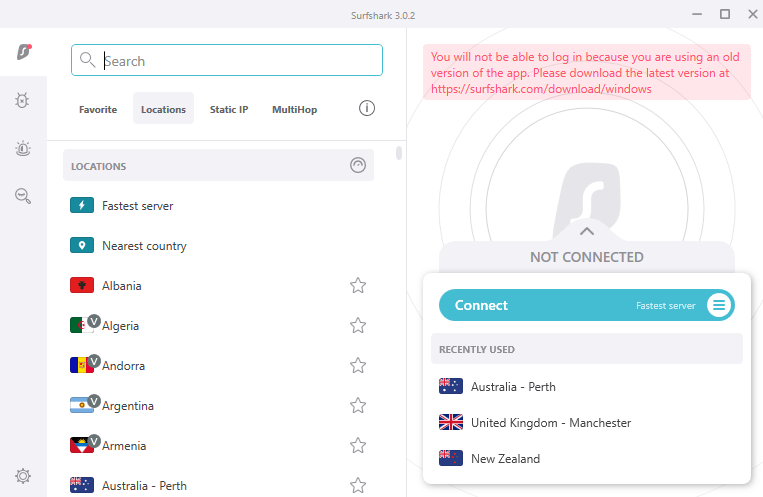
Both companies have desktop apps that are simple to use. Surfshark has a button that links you to the fastest accessible server, as well as a list of servers you’ve previously used. Servers are neatly divided into three categories on the server selection screen: general-purpose, static IP, and MultiHop.

surfshark-interface

IPVanish’s desktop client is somewhat similar, except instead of requiring users to travel to the whole server list, it allows them to instantly select their desired location from the home page. You can view servers in either a list or a map format. A panel with information about your server, current protocol, and data usage is also available.

ipvanish-windows-interface

Final Result: It’s a Tie!

Mobile apps

Both providers’ apps have the same look and feel as their desktop clients – Surfshark keeps its minimalist aesthetic, while IPVanish keeps its data-heavy interface.

Neither lacks in terms of features. Both IPVanish and Surfshark offer a variety of protocols, as well as a kill switch (albeit IPVanish’s iOS app does not).

Surfshark’s apps, on the other hand, stand out for their simplicity. While you won’t get quite as much in-depth information, you will get some very useful features, such as a list of your recently used servers. If you regularly transfer from UK to US servers, you’ll have to physically search each time with IPVanish.

Final Result: Surfshark is the Winner!

Browser extensions

Another thing that sets Surfshark apart is its outstanding browser extensions, available for Chrome, Firefox, and Edge. As for IPVanish, no browser extensions are offered.

Final Result: Surfshark is the Winner!

Customer Support Comparison

IPVanish and Surfshark both provide a variety of support options, including email, live chat, a knowledge base, and FAQs. The knowledgebase is the best place to go for step-by-step instructions and articles on how to fix minor installation, connectivity, and payment issues.

We used both live chat alternatives and were pleasantly surprised by the quality of the agents’ responses. The representatives were really responsive, answering our questions within minutes.

IPVanish, on the other hand, has an advantage over Surfshark in that it provides 24/7 phone assistance. Support agents can be reached via phone lines in the United States, the United Kingdom, Australia, Brazil, Germany, Mexico, and Spain.

Final Result: IPVanish is the Winner!

Surfshark vs IPVanish: which one is worth the money?

We’ve finally reached the conclusion of our IPVanish vs Surfshark analysis. Although Surfshark is clearly the superior VPN in most categories, IPVanish is still a viable option. What matters in the end are your priorities and the specific features you’re looking for in a VPN.

IPVanish is a fast and trustworthy VPN service with strong security features, a true no-logs policy, and a friendly support team.

Surfshark, on the other hand, is the best option. There are no restrictions on how many connections you can make. It does, however, provide faster overall speeds, improved network coverage, and enhanced privacy protections.

With static IP servers and the capability to access a broader spectrum of region-locked services, it’s also more versatile.

FAQs

Is IPVanish cheaper than Surfshark?

No, IPVanish is not cheaper than Surfshark. Its best plan costs $3.75/mo, while Surfshark comes at a price of $2.30/mo with 2 months of service absolutely free.

Is Surfshark good for gaming?

Yes, Surfshark is not a bad choice for gaming. Your connection will be stabilized, and your ping rate will be consistent. However, if you play using a VPN server that is located far away from your location, you may experience lag.

Can you be tracked using IPVanish?

No, you cannot be tracked using IPVanish. The best thing is that if you enable IPVanish’s obfuscation technology, it will hide that you’re using a VPN and not even your ISP would be able to guess that you’re actually connected to a VPN server.

Read more Comparisons!

Categories
Compare

ExpressVPN vs. NordVPN: A Thorough Analysis

If you already know some of the well-known VPN providers in the industry, then you probably already know ExpressVPN and NordVPN. However, you must consider which is better in terms of performance, speed, and security before choosing the one for yourself.

To answer this tricky question, the Best VPN Comparisons rigorously tested both of these leading VPN providers and compared them using specific attribute-by-attribute research metrics.

The answers we discovered should help you decide if NordVPN or ExpressVPN is better for your needs. So, without further ado, let’s get started on the ExpressVPN vs. NordVPN comparison and figure out which one’s better!

ExpressVPN vs. NordVPN – Summed up

Before we dig into the research metric-by-metric, here is a quick feature summary to figure out which is better in the NordVPN vs. ExpressVPN battle:

ExpressVPN NordVPN
3000+ servers in 90+ countries 5600+ servers in 59 countries
Unblocks multiple geo-locked streaming services and supports Ultra-HD video playback quality. Offers access to geo-restricted channels from across the world in Ultra-HD.
Servers are optimized for offering a lag-free streaming, gaming, and torrenting experience. Speeds are pretty fast. Downloads large files within minutes. Offers bufferless streaming on all Video-on-Demand services.
MediaStreamer, split tunneling, DNS leak protection, and Network Lock. Obfuscation technology, malware protection, CyberSec, and ad-blocking.
Five simultaneous connections Six simultaneous connections

Pricing Analysis

ExpressVPN vs. NordVPN Prices and Plans ExpressVPN NordVPN
Periods 1 month 1 month
6 months 1 year
1 year 2 years
Special offers and discounts 35% off on the 1-year plan 70% off on the 2-year plan
Lowest price per month $8.32/month $3.49/month
Highest price per month $12.95/mo $11.95/mo
Annual price
Money-back guarantee 30 days 30 days

While NordVPN offers steep discounts, ExpressVPN comes with less discount and a smaller commitment window, so you can leverage out from the situation and choose a different service in case you want to switch (which you wouldn’t want to, we promise you).

You get ExpressVPN’s premium service for 1 year at $8.32/month. But, if you believe you’re ready to commit to a longer-term, you can blindly opt for NordVPN’s 2-year plan, costing $3.49/month.

Let’s not forget that both of these VPN providers offer a no-questions-asked 30-days refund policy if you want to opt-out and choose a different service. The provider wouldn’t question you, and you won’t be required to give any reasons for a refund.

Final Result: NordVPN is the Winner!

Payment Policy

Supported Payment Methods ExpressVPN NordVPN
Credit/Debit Cards Almost all are supported Almost all are supported
PayPal Supported Not Supported
Giropay Supported Supported
Cryptocurrency Supported Supported

Both ExpressVPN and NordVPN offer customer-centric payment options, which is excellent, considering the more manageable, the better, right?

They support almost all credit and debit cards, be it American Express, Mastercard, Visa, JCB, and Discover. You can also subscribe to these VPNs through iTunes, Apple Pay, Mint, WebMoney, and more. 

They also accept payments through Bitcoin, XRP, Ethereum, USDC, and other cryptocurrencies.

However, in payment methods, ExpressVPN is a foot ahead from the latter as it accepts payments through one of the most used methods – PayPal, hence making the winner clear.

Final Result: ExpressVPN is the Winner!

Refund Policy

Refund Policy ExpressVPN NordVPN
Policy Duration 30-day money-back guarantee 30-day money-back guarantee
Refund Receiving Duration 5-7 working days 5-7 working days

Both of these VPNs offer a risk-free 30-day money-back guarantee. This helps users test out all the features and consider sticking with the VPN for an extended period, instead of jumping to another after claiming a refund. ExpressVPN and NordVPN transferred us our money within five working days when tested.

Final Result: It’s a Tie!

Features

Features ExpressVPN NordVPN
Compatible Apps macOS, Windows, Android, iOS, FireStick, Linux, Ubuntu, a few selected routers macOS, Windows, Android, iOS, FireStick, Linux, Ubuntu.
Simultaneous connections Five Six
Split tunneling Yes Only on Windows
Kill switch Yes Yes
DNS leak protection Yes Yes
Encryption AES 256-bit AES 256-bit
Browser extensions Chrome, Safari, and Firefox Safari and Chrome
Obfuscation technology On a few servers, like Hong Kong Yes
SmartDNS Yes, popularly called MediaStreamer Yes
RAM-only servers Yes Yes
Additional features 24/7 customer support, no-logs policy, set-up boxes for manual installation. Ad-blocker, zero-logs policy, customer chat support, set-up boxes.
For more information, do check out ExpressVPN review NordVPN review

As you can see, both VPNs offer some robust features that are pretty useful for every VPN user. However, it’s all clear who’s taking the lead in this one – ExpressVPN.

If taken security in ExpressVPN vs. NordVPN into account, then one can see that NordVPN still lacks one of the most significant features, i.e., split tunneling, which allows users to use the VPN-enabled and their regular connections together on different platforms.

Furthermore, ExpressVPN is relatively easy to install on routers as it offers its own custom firmware, which NordVPN doesn’t.

Final Result: ExpressVPN is the Winner!

Geo-Unblocking Capabilities

Streaming Channels ExpressVPN NordVPN
Netflix Multiple libraries, including UK, Canada, Australia, Japan, and Korea Multiple libraries, including Canada, India, Australia, Ireland, and Malaysia
Amazon Prime

Video

Yes Yes
CBS Yes Yes
Hulu Yes Yes
BBC iPlayer Yes Yes
Disney Plus Yes Yes
Hotstar Yes Yes
HBO Max Yes Yes
ABC Yes Yes
Channel 4 Yes Yes
DAZN Yes Yes
NBC Yes Yes

Both ExpressVPN and NordVPN are neck to neck when it comes to unblocking geo-restricted streaming services worldwide. While they allow you to easily access the above streaming services, there are a few cons.

ExpressVPN’s UK servers are often inconsistent and sometimes don’t work with BBC iPlayer. Also, as with NordVPN, you’re redirected to the American Netflix library if the VPN can’t unblock a library you’re trying to access.

Final Result: It’s a Tie!

ExpressVPN vs. NordVPN – Torrenting

One of the most significant uses of a VPN is downloading torrents from P2P sites, like PirateBay, uTorrent, BitTorrent, and qBittorrent. However, when it comes to testing which VPN is better for torrenting, one needs to test its speeds and IP leaks.

So, first off, we tested both the VPNs for speeds and here is what we got on their servers:

ExpressVPN Torrenting Speeds

ExpressVPN Servers Torrenting Speeds
UK – Manchester 76.89 Mbps
Canada – Montreal 78.21 Mbps
Australia – Sydney 77.87 Mbps

NordVPN Torrenting Speeds

NordVPN Servers Torrenting Speeds
UK – London 75.46 Mbps
Canada – Vancouver 76.41 Mbps
Australia – Sydney 74.67 Mbps

We then conducted IP leak tests to test out the security of ExpressVPN and NordVPN. You can check the screenshots below and know that neither one of those VPNs leaked our US IP:

ExpressVPN IP Leak Test

expressvpn-ip-leak-test1

Now, here is the NordVPN IP leak test we conducted:

NordVPN IP Leak Test

nordvpn-ip-leak-test

These VPNs are too good to be true, at least when torrenting.

Final Result: It’s a Tie!

ExpressVPN vs NordVPN – Netflix Unblocking

As you already know, Netflix offers geo-restricted libraries across the world. This means that if you live in the US, then accessing the Canadian, British, or Aussie Netflix library would be impossible for you unless you use a reliable VPN.

ExpressVPN and NordVPN fall under this reliable category and let users access any Netflix library they desire.

Even though Netflix has now started blocking VPN IPs, these two virtual private networks have learned to overcome this issue by refreshing their IP address list now and then. As a result, you get a seamless Netflix experience using these VPNs on any library you want.

While ExpressVPN offers a server network in 90+ countries globally, NordVPN offers 5600+ servers. So, with one VPN, you can access more libraries, while with the other, you eliminate the chances of traffic overload on servers.

Final Result: It’s a Tie!

ExpressVPN vs. NordVPN – China Unblocking

Both these VPN services work efficiently in China, despite service outages. They have a solid record even with the Great Firewall of China, and assure a reliable connection.

Although the Chinese government has blocked ExpressVPN’s website, the VPN provider offers a mirror site as an alternative for getting ExpressVPN.

Final Result: It’s a Tie!

App Interface and Usability

App Interface and Usability ExpressVPN NordVPN
Easy-to-use apps iOS, Android, Linux, macOS, Windows Windows, macOS, Linux, iOS, Android
Selection of Servers Available in a list Available in the form of list and map
Auto-updates Available Available
Auto-setup wizard Linux, Windows, Mac, iOS, Android, Tomato, DD-WRT router Windows, Linux,  iOS, Android, Mac

Both ExpressVPN and NordVPN have a clean layout and functions that are easy to find. While using the app, you can select a configuration to enable the enhanced security features.

To choose a winner, we checked both VPNs’ user interfaces and their settings.

ExpressVPN: User Interface and Settings

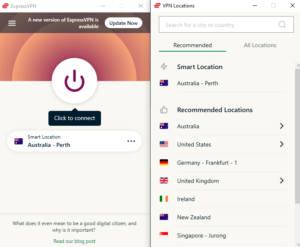
This VPN’s interface is pretty direct and easy to use. In ExpressVPN, simply pick on a specific region and then press the connect button to begin using a server. It also features several browser options that may be accessed directly from the interface.

expressvpn-interface

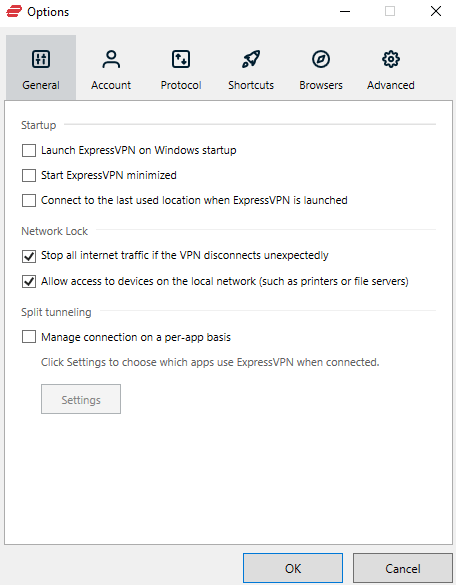
You can choose from various choices, like adding shortcuts, changing browsers, and customizing the desktop or mobile app to meet your needs.

When you click the setting options, you’ll be taken to a new page where you can review your account’s details. It decreases the amount of clutter on the app and allows users to navigate to their favorite settings rapidly.

expressvpn-settings

NordVPN: User Interface and Settings

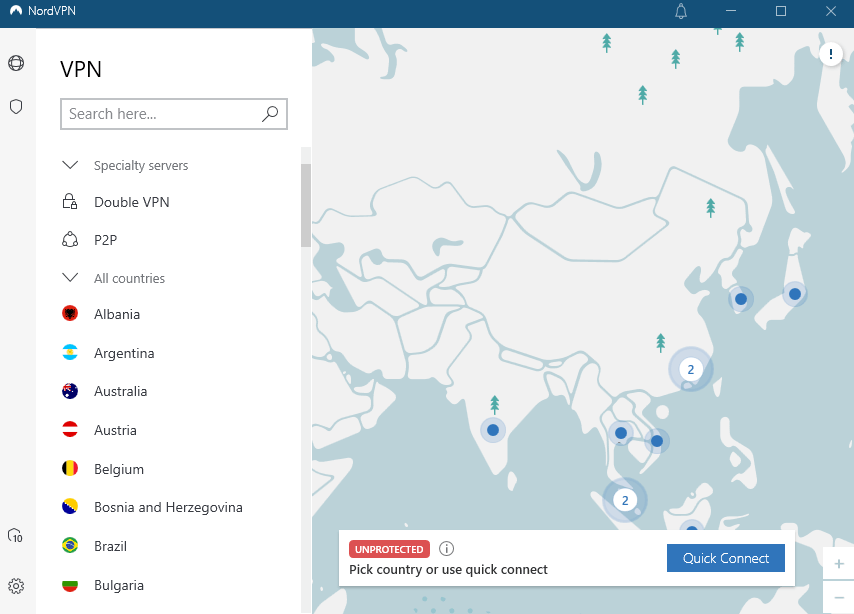
In NordVPN, you can pick between a list-based and a map-based menu on the main screen. As a result, it can be an attractive alternative for some VPN users who want to make sure they’re connecting to the appropriate server.

nordvpn-interface

You can use NordVPN to manually click on a country-bound server for a seamless connection, much like you can choose a place from Google Maps.

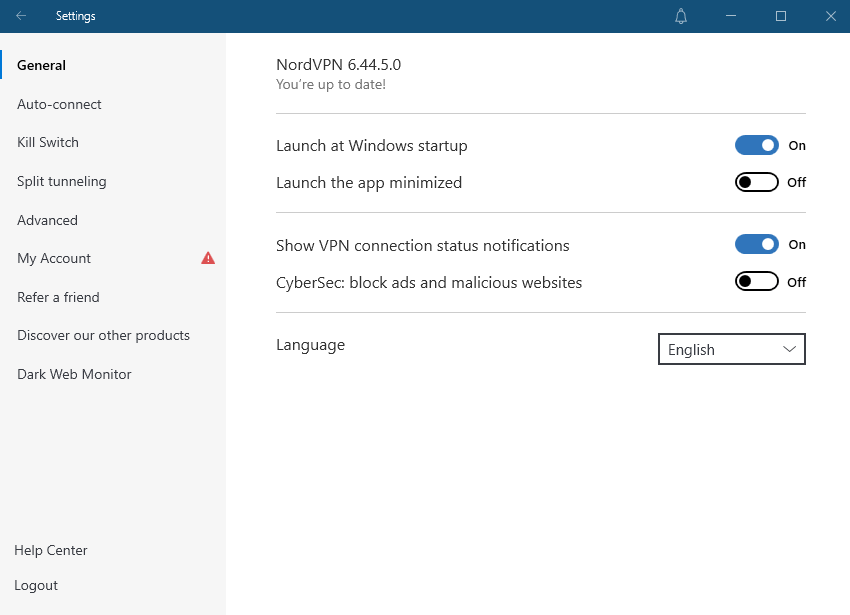
The user-friendly setup options allow you to turn on/off multiple functionalities and check account information.

nordvpn-settings

Final Result: NordVPN is the Winner!

Servers

Servers ExpressVPN NordVPN
Server count 3000+ servers 5600+ servers
Number of countries 90+ countries 59 countries
Virtual servers Yes No
Obfuscation  Yes Yes
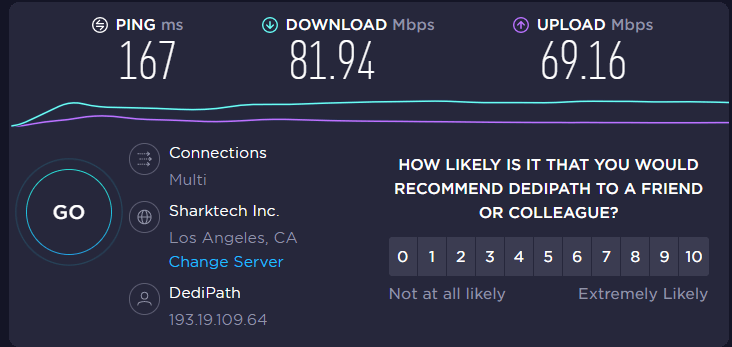
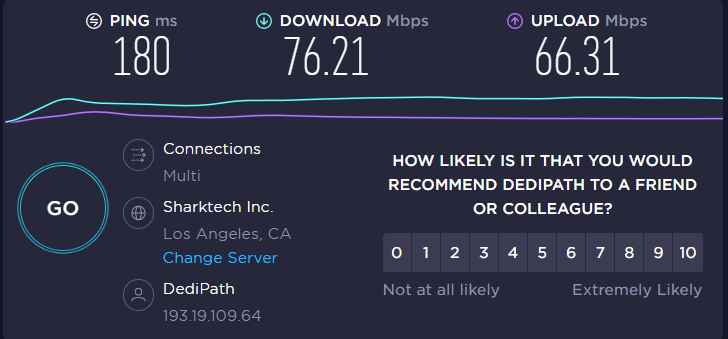
Speeds 81.94 Mbps 76.21 Mbps

Although NordVPN and ExpressVPN are among the top VPNs globally, their internet speeds and server availability may provide them an advantage over one another.

ExpressVPN vs. NordVPN Speed Tests

Split tunneling is the secret ingredient behind ExpressVPN’s lightning-fast performance. The best thing about this VPN is that you may use virtual servers from anywhere, which automatically boosts your internet speed. We completed the speed test and were astounded by the results:

expressvpn-speed-test

NordVPN outnumbers its competition and is far ahead of ExpressVPN, with over 5000 servers available. For example, you can use NordVPN to connect to a Brazilian or Icelandic server, and there are many other possibilities to pick from.

MultiHop feature, which can substantially encrypt your server and drive traffic from two separate servers, is another excellent function that NordVPN uses. However, it has the potential to slow down internet speed, which might be inconvenient.

We conducted a NordVPN speed test on the same server as ExpressVPN, and the results are as follows:

nordvpn-speed-test

Final Result: ExpressVPN is the Winner!

Security Policy

ExpressVPN vs. NordVPN – Privacy & Security Features ExpressVPN NordVPN
Jurisdiction British Virgin Islands Panama
Encryption AES 256-bit AES 256-bit
Logging policy No-logs No-logs
Kill switch Available Available
DNS leak protection Available Available
Tunneling protocols  SSTP, OpenVPN, PPTP, L2TP/IPSec, PPTP, IKEv2,

OpenVPN, L2TP/IPSec, SSTP

WebRTC Leak Yes No

With the help of the most excellent tunnelling protocols like OpenVPN, ExpressVPN and NordVPN provide consumers with dependable security solutions. You can rely on NordVPN and ExpressVPN for everything from an internet kill switch to a secure payment method and the prevention of IP leaks.

ExpressVPN can be the best-suited alternative for quicker internet when binge-watching or gaming online since it offers every security option available.

ExpressVPN’s L2TP option can deliver extra-fast internet speeds, high-grade encryption and is believed to be superior to PPTP protocols. ExpressVPN climbs the success ladder thanks to these tunneling protocols and encryption approaches, which easily wins the security struggle.

ExpressVPN DNS Leak Test

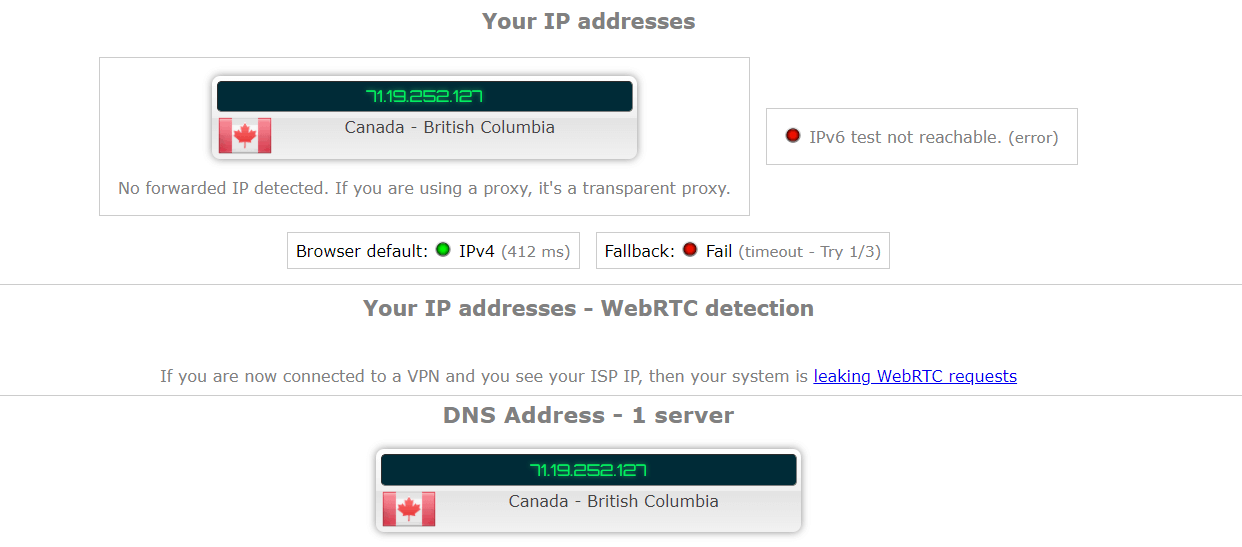
We tested ExpressVPN for DNS leaks using a Canadian server, and here are the results:

expressvpn-dns-leak-test

As for NordVPN, despite a data breach in 2018, this VPN offers high-end internet security with various tunnelling protocols, including L2TP and IKEv2.

However, the data breach has severely harmed NordVPN’s reputation, even though it is one of the fastest and most popular providers in 2026.

But, NordVPN’s IKEv2 protocol puts it ahead of ExpressVPN, making it more secure and faster.

We also evaluated NordVPN for torrenting, which entailed checking download speed, detecting IP leaks, and running a DNS leak detection test. Users who want to download torrents from their favourite websites can use NordVPN’s peer-to-peer servers.

The internet speed may be NordVPN’s biggest stumbling block, as it competes admirably with ExpressVPN regarding torrent downloads.

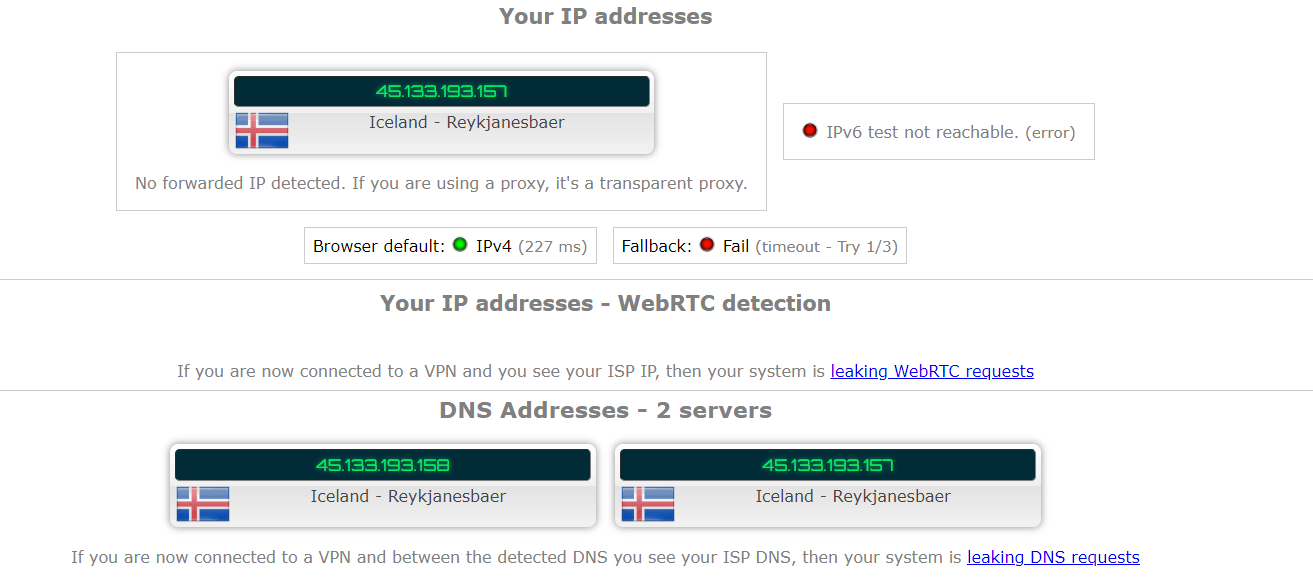
We tested NordVPN several times after connecting to a Icelandic server to guarantee our streaming device remained anonymous, especially when torrenting:

nordvpn-dns-leak-test

Final Result: ExpressVPN is the Winner!

Customer Service

Customer Service ExpressVPN NordVPN
Email/Ticketing Yes Yes
Live chat Yes Yes
Video guides Yes Yes
Phone support No No

In terms of customer service, ExpressVPN comes out on top. Users are not required to wait hours for a response to their email or message.

In addition to emails and live chats, ExpressVPN has prepared video lessons for users who have trouble connecting to a dependable server or moving servers. ExpressVPN takes an hour to respond to users, significantly faster than NordVPN.

Apart from live chat and email, NordVPN includes an extensive library of video lessons that guide customers through the user interface and assist them in selecting from various choices.

However, customer service employees often take more than three hours to respond to customers’ questions, which may be off-putting to some binge-watchers.

Final Result: ExpressVPN is the Winner!

FAQs

NordVPN vs ExpressVPN, which one is better for gaming?

NordVPN is a better choice for gaming as it offers more servers than ExpressVPN to choose from. It’s also quite fast. It further offers a dedicated IP option and robust unblocking capabilities which makes it a good choice for streaming as well.

NordVPN vs ExpressVPN, which one has a larger user base?

NordVPN has more servers i.e. 5600+ servers than ExpressVPN (3000+ servers). However, ExpressVPN has a more extensive server reach (90+ countries) than NordVPN (59 countries).

NordLynx vs Lightway, which one is better?

Although Lightway has double the number of lines of code as NordLynx, it is still slim by industry standards. The protocols have enhanced the speed and connection times in terms of performance. Lightway, in particular, usually establishes the connection in less than a second.

Final Takeout

Now that we’ve tested both the VPNs on all significant metrics, we can announce the ExpressVPN vs. NordVPN comparison winner – ExpressVPN!

How?

We compared these leading industry VPNs on 12 factors, including price, speed, security, refund policies, unblocking, and more. While we did see a few ties, ExpressVPN still took the lead by 5 factors and titled itself the overall best VPN in the industry and the winner of our guide.

NordVPN is equally great, especially regarding prices and usability, but ExpressVPN offers faster speeds, better reach, robust security, and excellent customer service.

To check both the VPNs in detail, check out our extensive ExpressVPN Review & NordVPN Review.

Read more Comparisons!

Categories
Compare

NordVPN vs. PIA: which one is better?

NordVPN and Private Internet Access are two well-known VPNs that offer consumers high-speed encrypted internet access as well as online protection.

You’re certainly not alone asking which service is superior. Both VPNs have extensive server networks, support multiple streaming platforms, and provide excellent security.

Nonetheless, they’re extremely distinct VPN providers, which can make your decision much more difficult than it needs to be. So, today, we’ll test both VPNs against one other in terms of speed, security, features, and ease of use. Let’s see which is better: NordVPN vs PIA.

NordVPN vs Private Internet Access: Head to Head Comparison

NordVPN PIA
Trustpilot Rating: 4.4 4.6
Servers: 5600+ servers in 60 countries 35000+ servers in 80+ countries
Logs policy: No logs No logs
Pricing: Starts from $3.29/month Starts from $2.19/month
VPN protocols: L2TP/IPsec, OpenVPN, IKEv2, Nordlynx OpenVPN, L2TP/IPSec, IKEv2 
Streaming Compatibility: Hulu, Amazon Prime, Netflix, BBC iPlayer, and more Hulu, Netflix, Amazon Prime, and more
Platforms: Linux, Windows, Firefox, Chrome, macOS, iOS, and Android iOS, Windows, Mac, and Android 
Simultaneous connections: 6 devices 10 devices
Support: 24/7 live chat, FAQs, knowledge base, email support knowledge base, FAQs, 24/7 live chat, email support

NordVPN vs PIA VPN; Which one is faster?

People often assume that VPNs would offer faster speeds than they have dreamed of. But the truth is that virtual private networks tend to offer speeds based on your base connection. Yes, they do help eliminating ISP throttling and the speeds are fast, but that all depends on the VPN you select and the protocol you choose.

We conducted NordVPN vs PIA speed tests on all protocols to figure which VPN offers better speeds overall on the following base criteria: 100 Mbps download speed/100 Mbps upload speed.

Protocols NordVPN PIA
Nordlynx/WireGuard 79/64 75/56
OpenVPN (TCP) 50/32 52/15
OpenVPN (UDP) 79/41 68/17

The WireGuard tunnelling protocol is used by both services. NordVPN just refers to it as NordLynx. As a result, NordVPN connected without issue, with only a 21% average speed drop for downloads and a 44% average drop-off for uploads. PIA’s download speed, on the other hand, dropped by 25 percent.

The average download speeds with PIA on the OpenVPN UDP protocol plummeted by 32%, while upload speeds declined by 83%. With NordVPN, download speeds dropped by 21% and upload speeds dropped by 59%.

The speed decreases are due to the fact that OpenVPN TCP is a slower and safer alternative. The average download speed of NordVPN is reduced by 50 percent, while upload speeds are reduced by 68 percent. PIA, on the other hand, isn’t that dissimilar. Their average download speeds are 58 percent, with 85 percent upload speeds.

Final Result: NordVPN is the Winner!

Which one has the best features?

One of the ways VPN providers may set themselves apart is by offering unique features. In our PIA VPN vs NordVPN comparison, we compared various features of both VPNs and the results are as follwos:

Split tunneling

Split tunnelling is available in both services, and they’re implemented similarly. So, you can set up whichever option is most useful for you.

During our tests, we discovered that the feature in PIA’s case didn’t always perform as it should. On NordVPN for websites and apps, the same feature worked flawlessly.

Split tunnelling is a reduced version of PIA’s desktop feature on mobile. It is available for specific apps but not for webpages.

Final Result: NordVPN is the Winner!

Kill Switch

Kill switches are accessible in the NordVPN and PIA apps for Windows, macOS, iOS, and Android. A kill switch for Linux is also available by NordVPN.

We intentionally disconnected our VPN connection while running an IP checking tool to see if the kill switches were working properly. Our IP address was always secured by PIA and NordVPN.

Because it has an app-specific kill switch and an internet kill switch that disables everything when the VPN connection goes down, NordVPN provides greater control than PIA. Because it is safer, we recommend that you utilise the internet kill switch.

PIA provides a one-of-a-kind kill switch feature that disables your internet connection until you launch the VPN app.

PIA-kill-switch

Final Result: NordVPN is the Winner!

Ad-blocker

NordVPN’s CyberSec is a built-in technology that blocks harmful websites, prevents botnet control, and allows you to bypass intrusive adverts. MacOS, Android,  Windows, iOS, and Linux are all supported.

PIA also has an ad-blocker built in called PIA MACE that helps to keep malware at bay. It isn’t the best ad-blocker, but it will suffice.

Final Result: NordVPN is the Winner!

Additional features

Both PIA and NordVPN offer a free SOCKS5 proxy, however the former also includes Shadowsocks, which NordVPN only offers on Android.

Each service has its own DNS server. NordVPN differs from Private Internet Access in that it offers Double VPN and obfuscated servers, which can help if the government bans VPN traffic.

For further protection, NordVPN uses the Tor network in conjunction with its Onion over VPN capability.

Handshake Naming System, or HNS for short, is a unique feature of PIA. It helps prevent DNS-level blocking by decentralising the domain name system. While this functionality seems interesting, it will only be beneficial to selected users: if you can’t access Facebook, HNS won’t help you either.

Final Result: NordVPN is the Winner!

Private Internet Access vs NordVPN: which VPN is more secure?

AES encryption is used by both NordVPN and PIA. The AES-256-CBC cipher with the SHA-512 hash function is used by NordVPN. PIA has a wider range of options, allowing you to choose between AES-128-CBC with SHA-1 (the default setting) and AES-256-CBC with SHA-256 (the strong setting). NordVPN excels not just in encryption but also in location,  transparency, and infrastructure.

Jurisdiction

When analyzing NordVPN vs PIA security in detail, the first thing to look at was jurisdiction. NordVPN is based in Panama, a country known for its privacy. It’s not present in the Five, Nine, and Fourteen Eyes jurisdiction. This is fantastic news because it implies that seizing somebody’s data will always necessitate a Panamanian court warrant.

Because PIA is based in headquartered the United States, the service provider is at the heart of the Five Eyes. Furthermore, some domestic legislation, such as the recently reauthorized Patriot Act, pose a threat to your privacy.

Final Result: NordVPN is the Winner!

Logging

As for NordVPN vs PIA logging policies, PIA claims that the company does not collect activity logs. This has been verified on multiple occasions when authorities have requested data from PIA.

The privacy policy of NordVPN is significantly more transparent. They claim they aren’t storing any of your information. So there is nothing to show when the government comes knocking. This is comforting because it corresponds to their RAM-only architecture claims. This stance has also been supported by an independent audit conducted by PwC.

Final Result: NordVPN is the Winner!

Encryption Protocols

With the OpenVPN and IKEv2 protocols, PIA uses an AES-256 cipher with SHA256 for authorization and an RSA-4096 handshake. Within the VPN software, PIA also allows users to change protocols and encryption cyphers (Windows and Mac OS).

NordVPN employs an AES-256 cipher with SHA256 authorisation and an RSA-4096 handshake with OpenVPN and IKEv2 in the same way that PIA does. NordVPN, like PIA, offers the WireGuard protocol with the ChaCha20 encryption upgrade.

Final Result: It’s a Tie!

Netflix and other streaming services unblocking

When it came to NordVPN vs PIA streaming capabilities, Netflix proved to be a difficult nut to crack with PIA. Even if Netflix in the United States worked, it was slow and the video quality was poor. Meanwhile, NordVPN had some issues at initially, but after turning off the custom DNS option, it was able to access blocked libraries.

With BBC iPlayer, PIA’s lucky streak came to an end. It displayed the error “BBC iPlayer only works in the UK,” preventing access to the site. In the meantime, NordVPN had no issues accessing the site’s content.

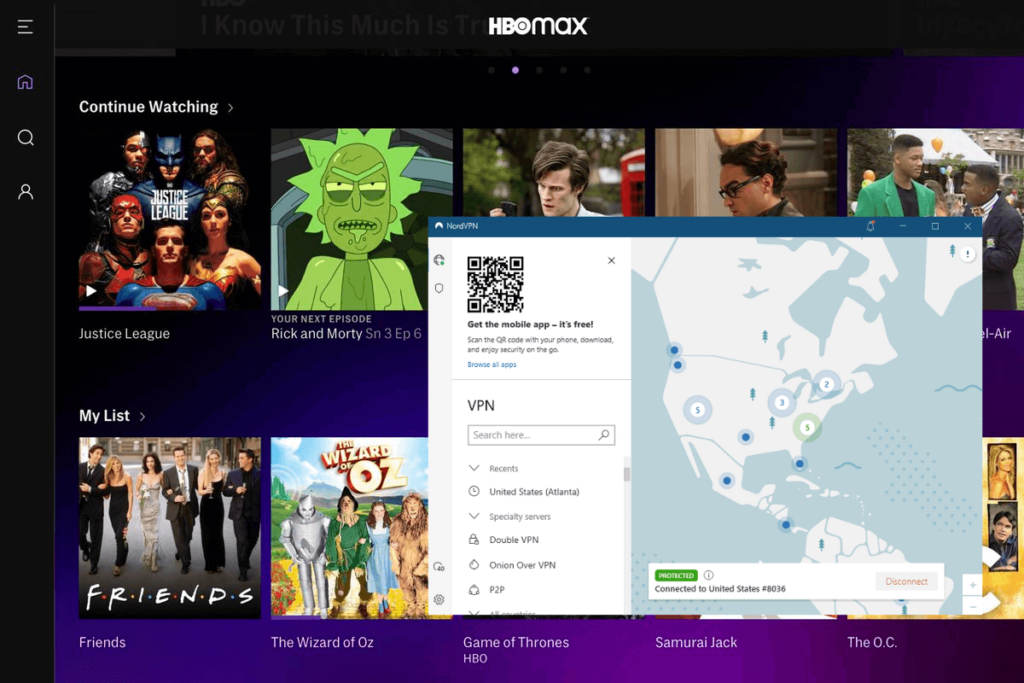
HBO Max is one of the most difficult to get around – only a few services are able to get around these restrictions. PIA was unable to obtain access to the streaming service. In the meantime, NordVPN was one of the few services that was able to unblock HBO Max.

nordvpn-unblocked-hbo-max

Final Result: NordVPN is the Winner!

Torrenting and P2P

P2P is supported by both NordVPN and PIA. So you’ll be users can download torrent files from either service.

Because PIA does not distinguish between specialised and non-P2P servers, it makes no difference which server you connect to.

Meanwhile, NordVPN operates in a unique way. It has dedicated torrent servers as well as ordinary servers. Technically, you can torrent on any server, but if P2P activity is identified, you’ll be redirected to a P2P server automatically.

Final Result: It’s a Tie!

Plans and pricing; Which one is more affordable?

Prices and Plans NordVPN PIA
Periods 1 month 1 month
1 year 6 months
2 years 2 years
Special offers and discounts 70% off on the 2-year plan 3 Years + 3 Free Months
Lowest price per month $3.49/month $2.03/month
Highest price per month $11.99/mo $9.95/mo

Private Internet Access is significantly less expensive than NordVPN in terms of price. As for similarities, both the VPNs offer risk-free 30-day money-back guarantees for you to test out the service.

Final Result: It’s a Tie!

Server locations

Private Internet Access has the most servers of any VPN we’ve tested, with over 30000. With 5600+ servers, NordVPN still outnumbers the competition, but Private Internet Access remains the obvious winner.

The number of server locations is a more direct comparison, with Private Internet Access having 78 versus NordVPN’s 60.

Final Result: PIA is the Winner!

Apps, interface, and ease of use

PIA NordVPN
OS supported Windows, Mac, Linux, iOS, and Android Windows, Mac, Linux, iOS, and Android
Other devices and operating systems Kodi, Fire TV devices, and Android TVs Kodi, Fire TV devices, and Android TVs
Browser extensions Chrome, Opera, & Firefox Chrome & Firefox
Simultaneous connections Ten Six

NordVPN and PIA offer apps for whichever device you use on a daily basis. Let’s check out the NordVPN vs PIA device compatibility in detail below:

Desktop apps

One thing we like about PIA is how informative its desktop apps for Windows and Mac are. It shows you the details of your protocols, port, encryption, connection,  and authentication cipher. Although the user interface isn’t as appealing, it provides more data than some other VPN providers.

An interactive map with a nation sidebar is included in the NordVPN desktop app’s user interface. You get less information than PIA because the only presented information is the freshly given IP address. If you tap on the three dots in a sidebar near a country then a server selection screen appears, where you can choose the quickest or a specific server.

pia-desktop-app

It’s worth noting that NordVPN has an odd distinction for macOS apps between the website app (sideload) and the App Store version. Only the OpenVPN tunnelling protocol is included in the sideload, which has the most recent upgrades. PIA makes no such distinction; their clients will behave the same regardless of where they are downloaded from.

Final Result: PIA is the Winner!

Mobile apps

There won’t be much of a distinction between Android and iOS apps in terms of user interface. This is true for both NordVPN and PIA. Both clients look to their desktop counterparts for inspiration.

A map and a country list are included in the NordVPN mobile apps. As a result, the functionality is equal to that of desktop clients. Your preferences are stored in a separate tab, making it simple to switch between them, make changes, and return to your previous task.

nordvpn-mobile-interface

On mobile, PIA’s apps strive to strike a balance between minimalism and a wealth of connection information. The apps have less area than desktop apps, which leads to some unusual design choices.

Both service providers have added the ability to switch between dark and bright modes in apps.

Final Result: It’s a Tie!

Browser extensions

While both NordVPN and PIA have Firefox and Chrome apps, only PIA has an Opera app. 

NordVPN’s Chrome browser extension is far superior to PIA’s. It comes with an ad blocker, a ‘Bypass List,’ which functions as split tunnelling for your browser, and a complete server list.

Both VPNs have a WebRTC leak blocker that prevents your IP address from being leaked while unblocking Netflix and BBC iPlayer. NordVPN has the second-best Chrome extension (right after ExpressVPN).

In addition, NordVPN’s Firefox app is superior to PIA’s. The Threat Protection feature for ad blocking is included in the Firefox extension, just like it is in the NordVPN Chrome extension, and it effectively unblocks geo-restricted content.

Final Result: It’s a Tie!

Customer Support Comparison

Customer service options are comparable for NordVPN and PIA. Both offer email assistance as well as 24/7 live chat.

NordVPN offers an automated chatbot, which is the most significant distinction between the two. The chatbot provided by NordVPN is the best we’ve seen. It provides quick and accurate responses and makes it simple to contact a human if necessary.

There is no phone assistance, as is frequently the case with VPNs. You can, however, send your query via email.

Final Result: NordVPN is the Winner!

NordVPN vs PIA: which one wins?

It was a difficult decision, but after going over all the information and passing both VPNs through multiple tests, we believe NordVPN has the dominant position over Private Internet Access in the end.

Both firms provide secure Internet access, encrypting and protecting our browsing activity; nevertheless, there are a few factors that make NordVPN a more appealing option, including as their exclusion from the surveillance jurisdictions of the Five Eyes, Nine Eyes, and 14 Eyes.

Because of their randomised IP addresses, global access, and ability to connect more devices at once, Private Internet Access had an advantage. If you’re on a budget, they’re also the less expensive option, though not by much.

FAQs

Is PIA a zero log VPN?

PIA has a rigorous no logs policy, which means they don’t collect or keep any information about our users’ VPN usage. They don’t keep track of your surfing activities, connection, bandwidth use, or anything else like that.

Is PIA good for gaming?

Yes! Thanks to their NextGen server architecture, Private Internet Access offers fast speeds for gaming, and with 84 countries on their network, you can access a vast amount of geo-restricted content, gaming and otherwise.

Read more Comparisons!

Categories
Compare

Hotspot Shield vs Surfshark: Less Money, More Value!

There are indeed tons of VPNs out there. And they all claim to be the fastest, safest, and most effective at accessing geo-blocked services and apps.

Hotspot Shield and Surfshark are two of the most amazing companies out there, and neither is hesitant about touting the merits of their respective services.

From the exhilarating speeds of Hotspot to Surfshark’s unlimited simultaneous connections, there’s something for everyone. One of the best aspects is that both have extremely low prices.

Both are highly regarded on our list of the best VPN services. So, how do you decide which one to go with? Let’s conduct a quick Hotspot Shield vs Surfshark comparison and find out!

Hotspot Shield vs Surfshark: Highlights!

Surfshark Hotspot Shield
Trustpilot Rating: 4.2 4.7
Servers: 3200+ servers in 95 countries 1800+ servers in 80+ countries
Logs policy: No logs No logs
Pricing: Starts from $2.30/month Starts from $7.99/month
VPN protocols: IKEv2, L2TP/IPSec, OpenVPN, WireGuard,  Shadowsocks Catapult Hydra, IKEv2
Streaming Compatibility: Hulu, Amazon Prime, Netflix, BBC iPlayer, and more BBC iPlayer, Netflix, YouTube
Platforms: Linux, macOS, Windows, Firefox, Chrome, iOS, and Android iOS, Windows, Linux, Mac, and Android
Simultaneous connections: Unlimited devices 5 devices
Support: FAQs, email support, 24/7 live chat, knowledge base FAQs, knowledge base, 24/7 live chat, email support

Hotspot Shield vs Surfshark speed test: Which is faster?

Both VPNs are known to offer blazing-fast speeds to users. However, one definitely stands ahead of the other. We conducted a speed test of both VPNs based on the formula: 100 Mbps download speed/100 Mbps upload speed, and got the following results:

Surfshark Hotspot Shield
WireGuard/Hydra 83/61 Mbps 87/56 Mbps
IKEv2 81/60 Mbps 85/44 Mbps

Hotspot Shield has been one of the fastest VPNs for a long time, due to the Catapult Hydra protocol. As per our testing on 100 Mbps,  we saw 80-90 Mbps download speed on US servers.

That’s a lot of speed. To put it another way, if you have Hotspot Shield set on while torrenting, gaming, or streaming, then the VPN usage will be completely undetectable.

When you compare this to the 80-85 Mbps speed we got from Surfshark on WireGuard, it was clear that Hotspot Shield is miles ahead.

Final Result: Hotspot Shield is the Winner!

Hotspot Shield vs Surfshark streaming; Which unblocks more platforms?

These two VPNs have been quite evenly matched, but Surfshark takes the lead in this category. Not only did it unblock every site we tried, but it also gave us access to a couple of extra Netflix libraries.

This makes it a particularly appealing alternative for anyone who enjoys streaming, especially since there is no connection limit, allowing you to effectively view everything, wherever.

unblock-netflix-uk-with-surfshark

Hotspot Shield has the distinction of being able to bypass the geo-restrictions of some of the most popular streaming services, including Netflix catalogues. Many larger services, on the other hand, blocked it outright, possibly due to the high volume of traffic originating from free-tier customers.

Final Result: Surfshark is the Winner!

Torrenting

When it comes to keeping you safe and secure while torrenting, Surfshark is no slouch. When it detects that you’re transferring torrent data, it connects you to a dedicated P2P server for the purpose.

Hotspot Shield, on the other hand, goes a step farther. It supports peer-to-peer (P2P) on all of its servers worldwide, whether you’re using a PC or a mobile device. That’s quite convenient, and it just means you’ll have one less thing to bother about while surfing the web.

Final Result: It’s a Tie!

Features overview

Whether you choose Surfshark or Hotspot Shield, you’ll have access to a vast range of features. A few prominent ones include:

Smart DNS

Surfshark offers a Smart DNS feature to users that allows you to enjoy an unrestricted access on devices that do not support VPN connections natively.

Meanwhile, Hotspot Shield doesn’t have Smart DNS, which puts it on line with other great VPNs for streaming.

Split tunneling

You’ll notice a feature called SmartVPN in Hotspot Shield, which is similar to split tunneling. Surprisingly, the VPN gives you the option of selecting not just apps but also websites, which is really useful.

hotspot-shield-smart-vpn

Whereas, Surfshark has the benefit of allowing URL-based split tunneling, while both app and IP-based split tunneling are supported.

Malware Blocking

Surfshark offers a CleanWeb feature that prevents users from all kinds of malware and phishing attempts on their device.

surfshark-cleanweb

Similarly, Hotspot Shield warns you when you’re about to access an infected website, preventing you from falling victim to phishing scams or malware.

Specialty servers

Surfshark offers a variety of specialty servers, including Static IP, MultiHop, and P2P servers, all of which provide reliable service to users.

However, when it comes to Hotspot Shield, then you’d have to give up on these servers as the VPN offers none.

Cybersecurity suite

You get more than just a VPN when you buy Hotspot Shield Premium. The list is as follows:

  • Spam-call blocker (Robo Shield) – This is a feature on Android and iOS that marks calls from unknown sources as spam.
  • Aura antivirus – A real-time antivirus is included with the Premium subscription. It is important to note, however, that it is only accessible on Windows and Mac.
  • 1Password – It’s a password manager that streamlines the process of filling out online forms and remembering passwords. It’s one of the safest and most effective password managers available. It has a 1 GB document storage capacity.

Final Result: It’s a Tie!

Hotspot Shield vs Surfshark VPN: which is more secure?

Moving on to Hotspot Shield vs Surfshark security features, both VPNs are slightly different from one another. Let’s review them in detail:

Encryption and tunneling protocols

Surfshark supports the OpenVPN, WireGuard, and IKEv2 protocols, all of which are fairly common. It also allows you to connect via Shadowsocks, an open-source protocol that specializes at avoiding detection by encrypting only your browser traffic, the same as a proxy server.

Hotspot Shield also has a few tricks up its sleeve, supporting IKEv2 and Hydra protocols. The latter is a separate protocol meant to allow faster connectivity over large distances.

Both VPNs use 256-bit AES encryption and 2048-bit RSA keys, which are practically unbreakable. To put things in perspective, cracking this would take countless lifetimes without the correct decryption key.

Logging

As for Hotspot Shield vs Surfshark logging policies, Surfshark claims to simply keep your billing details and email address. Nothing else.

Hotspot Shield, on the other hand, confesses of storing additional data such as session duration, websites accessed, device hashes, and IPs. This feels more intrusive than Surfshark in several ways.

On the other hand, we appreciate that the provider is so forthright about it, going to great lengths to state that none of the data can be linked to your personal account or usage.

Kill Switch

Each service also has a kill switch, that instantly blocks your internet connectivity when you lose your VPN connection, ensuring that you never have to surf without protection.

Final Result: It’s a Tie!

Plans pricing

Prices and Plans Surfshark Hotspot Shield
Periods 1 month Basic
6 months Premium
2 years Premium Family
Special offers and discounts 82% off on 2 years + 2 months plan 38% off on the Premium plan
Lowest price per month $2.30/month $7.99/month
Highest price per month $12.95/mo $11.99/mo

There’s only a slight difference between both VPNs’ monthly plans – both are quite expensive. However, only when you check out the prolonged plans is when you see the difference. Surfshark is WAY cheaper than Hotspot Shield, and has, therefore, taken the lead.

Final Result: Surfshark is the Winner!

China and countries with restricted internet access

You’re probably aware that China restricts the amount of online content that its citizens and visitors can access. The Great Firewall, a suite of tools, is used to accomplish this. While a VPN can help you get around the restrictions, most of these services are unavailable in China.

Although the websites for Surfshark and Hotspot Shield are inaccessible, the apps themselves are fully functional. As a result, if you install these apps before landing in China, you will have unrestricted access to the internet.

Users of Hotspot Shield don’t need to do anything special and can resume browsing as usual. Customers who use Surfshark must first enable NoBorders mode (Settings > Advanced > NoBorders).

Final Result: It’s a Tie!

Server locations

Surfshark has a prominent lead when it comes to servers. It offers 3200+ servers across 95 countries worldwide for users to connect to and enjoy an unrestricted connection.

Whereas, Hotspot Shield only offers 1800+ servers in 80+ countries. Even though the country count is not bad, the server count is just over half of what the former has to offer.

Final Result: Surfshark is the Winner!

Hotspot Shield vs Surfshark device compatibility: Interface & Ease of Use

Hotspot Shield Surfshark
OS supported Mac, Windows,  iOS, and Android iOS, Mac, Windows, Linux, and Android
Other devices and operating systems Android TVs & Fire TVs Fire TV devices, Kodi, and Android TVs
Browser extensions Chrome Chrome & Firefox
Simultaneous connections Five Unlimited

Surfshark offers unlimited simultaneous connections and is compatible with various platforms. Whereas, you can use Hotspot Shield on five devices at once.

By the looks of it, Surfshark is the winner. However, we’ll only confirm which is better: Hotspot Shield vs Surfshark after reviewing their  desktop and mobile apps.

Desktop apps

Both VPNs include user-friendly desktop applications. Surfshark puts your most-recently-used servers directly on the main screen for quick access, and you can also connect to the server that’s closest to you.

The servers are grouped into three categories (Static IP, Location, and MultiHop), making it simple to discover what you need. The controls are very simple to comprehend, with clear explanation and toggle switches.

surfshark-interface

Hotspot Shield’s style is more on the minimal side. On the main page of Hotspot Shield, there’s a quick-connect button, a daily data use monitor, and a server selection option, as well as a sidebar for navigating to other parts of the desktop app.

hotspot-shield-desktop-interface

If we had one issue, it would be some of the sidebar icons are needless, although this isn’t a major flaw. There’s a lot to enjoy here, with uncomplicated server selection and easy-to-use settings pages.

Mobile apps

The mobile apps of Surfshark are pretty similar to the desktop counterparts. There are a few minor modifications, such as the sidebar being relocated to the bottom of the screen. Furthermore, unlike desktop users, mobile users are unable to perform a speed test immediately within the app.

Without the need of third-party apps, the mobile version allows you to override your phone’s GPS location. You can also switch to a different sort of encryption, which isn’t available on desktop systems.

Hotspot Shield’s mobile app, like the desktop version, has a quick connect icon and a server selection feature directly on the home screen.

Although customers cannot change protocols in the mobile app, its settings are almost the same. The only actual difference is that the sidebar has shrunk and now runs to the bottom of the screen.

Final Result: It’s a Tie!

Customer support

Both VPNs provide live chat and email assistance 24/7. This means that a response to your difficulties is really no more than a few minutes away.

Surfshark will answer anyone’s query, whereas Hotspot Shield exclusively offers assistance to paying subscribers only.

Otherwise, you’ll have to hope that the knowledge base has a related article. Surfshark also includes a question database, as well as an official YouTube channel with video walkthroughs.

Final Result: Surfshark is the Winner!

Hotspot Shield vs Surfshark – The Winner?

Honestly, either one of these VPNs would be a great choice for daily use. Hotspot Shield is fast and dependable, with good unblocking ability, and it has a lot of features that its competitors don’t.

However, according to our testing, Surfshark is the superior option and the winner of our comparison. It covers many countries, offers fast speeds, and can unblock significantly more geo-restricted services.

This privacy-focused service also accepts crypto, keeps no logs, and allows you to connect quite so many devices as you want.

To summarise, Surfshark is a remarkable VPN that would be ideal for almost any task.

FAQs

Is Hotspot Shield good for gaming?

Yes, Hotspot Shield is a good choice for gaming. It prevents bandwidth limiting, encrypts your gaming data, lowers latency, and keeps your online profile anonymous.

Is Hotspot Shield better than NordVPN?

Well, NordVPN appeals majority of customers. This is due to the fact that it is less expensive, unblocks numerous streaming sites, and provides superior customer service. Some users, however, may prefer Hotspot Shield due to its lightning-fast download speeds.

We thoroughly reviewed the two in our Hotspot Shield vs NordVPN comparison to find out the answer.

Categories
Compare

Hotspot Shield vs NordVPN

There’s no doubt that NordVPN is now one of the best VPNs on the market. But how far ahead of the competition is it? What if we compared it to a smaller provider?

Consider the comparison between NordVPN and Hotspot Shield. The latter is far from insignificant in the business. It has established a reputation as an excellent freemium choice with its own proprietary tunneling technology, Hydra.

You’ve come to the right place if you’re attempting to decide between NordVPN and Hotspot Shield for the finest service. We’ll attempt to answer this question in our NordVPN vs Hotspot Shield comparison.

Let’s have a look at how these two VPN services perform in this VPN comparison in terms of speed, security, features, and other essential factors.

Hotspot Shield vs NordVPN: A Face Off!

NordVPN Hotspot Shield
Trustpilot Rating: 4.4 4.7
Servers: 5600+ servers in 60 countries 1800+ servers in 80+ countries
Logs policy: No logs No logs
Pricing: Starts from $3.29/month Starts from $7.99/month
VPN protocols: L2TP/IPsec, OpenVPN, IKEv2, Nordlynx Catapult Hydra, IKEv2
Streaming Compatibility: Hulu, Amazon Prime, Netflix, BBC iPlayer, and more BBC iPlayer, Netflix, YouTube
Platforms: Linux, Windows, Firefox, Chrome, macOS, iOS, and Android iOS, Windows, Linux, Mac, and Android
Simultaneous connections: 6 devices 5 devices
Support: 24/7 live chat, FAQs, knowledge base, email support 24/7 live chat, knowledge base, email support, FAQs

Hotspot Shield vs NordVPN: Which One is the Fastest?

To start off, we wanted to conduct a Hotspot Shield vs NordVPN speed test to figure out which VPN is better in terms of speeds. Hotspot Shield, like NordVPN, has a proprietary protocol that focuses entirely on speed.

So, which is the quicker handcrafted protocol: NordLynx, Catapult Hydra, or the oldest IKEv2? Let’s take a look at what we’ve got using the formula 100 Mbps download/100 Mbps upload speed.

NordVPN Hotspot Shield
NordLynx/Hydra 86/76 Mbps 87/63 Mbps
IKEv2 82/65 Mbps 84/45 Mbps

In terms of download speed, we observed that Hotspot Shield’s Hydra is led the pack. In fact, speed drops were as less as 13% in some cases, which is an outstanding achievement for a VPN. In the meanwhile, NordLynx’s download speeds were excellent, although not as fast as Catapult Hydra’s.

Hydra’s upload speed, on the other hand, left us wanting more. It was noticeably slower than NordLynx, which is unfortunate if you need a VPN for gaming.

IKEv2 is another tunneling protocol shared by NordVPN and Hotspot Shield. Once again, Hotspot Shield outperformed NordVPN in terms of download speeds. Hotspot Shield’s upload speeds, on the other hand, were disappointing.

Overall, due of the disparity in download and upload speeds, it’s tough to identify a clear winner in this category.

Final Result: It’s a Tie!

Netflix and streaming platforms: Unblocking Comparison

As for Hotspot Shield vs NordVPN streaming capabilities, the latter can unblock almost any streaming service you can think of, including Netflix, Hulu, Disney+, and HBO Max. There are no buffering concerns, and you can usually access movie libraries from a variety of nations, not just the United States or the United Kingdom.

It’s worth noting that NordVPN is ideal for watching Netflix because it unblocks around 16 different libraries.

nordvpn-unblocked-american-netflix

Now let’s talk about Hotspot Shield. It’s also a decent VPN for streaming, as it can unblock Amazon Prime Video, Netflix, Hulu, YouTube, Amazon Prime Video, and BBC iPlayer, among other services. However, the list comes to an end here, as we were unable to access the other services (such as DAZN) while using the VPN.

NordVPN also has a SmartDNS feature that lets you view content on devices that don’t support VPN connections.

Final Result: NordVPN is the Winner!

Torrenting

Both Hotspot Shield and NordVPN are good torrenting options. If you download torrents frequently, then NordVPN should be your first choice.

While Hotspot Shield supports torrenting on all servers, NordVPN is a superior option since it has specialized servers that are specifically designed for P2P connections. There’s more: you can connect to its Onion over VPN servers, that are incredibly secure.

Finally, NordVPN includes a built-in SOCKS5 proxy that may be used with a variety of torrenting clients.

Final Result: NordVPN is the Winner!

Features overview

In this section, picking a winner is challenging as both VPNs offer distinct advanced features. Let’s check a few in detail below:

Smart DNS

SmartDNS is a feature of NordVPN that allows you to access Netflix and other streaming services on devices that don’t support VPN connections, such as game consoles and some smart TVs. But keep in mind that your connection will not be encrypted, and you will only be using an international IP address.

Split tunneling

Both NordVPN and Hotspot Shield offer split tunneling. It’s quite beneficial because it lets you to use the VPN connection for specific applications while leaving the rest of your traffic unencrypted. You won’t have to switch the VPN on and off all the time this way.

In NordVPN’s case, the function is highly customizable. On both Windows and Android, you can include or exclude specific apps from the VPN connection.

When you use Hotspot Shield, you’ll see a feature called SmartVPN, which is practically the same as split tunneling. Surprisingly, the VPN lets you select not just apps but also sites, which is really useful. However, exclusion is the sole option, which limits this Windows and Android feature.

hotspot-shield-smart-vpn

Malware Blocking

Surprisingly, several VPNs can protect you from not only snoopers but also malware. NordVPN uses a mechanism called CyberSec to accomplish this. It prevents your computer from being infected by blocking dangerous ads and websites.

Similarly, Hotspot Shield warns you when you’re about to access an infected website, preventing you from falling victim to phishing scams or infections.

Specialty servers

Unlike Hotspot Shield, NordVPN has a number of specialized servers that you may use to further customize your VPN connection. They are as follows:

  • Onion over VPN – Your connection is also routed through the Tor network, making these servers incredibly safe.
  • Obfuscated servers – In repressive nations, these servers can be incredibly valuable because they disguise VPN traffic as ordinary traffic, allowing you to circumvent different restrictions.
  • P2P servers – These servers, which are optimized for P2P connections, will let you to torrent at high speeds.
  • Double VPN – This option is available with the OpenVPN protocols and connects you to two distinct servers at the same time.

nordvpn-specialty-servers

Cybersecurity suite

When you purchase Hotspot Shield Premium, you will receive more than just a VPN. This is what you’ll get:

  • 1Password – A password manager that will fill out internet forms and passwords for you. It is one of the safest and most effective password managers available. It comes with 1 GB of secure storage of documents.
  • Aura antivirus – A full-featured antivirus with real-time security is included in the Premium subscription. Keep in mind, though, that it is only functional on Windows and Mac.
  • Spam-call blocker (Robo Shield) – This is an iOS and Android feature that marks calls as spam if they originate from unknown numbers.

Final Result: It’s a Tie!

Hotspot Shield vs NordVPN: Security Comparison

In the Hotspot Shield vs NordVPN security comparison, the latter takes the lead due to its powerful security and privacy features. Let’s check a few out below:

Encryption and tunneling protocols

Both of the VPN services offer different encryption and tunneling protocols to users. For example, NordVPN supports OpenVPN, the industry standard, but Hotspot Shield relies on IKEv2.

Furthermore, NordVPN and Hotspot Shield also use proprietary protocols called NordLynx and Hydra, respectively. These protocols have been designed to be speedier than more commonly used protocols while maintaining security. Hydra, according to Hotspot Shield, is 2 times quicker than OpenVPN for long-distance connections.

Both VPNs employ 256-bit AES encryption, which is usually thought to be impenetrable. The 4096-bit RSA keys used by NordVPN are twice as long as those used by Hotspot Shield. Although this makes the key more difficult to crack, even 2048-bit keys are highly secure.

Logging

When it comes to jurisdiction, NordVPN has a significant advantage since it is situated in Panama, a country that values privacy. Hotspot Shield, on the other hand, is based in the United States, which is one of the least private countries in the world.

As for Hotspot Shield vs NordVPN logging policies, there is also a significant difference. NordVPN keeps no user logs and has had its privacy policy independently certified twice. Meanwhile, there hasn’t been a single audit of Hotspot Shield’s privacy policy.

In addition, Hotspot Shield saves your approximate city-level location to suggest the fastest servers. For most privacy-conscious consumers, this may not be the best option.

Kill Switch

NordVPN’s kill switch works great and is fully customizable; you can opt to turn off the internet for the entire device or just certain apps.

nordvpn-kill-switch

The kill switch on Hotspot Shield VPN is excellent, and it cleared our tests with flying colors. However, unlike NordVPN, it is system-wide; you cannot pick specific applications.

Final Result: NordVPN is the Winner!

Plans pricing

Prices and Plans NordVPN Hotspot Shield
Periods 1 month Basic
1 year Premium
2 years Premium Family
Special offers and discounts 70% off on the 2-year plan 38% off on the Premium plan
Lowest price per month $3.49/month $7.99/month
Highest price per month $11.99/mo $11.99/mo

When comparing the costs of NordVPN and Hotspot Shield, it’s clear which one is less expensive – NordVPN. Otherwise, the Premium plan of Hotspot Shield is quite expensive.

Of course, we must not overlook Hotspot Shield’s free plan, which NordVPN does not have. Keep in mind, however, that the free subscription is restricted to 500 MB per month, which is just enough for light browsing.

Final Result: NordVPN is the Winner!

China and countries with restricted internet access

NordVPN and Hotspot Shield, fortunately, both work in China. Users using Hotspot Shield do not need to adjust any settings and can continue to browse normally. Users of NordVPN, on the other hand, must first instruct the service to use specific privacy-focused obfuscation servers.

To do so, go to the settings menu, choose Advanced, and check if the Obfuscated servers (OpenVPN) toggle is turned on. When you go back to the main screen, the list on the left will now include obfuscated servers.

Final Result: It’s a Tie!

Server locations

Servers Countries
NordVPN 5500+ 60
Hotspot Shield 1800+ 80+

This is where Hotspot Shield VPN really shines, because its country selection is incredible: you can choose from over 80 countries to access the content you want.

Hotspot Shield’s server fleet, on the other hand, is substantially smaller than NordVPN’s. As a result, NordVPN’s servers are much less likely to be overloaded.

Furthermore, Hotspot Shield does not provide any form of dedicated server. Meanwhile, NordVPN provides us with a variety of server options, including P2P servers, obfuscated servers, double VPN, and Onion over VPN.

Final Result: NordVPN is the Winner!

Interface & Ease of Use

Hotspot Shield NordVPN
OS supported Windows, Mac, iOS, and Android Windows, Mac, Linux, iOS, and Android
Other devices and operating systems Fire TVs & Android TVs Kodi, Fire TV devices, and Android TVs
Browser extensions Chrome Chrome & Firefox
Simultaneous connections Five Six

Now that we’re reaching the end, let’s conduct a Hotspot Shield vs NordVPN device compatibility comparison to know which is better to use in terms of user-friendliness and navigation.

Desktop apps

NordVPN’s Windows and macOS apps are very similar. They each have a map, which is a rare (but useful) feature to see on a VPN app. You won’t have any trouble using either one of these NordVPN apps if you’re a newbie. The Linux version, on the other hand, is completely different; you’ll have to use the command line terminal because there is no graphical interface.

nordvpn-interface

Hotspot Shield is similar in this regard: it provides excellent and simple-to-use apps for Windows and macOS, but no graphical interface for Linux distributions.

hotspot-shield-desktop-interface

Mobile apps

NordVPN’s mobile applications will satisfy you if you use Android or an iOS device. Despite the nearly identical appearance, there are some features that differ.

The iOS application, for example, offers Dark Web monitoring. It also doesn’t let you turn off the kill switch. Whereas, Split tunnelling, auto-connect settings, and a configurable kill switch are available in the Android app.

The mobile apps for Hotspot Shield VPN are not just identical, but they also appear to be smaller versions of the desktop apps. They’re also rather feature-rich, even the iOS version.

Final Result: It’s a Tie!

Customer support

Getting assistance with either service is fairly simple. They both have a help desk that is available 24/7, via email or  live chat. Hotspot Shield, on the other hand, will only assist you if you have a premium subscription. As a result, if you’re a free user or just curious about the service, you’ll have to search the knowledge base for answers to any questions you might have.

Both VPNs offer extensive walkthroughs for resolving common issues, but NordVPN additionally has video guides available on its site and YouTube channel.

Final Result: NordVPN is the Winner!

Hotspot Shield vs NordVPN – The Winner?

Now that we’re ending the guide, the real question arises: ‘Which is better: Hotspot Shield vs NordVPN?’ 

The answer is clear: NordVPN is the winner. Given that NordVPN is the best provider in practically every category, this fight may appear to be a bit unfair. However, there is sometimes value in determining what distinguishes the good from the best.

Hotspot Shield got close to NordVPN in certain aspects, which means it’s still a superb VPN. It may make more sense to get the premium Hotspot Shield bundle, which includes a password manager and antivirus. However, as a standalone app, it is a little pricey.

FAQs

Is Hotspot Shield free?

Hotspot Shield Basic is completely free, unrestricted, safe, and simple to use. However, its bandwidth is limited to 500 MB per day and it only offers 1 server location in the US on its free plan.

Is Hotspot Shield trustworthy?

Yes, you can trust Hotspot Shield, but given it’s jurisdiction in the United States, we believe there are better VPNs available that you can opt for.

Read more Comparisons!