Categories
Compare

Surfshark vs PIA: Which One is Better?

Surfshark and PIA are two of the most inexpensive (if not the cheapest) VPN providers available. Despite being on the lower end of the price spectrum, their capabilities differ.

We’ve highlighted both providers below to give you a sense of their strong aspects, but after that, you’ll get a detailed side-by-side comparison set out for each category in this Private Internet Access vs Surfshark showdown. Let’s see who comes out on top without further delay!

Surfshark vs Private Internet Access: Head to Head Comparison

Surfshark PIA
Trustpilot Rating: 4.2 4.6
Servers: 3200+ servers in 65 countries 35000+ servers in 80+ countries
Logs policy: No logs No logs
Pricing: Starts from $2.30/month Starts from $2.19/month
VPN protocols: OpenVPN UDP & TCP, IKEv2, IPSec/L2TP, WireGuard,

Shadowsocks

OpenVPN, L2TP/IPSec, IKEv2
Streaming Compatibility: Netflix, HBO Max, BBC iPlayer, Hulu, and more Hulu, Netflix, Amazon Prime, and more
Platforms: Linux, Firefox, macOS, Chrome, iOS, Windows, and Android iOS, Windows, Mac, and Android
Simultaneous connections: Unlimited devices 10 devices
Support: knowledge base, 24/7 live chat, FAQs, email support knowledge base, FAQs, 24/7 live chat, email support

Surfshark vs PIA speed test: Which one is faster?

While using a VPN will slow down your connection, the fastest VPNs will ensure that the effect on upload and download speed is low. They maintain high internet connections, allowing you to stream, torrent, play online games, and browse without interruption.

Surfshark is well-known for its speed. The same cannot be true of PIA, which has been criticised for its delays. It slows down your internet connection, making downloading files, playing games, and watching movies more difficult.

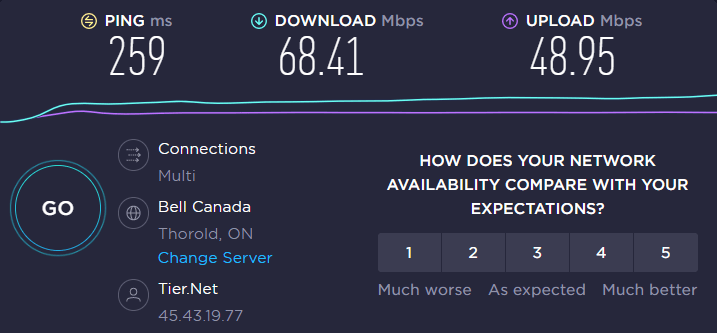
However, we did conduct a speed test of both VPNs to confirm this and here are the results:

Surfshark speed test:
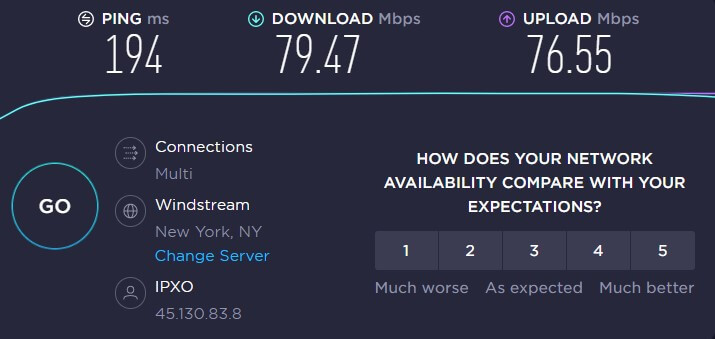
surfshark-speed-test

PIA speed test:

pia-speed-test

Final Result: Surfshark is the Winner!

Surfshark vs PIA VPN: Which one has the best features?

If you’ve already overruled Private Internet Access due to its slow speeds, its features may persuade you otherwise. PIA, like Surfshark, includes all of the necessary VPN functions and enhances its core with ultimate add-ons.

Split tunneling

Both Surfshark and PIA offer IP and app-based split tunneling features. Surfshark also offers URL-based split tunneling. PIA’s split tunneling, on the other hand, operates on both desktop and Android OSes, whilst Surfshark only works on Windows and Android.

Final Result: It’s a Tie!

Kill Switch

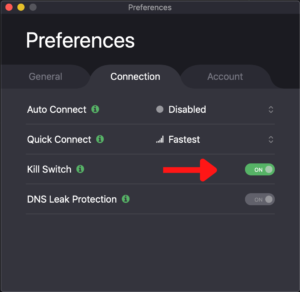
When your VPN connection drops, Surfshark provides the most basic kind of a kill switch, which disconnects your device from the internet. A sophisticated kill switch is also available in PIA that keeps you from accessing the internet unless the VPN is active again.
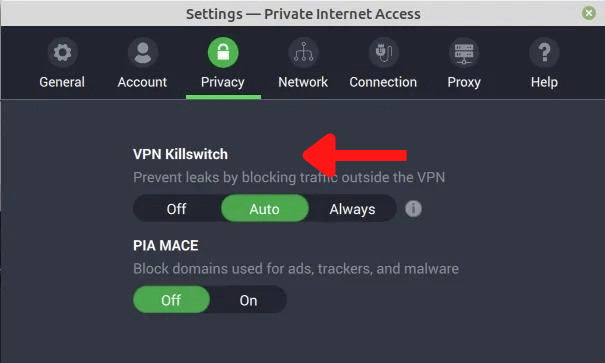
PIA-kill-switch

Final Result: It’s a Tie!

Ad-blocker

PIA features a built-in ad-blocker named PIA MACE that helps keep viruses at bay. It’s not the best ad-blocker, but it’ll do the job.

However, if you want to be completely protected, we recommend using a different blocker. It’s worth noting that Surfshark has a super-effective ad-blocking feature named CleanWeb.
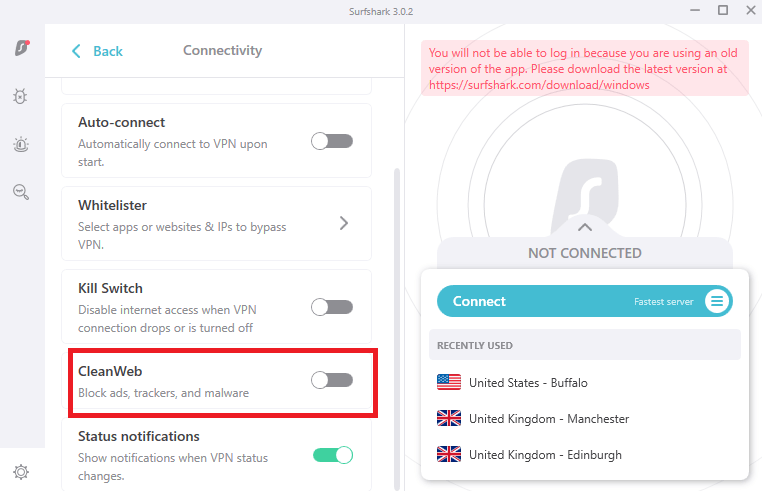
surfshark-cleanweb

Final Result: Surfshark is the Winner!

Exclusive features

In addition to the standard functions, PIA and Surfshark offer advanced security features, some of which are premium add-ons.

SurfsharkONE and Antivirus by PIA are two paid antivirus add-ons they provide.

In addition, in the client control panel, PIA offers Identity Guard, an email breach monitor. Your email address is scanned and monitored by the software to discover if it has ever been involved in a data breach.

Whitelister is a feature by Surfshark that is similar to PIA’s split tunneling.
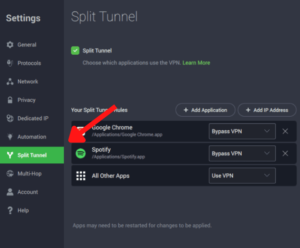
pia-split-tunneling

MultiHop is also included in Surfshark’s subscription. To boost security, the function routes your web traffic over two servers.
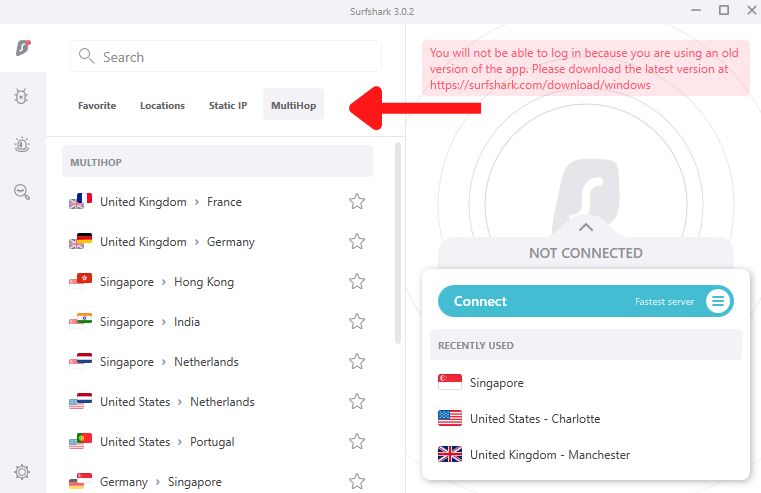
surfshark-multihop-servers

So, which is better: Surfshark vs PIA? Well, when it comes to features, it’s definitely a draw!

Final Result: It’s a Tie!

PIA VPN vs Surfshark: which VPN is more secure?

A VPN with great security is required to protect your privacy. That means strong encryption, as well as any other particular security measures a service may offer. This is what Surfshark vs PIA security looks like:

Jurisdiction

Surfshark is based in the Netherlands. While being located in Europe, this is not a fantastic jurisdiction, it is certainly not terrible, since the Netherlands does not belong to the controversial Five Eyes Alliance.

Private Internet Access is situated in the United States, which is one of the most hostile jurisdictions for a privacy-focused company in the world. That’s because the US government has ordered VPNs and email companies in the US to harvest data on users for multiple investigations.

Final Result: Surfshark is the Winner!

Logging

As for Surfshark vs PIA logging policies, Surfshark advertises itself as a no-logs VPN service. The only information they save is your email address and billing information, according to their Terms of Service. Nothing you do online is stored.

However, PIA offers both strengths and limitations when it comes to logging. It is a verified no-logs VPN service, which has been validated in two separate court instances.

But, when you consider that PIA is based in the United States, it becomes less comforting. As we’ve seen at least three times previously, it might be forced to log users at any time by US authorities.

Final Result: Surfshark is the Winner!

Encryption Protocols

The strength of a VPN is determined by the quality of its VPN protocols and encryption standards.

For your VPN protocol, Surfshark allows you choose among OpenVPN (UDP and TCP), WireGuard, and IKEv2. AES 256-bit encryption is used in all of these protocols.

PIA, on the other hand, comes pre-configured with OpenVPN, but you may switch to WireGuard on all devices, as well as IKEv2 on iOS. If your internet service is unreliable, PIA allows you to reduce packet size for better VPN performance.

Final Result: It’s a Tie!

Surfshark vs PIA streaming capabilities

Surfshark is well-known for being able to get around most streaming websites’ geo-blocks. On the other hand, PIA is reported to be inefficient at working around geo-restrictions.

Surfshark is a quick service that unblocks a large number of services. It’s one of the best streaming VPNs that supports 17 different Netflix libraries officially.
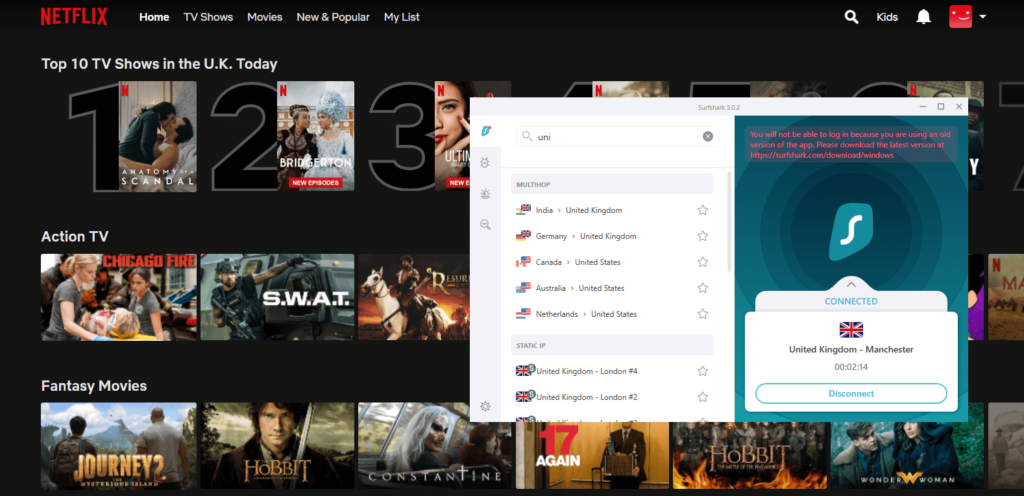
unblock-netflix-uk-with-surfshark

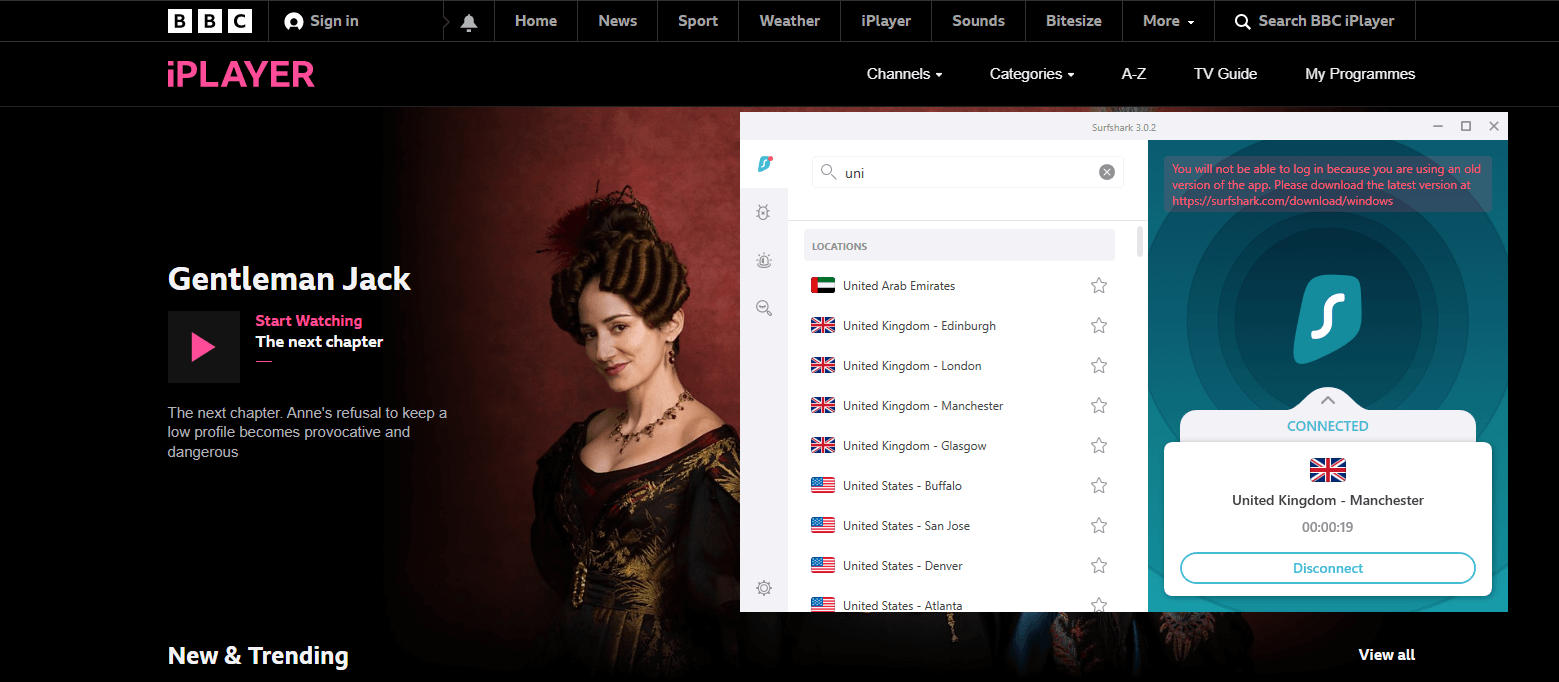
That’s not all, though. Surfshark also works with Hulu, DAZN, BBC iPlayer, Disney Plus, and other streaming services.

Whereas, Netflix frequently blocks Private Internet Access, according to our tests. They also have issues with Hulu and other popular streaming services.

Final Result: Surfshark is the Winner!

Torrenting and P2P

Things get a little more complex when it comes to torrenting (P2P file transfers). Surfshark is one of the finest VPNs for torrenting, according to our tests.

It is an extremely fast network that supports torrenting and P2P downloads over every server, thanks to leak protection and kill switches incorporated into their software.

PIA is also strong on the technical front, albeit not as fast as we would want. It enables port forwarding, which is useful for torrenting, however the speeds are too slow. We can’t suggest PIA for torrenting or other high-bandwidth activity because of this.

Final Result: Surfshark is the Winner!

Plans and pricing; Which one is more affordable?

Prices and Plans Surfshark PIA
Periods 1 month 1 month
6 months 6 months
2 years 2 years
Special offers and discounts 82% off on 2 years + 2 months plan 3 Years + 3 Free Months
Lowest price per month $2.30/month $2.03/month
Highest price per month $12.95/mo $9.95/mo

If you’re looking at nothing but price, then, well, PIA might be it. But, if you genuinely care about the service you get with the subscription, then there should be no second thoughts when subscribing to Surfshark. Yes, IT’S THAT GOOD.

If you’re worried about a longer-term commitment, both companies provide a 30-day money-back guarantee, which we recommend taking advantage of by signing up for a one-month package.

If you aren’t completely pleased after 30 days, you can request a cancellation and receive a full refund.

Final Result: Surfshark is the Winner!

Server locations

With over 30,000 servers around the world, Private Internet Access outnumbers Surfshark’s 3200+ servers. PIA also provides servers in 78+ countries, which is significantly more than Surfshark’s 65 countries.

Unlike Surfshark, a large number of PIA’s servers are virtual, making pinpointing a server’s specific location more challenging. This could be inconvenient for users in the United States who want to access the server in New Jersey but are instead connected to one on the opposite side of the country.

Final Result: PIA is the Winner!

Surfshark vs PIA device compatibility & interface

App Interface and Usability Surfshark PIA
Location selection List form List form
Multi-logins Unlimited Ten
Mobile-friendly apps Yes Yes
Other devices and operating systems iOS, Windows, Android, Linux, and Mac iOS, Windows, Android, and macOS

Both PIA and Surfshark stand out because they have apps for a variety of OS systems. They can also be installed on compatible routers quite easily.

Desktop apps

Surfshark and PIA both have a sleek and modern-looking user interface (UI). The desktop applications offer a clean UI with clearly labeled items so you don’t have to guess how to use them. You can either use the country name to find the server you wish to connect to or scroll through the whole list of server locations.
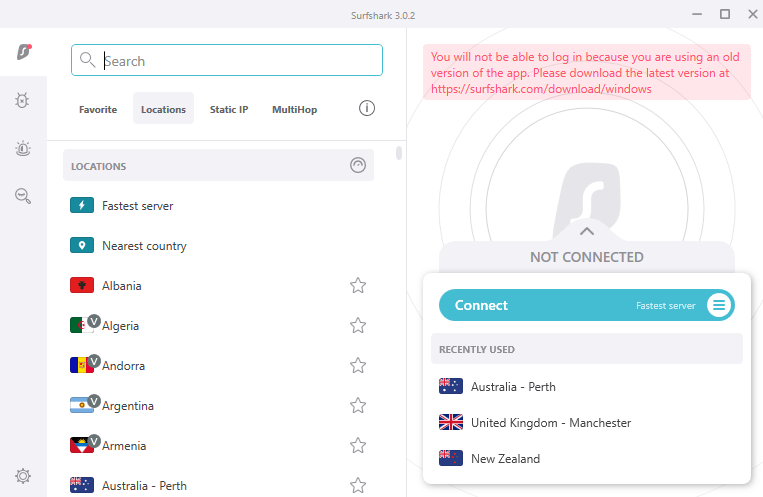
surfshark-interface

Aside from that, the “options” page makes it simple to change the default settings of both PIA and Surfshark. Every setting is intuitively located, and functions like the split tunneling, kill switch, and auto-connect can be turned on or off with the touch of a button.
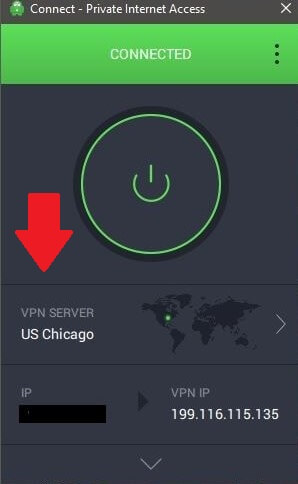
pia-desktop-app

Final Result: It’s a Tie!

Mobile apps

The Android app of Surfshark is just as powerful and simple to use as the PC version. It has everything you need, including split tunneling and a kill switch. The iOS app is as simple to use as the Windows version, however it lacks split tunneling.

In terms of usability, PIA mobile apps outperform the PC version. In the main window of the Android app, there is now a “quick settings” option to access and manage features like the kill switch and automation. The iOS app is very simple to use and includes capabilities like the IKEv2 protocol.

Surfshark and PIA are both quite simple to use. You won’t have any trouble connecting to a VPN server or adjusting the settings to suit your needs.

Final Result: It’s a Tie!

Browser extensions

Chrome and Firefox extensions are available from PIA and Surfshark. Extensions are extremely useful as they would just secure your privacy while visiting websites and not the rest of your device.

Please note that Private Internet Access also has an Opera browser extension, which Surfshark does not.

Final Result: PIA is the Winner!

Customer Support

Surfshark and PIA are quite similar when it comes to customer support, and offer a ticketing, 24/7 live chat option, and email support, as well as a comprehensive knowledge base.

On live chat, Surfshark slightly outperforms PIA since its responses are more thorough, and PIA takes a bit longer to respond at night.

If your topic isn’t as urgent, Surfshark’s knowledge base might help by answering frequently asked questions. PIA is on par with best-case solution guides that include screenshots and step-by-step walkthroughs.

When the FAQs aren’t cutting it, email support and ticketing are the next best things, with both providers responding the same day.

Final Result: It’s a Tie!

Surfshark vs PIA: which one is worth the money?

In our Surfshark vs PIA comparison, Surfshark won in most categories, though a few were close. It is unquestionably the best and valuable product. We have no concerns about recommending Surfshark to you.

Surfshark is a faster and more secure alternative. Because the VPN can be utilized in China, it can reach a whole new demographic.

Surfshark lets you stream any catalog of any geo-restricted library you throw at it. PIA, on the other hand, has issues with various services and isn’t always reliable when it comes to letting you stream Netflix.

Finally, Surfshark has more additional functions and improved apps, thereby being the most recommended option in this comparison. Read more about it in our detailed Surfshark review.

FAQs

Is PIA a zero log VPN?

PIA has a rigorous no-usage-logs policy as per their website. This means that they don’t collect or keep any information about our users’ VPN usage. They don’t keep track of your surfing activities, connection, bandwidth use, or anything else like that.

Is PIA good for gaming?

Yes! Thanks to their NextGen server architecture, PIA is one of the fastest VPNs in the world, and with 84 countries on their network, they can provide you access to a vast amount of geo-restricted content, gaming and otherwise.
Read more Comparisons!

Categories
Compare

ProtonVPN vs ExpressVPN: The Affordable Battles with the Premium

We’ll be honest: we trust both ProtonVPN and ExpressVPN to secure our online privacy when it comes to VPNs. We wouldn’t continue to put them on our best VPNs recommendations if we didn’t. However, this does not imply that they are identical.

To mask our location, ExpressVPN uses rotating IP addresses, whereas ProtonVPN uses static, shared ones. Which of these two VPNs should you choose? Below, in our ProtonVPN vs ExpressVPN comparison, we will go over all of the finer points to assist you in making your decision.

ProtonVPN vs ExpressVPN: A Face Off!

ExpressVPN ProtonVPN
Trustpilot Rating: 4.6 2.6
Servers: 3000+ servers in 94 countries 1700+ servers in 63 countries
Logs policy: No logs No logs
Pricing: Starts from $8.32/month Starts from €4.99/month
VPN protocols: Lightway, L2TP/IPsec, OpenVPN, IKEv2 OpenVPN, WireGuard, and IKEv2/IPSec
Streaming Compatibility: Disney+, BBC iPlayer, Hulu, Netflix, and more Hulu, Netflix, YouTube, and more
Platforms: Windows, Linux, Chrome, Edge, Firefox, macOS, iOS, and Android Windows, Mac, iOS, and Android
Simultaneous connections: 5 devices 10 devices
Support: 24/7 live chat, knowledge base, FAQs, email support knowledge base, email support

Speed comparison: ExpressVPN vs ProtonVPN

We conducted a ProtonVPN vs ExpressVPN speed test to figure out how fast these VPNS are. We dove into each of their protocols and tested them on our baseline testing formula: 100 Mbps download speed/100 Mbps upload speed.

Here are the results:

Protocols ExpressVPN ProtonVPN
Lightway (ExpressVPN) 87/65 –
IKEv2 82/59 66/17
OpenVPN (TCP) 78/46 50/21
OpenVPN (UDP) 75/47 45/29

In our ExpressVPN speed test, we only saw a 13% decrease in download speed on its Lightway protocol, which is really impressive. Our quickest speeds were on local servers (in the United States), but we were also able to sustain them on servers in Europe, Japan, India, Brazil, and Australia.

The speeds were also great on its other protocols, with a maximum decrease of 25% on its OpenVPN UDP protocol.

Although ProtonVPN isn’t as quick as ExpressVPN, we were still able to torrent, browse, stream, and play games over most servers without experiencing any noticeable delays.

Overall, ProtonVPN reduced our speed by roughly 22% on WireGuard, which was not bad. We had amazing download speeds on nearby servers, just like ExpressVPN, however our download speeds plummeted on distant servers – while our internet activity was unaffected.

Final Result: ExpressVPN is the Winner!

Netflix and streaming platforms; Which one unblocks more?

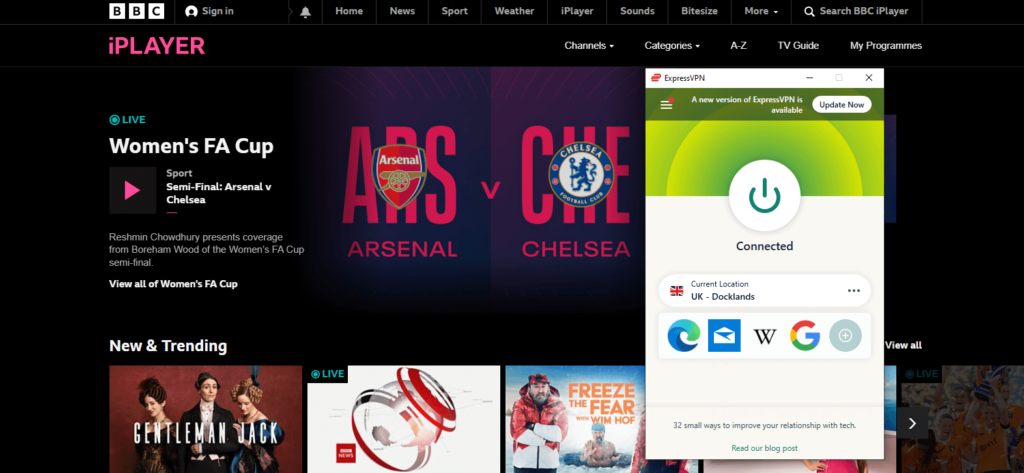
In our ProtonVPN vs ExpressVPN streaming tests, we were able to enjoy TV episodes and movies on Amazon Prime, BBC iPlayer, Disney+, ESPN+, Netflix, HBO Max, Hulu, and even lesser-known applications like DAZN, Sling TV, and Comedy Central using ExpressVPN.

expressvpn-works-with-bbc-iplayer

ExpressVPN’s DNS solution (named MediaStreamer) also allows you to watch streaming video on devices that don’t ordinarily accept VPN connections, such as game consoles and Apple TV.

Accessing streaming services with ProtonVPN is a breeze as well. In our tests, ProtonVPN had no trouble accessing Amazon Prime, Netflix, Hulu, Disney+, and a variety of other streaming apps, similar to ExpressVPN (albeit ProtonVPN’s Free plan does not support streaming).

Also, you cannot access any lesser known apps with ProtonVPN, like DAZN, FXNOW, Kayo Sports, and more.

Final Result: ExpressVPN is the Winner!

Torrenting

Torrenting is an excellent way of transferring huge files like music and movies. Unfortunately, because torrenting is a grey area when it comes to copyright regulations, it can be dangerous.

ExpressVPN is a fast VPN service (thanks to Lightway). It has the ability to securely disguise your IP address, retain no logs, and provide excellent leak protection. The Network Lock (kill switch) protects you against IP and DNS leaks in a very safe manner. This enables you to torrent for hours without the fear of being interrupted.

ProtonVPN tested to be slower than ExpressVPN, which can have a negative impact on torrent speeds. ProtonVPN’s paid plans include complete torrenting capability, as well as no logs and leak prevention. However, if you’re anything like us, you’ll want the quickest speeds available.

Final Result: ExpressVPN is the Winner!

Features Overview

ExpressVPN and ProtonVPN offer a variety of features to its users for security, privacy, and accessing geo-restricted platforms. Let’s look at few of them below:

Split tunneling

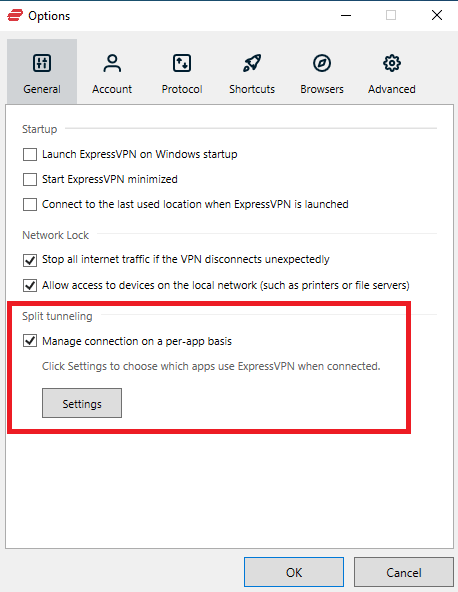
Split tunneling allows you to use the VPN connection for specific apps. This could be handy if you want to use a VPN to unblock geo-restricted services while using your regular connection to ensure the fastest possible download speeds.

Split tunneling is supported by both ExpressVPN and ProtonVPN. ExpressVPN, on the other hand, offers this feature on all platforms, whilst ProtonVPN only offers it on Windows and Android.

expressvpn-split-tunneling

Ad-blocker

ProtonVPN features a built-in ad blocker and scans files you downloaded for malware automatically. ExpressVPN does not have this capability, but it does have Firefox and Chrome extensions that let you control the app from your browser.

It can also be set to automatically connect whenever you connect to an unprotected wireless network. This is especially useful if you travel frequently because you’ll be relying on public wi-fi networks, which are infamously insecure.

RAM-only servers

ExpressVPN’s network is exclusively made up of RAM-only servers, meaning that whenever a server is reset, all data saved on it is gone forever. This goes a long way toward defending their no-log policy; even if they intended to breach their consumers’ privacy, it would be impossible. The information is just no longer available.

However, the feature isn’t available on ProtonVPN.

Final Result: ExpressVPN is the Winner!

Proton VPN vs ExpressVPN: which is more secure?

As for the ProtonVPN vs NordVPN security, both of these VPNs don’t only talk about privacy. They’ve both taken steps to ensure that even if they were served with a warrant, they wouldn’t be able to hand out our information. AES-256 bit encryption, no traffic tracking policies, and more are among their security features. Let’s have a look at them now:

Encryption and tunneling protocols

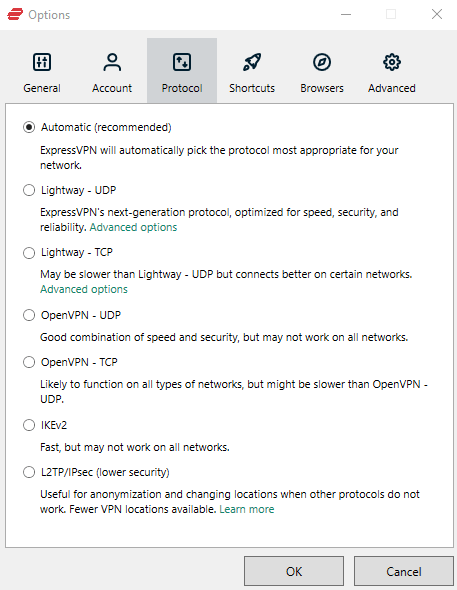
The OpenVPN protocol is supported by both of these services. This is the industry standard and, in most cases, your best bet. ExpressVPN, on the other hand, supports the L2TP and IKEv2 protocols, as well as Lightway, its own proprietary security mechanism.

expressvpn-tunneling-protocols

Lightway is faster than OpenVPN, great for long connections, and it will shortly be made open-source, allowing for full privacy auditing. IKEv2 is an option with ProtonVPN for mobile.

Both ExpressVPN and ProtonVPN use 4096-bit RSA keys and 256-bit AES encryption. This is incredibly secure, without being too technical. Without the correct decryption key, even the world’s best computers would take thousands of years to crack this degree of security.

Logging

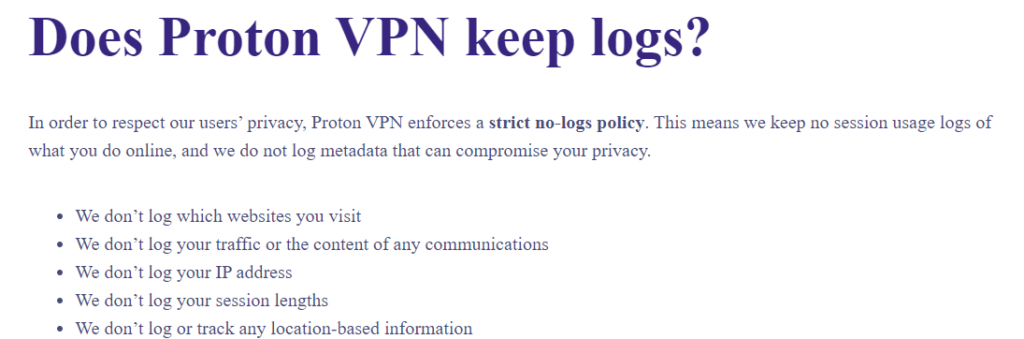
As for the ProtonVPN vs ExpressVPN logging policies, both VPNs clearly value your privacy. ExpressVPN is not obligated to store logs. As a result, it merely saves your connection date, the server you selected, and the amount of data sent.

ProtonVPN keeps no logs that might be used to identify you, simply the date and time you last connected.

protonvpn-no-logs

Kill Switch

Kill switches are included into both firms’ services. This means that if our router went down for some reason, all of our browsers would go down with it. There was no way our site’s history could be discovered by accident.

protonvpn-kill-switch

Final Result: It’s a Tie!

Plans and Pricing

Prices and Plans ExpressVPN ProtonVPN
Periods 1 month 1 month
6 months 1 year
1 year 2 years
Special offers and discounts 35% off on the 1-year plan –
Lowest price per month $8.32/month €4.99/month
Highest price per month $12.95/mo €9.99/mo

Both of these VPNs can be subscribed to at a similar cost. However, ProtonVPN offers a free plan to users with multiple limitations. Both VPNs are backed with risk-free 30-day money-back guarantees as well for testing them out.

Final Result: It’s a Tie!

China and countries with restricted internet access

China has some of the world’s strongest and most widespread internet restriction policies.

Fortunately, ExpressVPN continues to function flawlessly in China. There are no manual setup requirements or changes to be made to the settings. This service even has a mirror site that you can visit in China (but you’ll have to request for the address before you go).

Regrettably, ProtonVPN is no longer available in China. The appropriate support post on the website indicates that the service is looking into the matter, but the page hasn’t been updated since 2019, so you shouldn’t rely on it if you’re planning a trip to China.

Final Result: ExpressVPN is the Winner!

Server locations

ExpressVPN beats ProtonVPN when it comes to network size with 3000+ servers in 94 countries. It not only gives you access to 3 times as many servers, but it also gives you access to servers in an extra 30 countries.

However, ProtonVPN’s network is approximately what you’d expect from a mid-tier provider; offering 1700+ servers in 63 countries. Also, there are plenty of subscription providers with fewer servers available.

Final Result: ExpressVPN is the Winner!

Interface & Ease of Use

ProtonVPN ExpressVPN
OS supported iOS, Windows, Mac, and Android Mac, iOS, Linux, Windows, and Android
Other devices and operating systems Android TVs and Fire TVs Fire TV devices, Kodi, and Android TVs
Browser extensions Safari, Chrome, Edge, Firefox, Opera Firefox, Brave, Edge, Chrome, and Vivaldi
Simultaneous connections Ten Five

For the most popular platforms, each of these services has an easy-to-use app. For testing the ProtonVPN vs ExpressVPN device compatibility and deeming which VPN is better, we used them both on our devices, and here is all that we discovered:

Desktop apps

The ExpressVPN desktop app includes a large quick connection button as well as a server list organized by continent. Of course, if you like, you can search for a certain country. The settings menu is divided into numerous tabs to keep things organized.

We enjoyed how informative the option names are, as well as how the VPN provides examples of when you would need to update them.

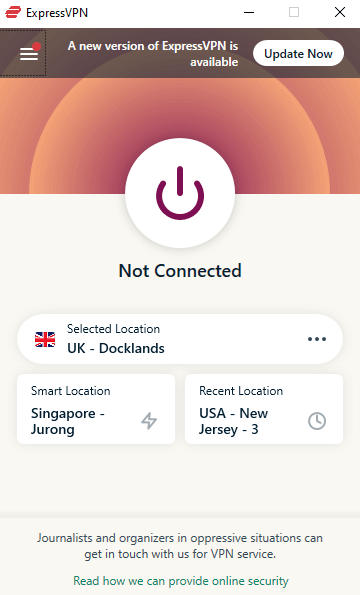
expressvpn-windows-interface

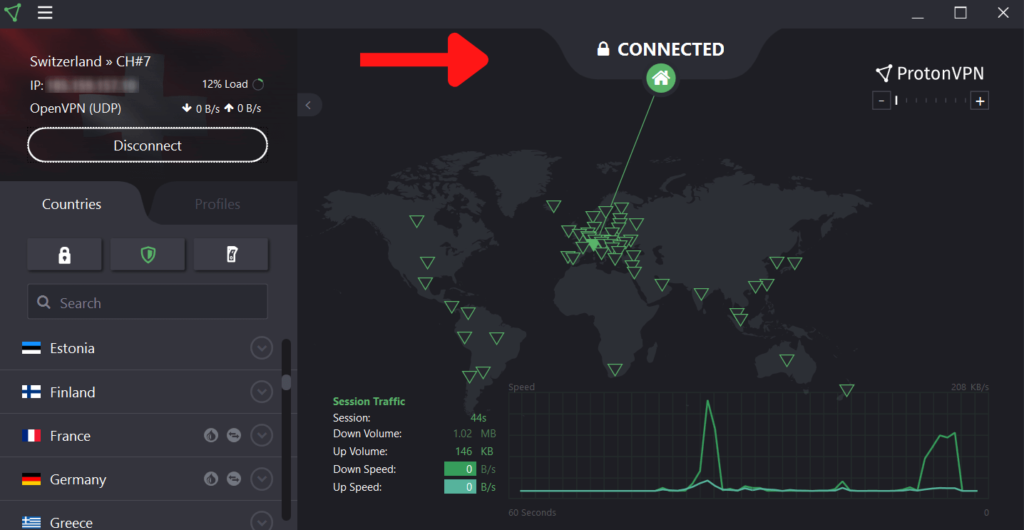
The desktop interface for ProtonVPN allows you to select a server from a map or a list. Alternatively, if you wish to utilize a different server every time, you can set up distinct profiles. Most features are activated with a simple toggle switch on the server menu, which is minimalistic and easy to navigate.

However, the NetShield and kill switch must be enabled from the main screen, which seems contradictory given that these are two of the most essential security tools available.

protonvpn-desktop-interface

Mobile apps

On mobile devices, ExpressVPN is almost identical. The settings menu is missing a handful of elements (DNS server selection and IPv6 leak protection).

You can, however, opt to connect automatically whenever you use an unprotected network, which isn’t available on the desktop versions of the app.

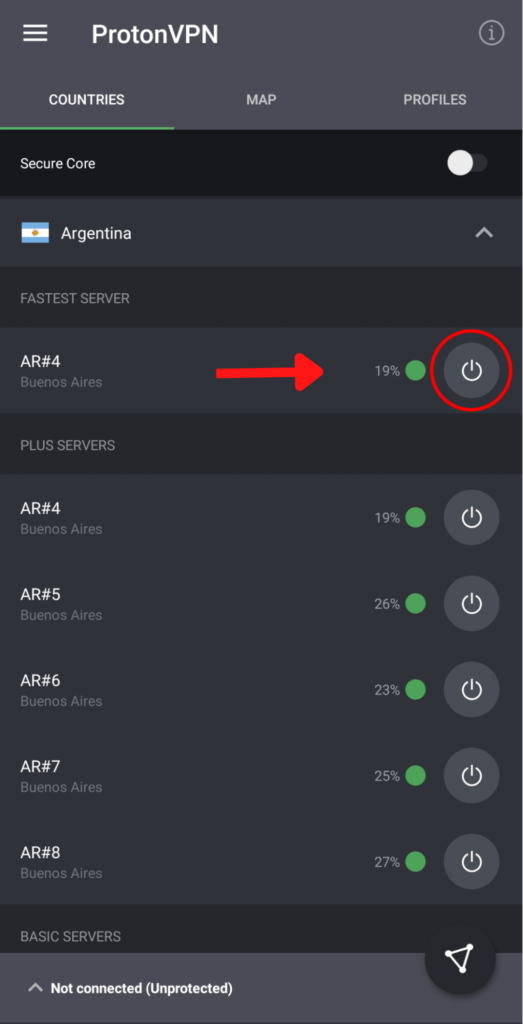
For mobile users, ProtonVPN’s layout is slightly different, with the map, server list, and profile list separated into distinct tabs. Furthermore, rather than having the quick connect button visible at all times, users must click a popup at the bottom of the screen to activate it.

protonvpn-mobile-app

This isn’t immediately apparent the first time you use the app, and it will take some time to get used to. The IPV6 leak protection and the ability to connect automatically when opening the app have also been disabled.

Final Result: It’s a Tie!

Customer support

ExpressVPN’s customer service is outstanding, with a comprehensive collection of troubleshooting instructions, video setup tutorials, a large number of FAQs, 24/7 live chat, and email assistance.

The live chat is available 24/7, and we were always connected to a support representative in about 15 seconds, and every rep was quick, knowledgeable, helpful, and polite. We tested the email support a few times and had a response within a couple hours each time, which is very typical for a VPN.

ProtonVPN’s customer care is adequate, but not as good as ExpressVPN.

ProtonVPN has excellent support guides that are organized by category and provide in-depth information, but email assistance is lacking (We had to wait for nearly a day for a response, which, however, was helpful), and there is no live chat.

Final Result: ExpressVPN is the Winner!

ProtonVPN vs ExpressVPN – The Winner?

In the end, the real question arises “Which is better: ProtonVPN vs ExpressVPN?” Although it was close, ExpressVPN emerged victorious in this head-to-head competition.

It’s certainly the superior pick if you’re an international traveler, with over 3000 servers in 94 different countries. It also has substantially quicker download speeds, which is important if you use streaming services.

However, ProtonVPN may be preferred by some users. It’s a few dollars less expensive, and it has faster upload rates for individuals who use Skype or Facetime frequently.

FAQs

Is ProtonVPN cheaper than ExpressVPN?

Both ExpressVPN and ProtonVPN provide excellent value. ProtonVPN’s plans are all less expensive than ExpressVPN, and have the best free plan available.

Is ProtonVPN secure?

ProtonVPN is a VPN that is completely safe to use. ProtonVPN has a stringent no-data-logging policy, so if someone asks for your data, it won’t be able to provide it. If needed, it has Tor integration and SecureCore servers for added security.

Read more Comparisons!

Categories
Reviews

Mysterium Network dVPN Review: Is It Safe to Use?

mysterium-network-dvpn-review

So we all know how our privacy is eroding with each passing day. Companies know more about us than we know about ourselves. We’re essentially moving towards a world where there will be no more privacy.

Even the technology we use to stay anonymous online, the technology we trust to safeguard our privacy, keeps logs. We’re talking about VPNs.

Sure, most VPN providers say they offer a zero logs policy.  But how can you be certain?

In our experience reviewing VPNs, there is no concrete way to tell whether a company follows a no-logs policy or not.

However, it seems like these days of mistrust may be coming to an end thanks to a revolutionary new concept that promises to entice even more privacy enthusiasts like us: a decentralized VPN.

Yes, that’s right! We recently came across a new VPN by the name of Mysterium Network dVPN. It is a node-sharing P2P decentralized VPN network that is still in its early stages of development.

Mysterium is powered by an open-sourced network, which means that all you tech-savvy individuals out there can easily spot what goes on under the hood of a VPN and learn exactly how your private information is handled, which is not what happens with the vast majority of consumer VPNs.

To test out how practical Mysterium VPN is, we conducted this VPN review by putting this Mysterium through a battery of tests to see how it performs and where it can be improved. Our evaluation is based on its streaming performance, speeds, privacy, security features, torrenting, and other factors.

Let’s dive in to find out if this is really a game-changing VPN.

Mysterium Network VPN pros and cons

Although Mysterium VPN is still a work in progress and is still improving, it is not yet perfect. Based on our testing, the security features appear to be a little lacking, but it has an excellent ability to unblock streaming platforms.

Let’s look at the VPN’s pros and cons and see where it stands:

Pros

Cons

It is technologically impossible to store user logs centrally in a decentralized system Speed tests showed a 30% drop in base speed
Cryptocurrency, along with credit cards, GooglePlay, PayPal, and more are accepted for payment Several DNS leak tests revealed the location of network nodes, revealing inconsistencies in coverage and security
Works in China, but not consistently The beta version is free to try, but users will have to pay with cryptocurrency on a pay-per-use basis.
There is no affiliation with the 5 Eyes, 9 Eyes, or 14 Eyes surveillance alliances
Unblocks streaming sites such as Netflix
Desktop and mobile VPN clients that are both stylish
The ability to run your own node to earn cryptocurrency
A protocol, tool, and infrastructure ecosystem that is open source

Speed and performance: Is Mysterium VPN fast?

The “node-runners” that provide the IPs you connect to are essential for decentralized networks. The speeds that are provided are determined by the nodes, which should get better over time as more providers join the market.

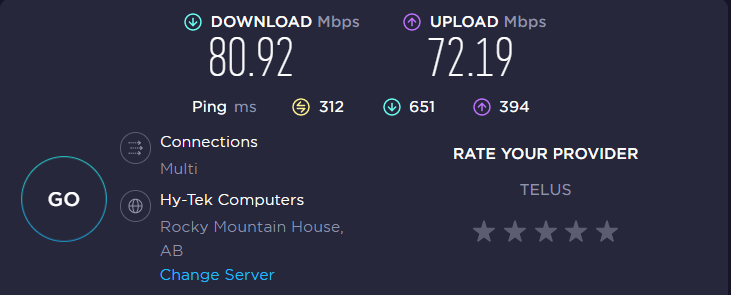
For speed testing purposes, we chose a close-by Canadian server with a strong connection and performed a speed test. The findings are shown below:

mysterium-dvpn-speed-test-on-canada-server

As you can see, we received an average speed drop of 30%, which is normal when considering that you’re using a VPN service. Using these speeds, you can perform all activities you like, including streaming, browsing, and torrenting.

We also connected to its far-away UK server, and got a speed drop of 37%. While this was a bit high, we’re sure that the speeds would improve once the VPN starts offering more nodes.

Streaming: Does Mysterium Network VPN work with Netflix?

Every streaming service we tried was instantly unblocked by Mysterium VPN. First, we connected to a US servers and were able to access the US Netflix library.

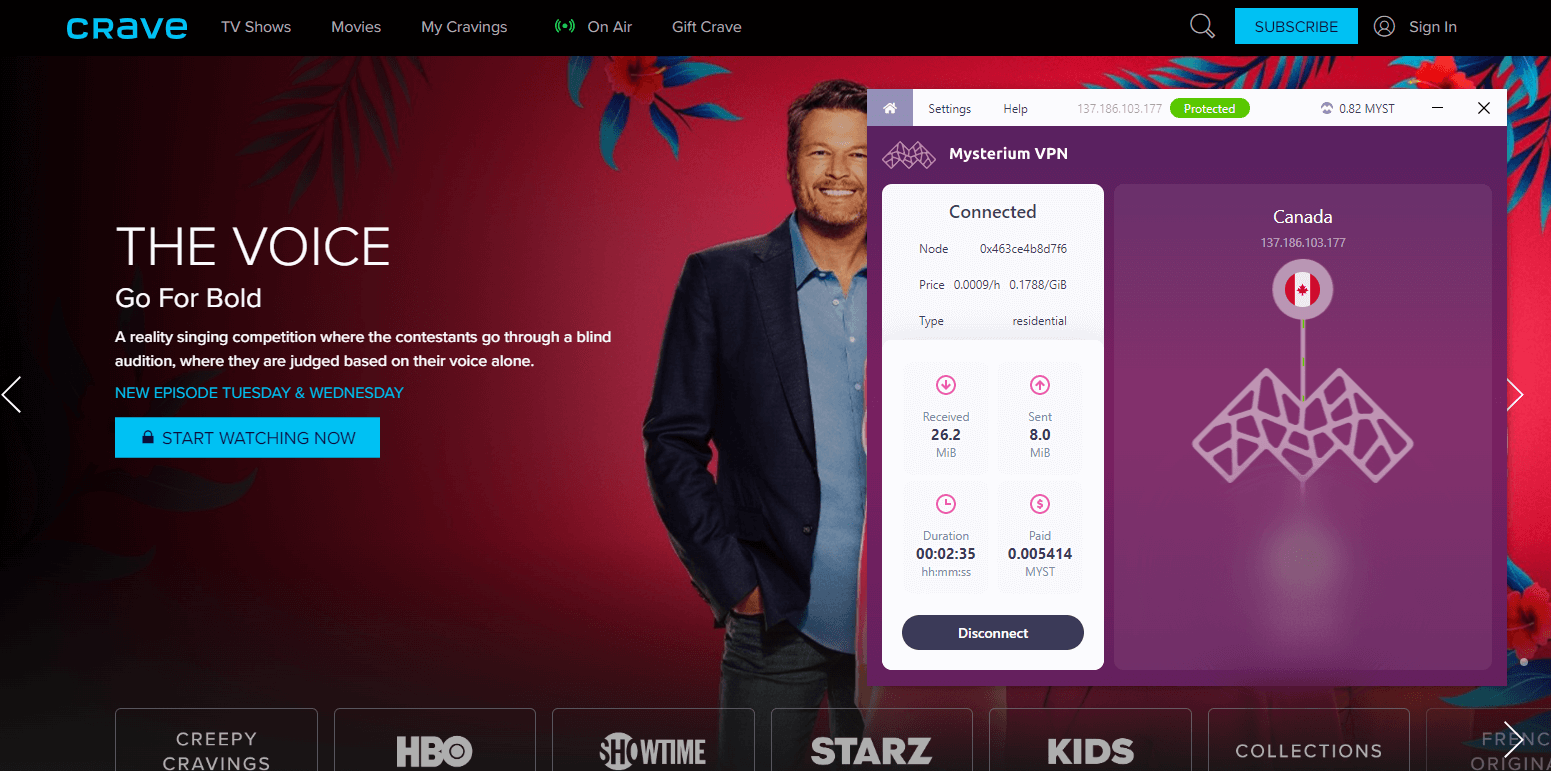
Disney+, HBO Max, and Hulu, three other popular US streaming services, also functioned without any issues. By connecting to a Canadian server, we could also bypass CraveTV’s geo-restrictions.

mysterium-unblocked-crave-tv

There may be a few streaming platforms that the VPN might not be able to access, but that wasn’t the case in our tests. Overall, we were really pleased with its ability to circumvent geo-blocks as it worked just like other premium VPNs like ExpressVPN.

Is Mysterium Network good and safe for torrenting?

Although torrenting is not forbidden by Mysterium anywhere, you need to take privacy issues into account.

Since torrenting is frequently used for illegal activities, the VPN may view it as inconsistent with its standards and exclude it from the whitelist vetting procedure. Hence, before attempting to torrent, be sure that it is legal where you are.

Is Mysterium Network safe and secure?

Strong encryption protocols like OpenVPN and the more recent WireGuard are offered by Mysterium VPN, yet we had some reservations. The network operates similarly to a hybrid Tor-VPN, theoretically providing better security and anonymity.

However, it is slightly deficient in some capabilities found in conventional VPNs, such as a split tunneling, MultiHop, and kill switch.

Moreover, keep in mind that decentralizing the network improves security, but also increases your vulnerability to man-in-the-middle attacks if a node-runner acquires access to your online traffic.

DNS leak test

When we tested the VPN for DNS leaks, the dVPN gave us mixed results. On a few servers, we were absolutely secure.

However, it did leak our DNS/IP once when we connected to its UK server. This is not ideal because leak protection ought to be reliable and constant. Your online activities may be compromised if your DNS address is visible, putting you at risk from malware.

Using Mysterium Network dVPN, your information won’t be logged since the corporation, which is based in Panama, is not subject to any “Eyes” agreements. You are, however, placing a great deal of faith in each node’s service providers.

Mysterium Network servers and locations

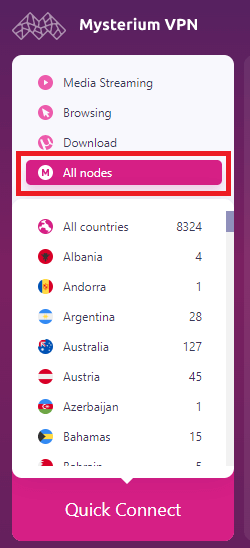
The network of Mysterium Network VPN is decentralized. This distinguishes itself from other VPNs because it uses nodes from users all around the world. These nodes basically act as servers and let you connect to them.

mysterium-dvpn-nodes

The nodes are available across 130+ countries, and has an excellent coverage across Africa, North and South America, Europe, and more. While reviewing, we were pleasantly surprised by the variety of places we could pick from.

Does Mysterium Network work in China?

Mysterium Network clearly mentions on their website that the VPN does work in China. However, they do get blocked sometimes.

The provider further mentioned that they’re trying to refine their bypassing methods, so users can enjoy their service while traveling to China.

Well, we couldn’t help but appreciate their honesty over the service.

Plans and pricing

Using Mysterium VPN is free. This is due to the fact that it is still in the development stages and will eventually switch to a fully crypto-powered configuration.

Once the system is completely functional, customers will pay in MYST. Nevertheless, your average price over time will probably equal to that of a budget-friendly regular VPN. However, this is susceptible to changes in the cryptocurrency market.

Interface and ease of use

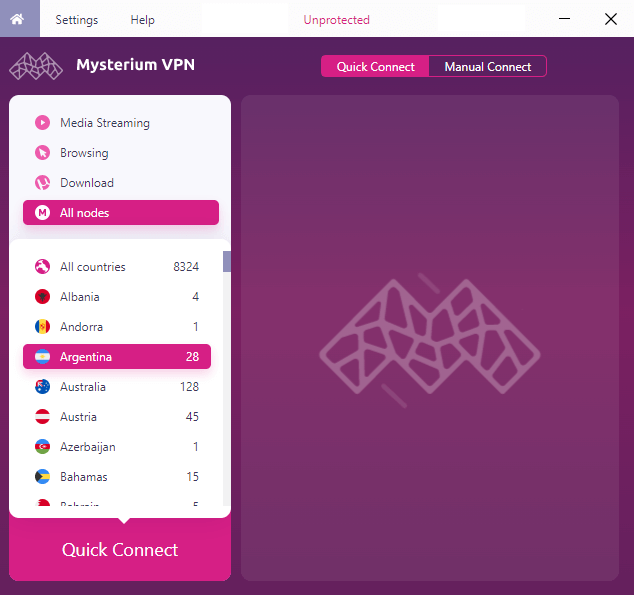
Despite having cross-platform compatibility, Mysterium VPN does not currently offer an iOS app. However, it works with Android, macOS, Windows, Avado Raspberry Pi, and Linux.

Desktop versions

Installing the Windows software was really simple, and once you launch the app, you’ll see all your location options.

You must choose from a number of nodes in that country as you cannot specify a specific city. You can see a description of each one’s quality and cost next to it.

mysterium-dvpn-desktop-app

Once you’ve installed the app, you don’t need to establish an account or log in. It simply manages your MYST/ETH spending and revenue using a generated “key.”

Remember that you will lose the key and the ensuing cryptocurrency earnings if you delete the app. Moreover, there is also no need to input any payment information.

Mobile apps

The Android app has few configuration choices but is equally user-friendly. You might be a little concerned when the software asks for permission to access storage and images when you install it.

Once it is installed, you can import your private key, which is connected to your MYST/ETH.

Customer support

The chat support is the only way to get in touch with the dVPN’s representatives, and it never seemed to be active at all when tested. It turned out to be more of an online form with a ticket system, where you may expect a response in one day.

After almost 16 hours, we received an email response that was incredibly brief yet provided the information we needed.

In addition, there is an FAQ section that appears to address the majority of common queries.

Conclusion

The future of VPNs may well be decentralized crypto markets, but Mysterium Network dVPN needs some improvement if it wants to draw in users.

There are some privacy issues since you need to be able to blindly trust every node owner. However, one selling feature of cryptocurrency payments, no-login apps, and decentralized monitoring is the natural anonymity they provide.

You also get robust encryption, and the ability to unblock a variety of streaming platforms.

FAQs

Is Mysterium Network safe?

Although Mysterium Network offers excellent encryption, our DNS was compromised once. Since Mysterium VPN is still in its early stages, it is difficult to declare with certainty that it is completely secure.

How do I pay for Mysterium VPN?

Mysterium accepts cryptocurrency and lets you pay anonymously for your security. It also allows you to pay through credit cards, GooglePay wallet, PayPal, and more.

Categories
Best VPNs

The Best VPNs for Small Businesses in 2026

Small businesses are appealing targets for cybercriminals because they typically lack the cybersecurity safeguards that larger organizations have. Small businesses are the target of 43% of all cyberattacks, and the consequences of these breaches can be extremely costly, ranging from lost productivity to company reputation.

Large corporations typically run their own VPN services. Small and medium-sized businesses, on the other hand, lack the IT resources to set up and maintain a secure and private VPN.

Fortunately, a few consumer VPN providers have expanded into the enterprise market to serve this underserved market. In some cases, a typical consumer VPN may suffice, but businesses frequently require secure access to a server where they can host documents, apps, and other office resources for staff to access remotely.

A VPN is the most effective way to secure data in transit. A VPN encrypts and secures all internet traffic between a laptop or smartphone and the VPN server. This makes it difficult for nosy hackers to pry into sensitive data.

When looking for the best VPN, it’s critical to find one that meets your company’s requirements. Military-grade encryption, support for multiple devices and protocols, and a large number of server locations are all features of the best business VPNs.

Quick Overview – Best Business VPNs

When it comes to high-profile cybersecurity incidents, it’s usually large corporations that get the most attention. Small businesses, on the other hand, are even more frequently targeted by attacks, accounting for 43% of all data breaches.

Solution? Use the best business VPN!

It is an inexpensive cybersecurity solution that can save businesses from losing their confidential information.

We’ll go over each of the providers in detail, but if you only have time for a quick glance, here’s a summary of the best VPNs for businesses.

  1. Perimeter 81: Full-Fledged Business VPN. Supports SWG Web Filtering, Split Tunneling, Site-to-Site Interconnectivity, Data Centers & PoPs, Multi-factor Authentication (2FA/MFA), and much more.
  2. Surfshark: Complete privacy for employees and clients. Stay secure when working from home. Offers Military-grade encryption, Kill Switch, a strict no-logs policy, and more.
  3. ExpressVPN: A large network of 3000+ fast servers. Offers high-grade encryption that works flawlessly in China and the UAE. A pricey option on the list.
  4. NordLayer: Reliable VPN option for small and medium-sized organizations. Offers 24/7 support, a full-fledged control panel, two-factor authentication, and more.
  5. CyberGhost: Bargain-priced provider for small businesses. Offers dedicated IP add-on for small privacy-minded businesses.

The Best VPNs for Business – our detailed list:

1. Perimeter 81: Full-Fledged Business VPN

perimeter-81

  • Apps for: PC, Mac, iOS, Android, Linux
  • Money-back guarantee: 30 days
  • SWG Web Filtering
  • Split Tunneling
  • Multi-factor Authentication (2FA/MFA)
  • Bank-level AES-256 encryption

First up, we have Perimeter 81 as the best business VPN. Unlike most typical consumer VPNs, Perimeter 81 is specially designed for businesses. You can use Perimeter 81 to set up private VPN servers that your employees can securely connect to from anywhere in the world.

Furthermore, because this service is cloud-based, it has lower latency, dynamic server location changes, and easy scalability. In other words, if you unexpectedly hire 50 new employees, you won’t have to worry about adding a new server or upgrading an existing one.

That’s how cool Perimeter 81 is!

When we say this VPN is designed for businesses, we mean it. It literally enables business owners to manage the network activity of their entire staff from an easy-to-use online dashboard without having a proper IT degree.

There is a reason why this VPN is trusted by 2,800+ customers.

If we talk about features, one thing we really like about this VPN is that it supports network segmentation. This essentially allows business owners to isolate sensitive data in case of a security breach.

As for security features, Perimeter 81 supports WireGuard, OpenVPN, and IPSec as tunneling protocols. WireGuard is particularly noteworthy in this regard, as it is capable of providing extra-fast speeds of up to 1 gigabit/s to business users. It encrypts all of your data with 256-bit AES.

What we also like about Perimeter 81 is the fact that it offers access control. The network’s privileges and available protocols can be changed based on the user’s identity and the device they use.

It is also relatively simple to monitor and modify an employee’s level of access to your infrastructure. You can even determine whether a user’s device is infected and prevent it from connecting to the network.

As for compatibility, Perimeter 81 offers apps for Windows, macOS, Linux, iOS, Android, and Chrome.

And now, let’s address the elephant in the room – the price.

Perimeter 81 is on the more expensive side. It essentially offers four plans to choose from:

  1. Essentials – $8 per seat (Min. 10 users)
  2. Premium – $12 per seat (Min. 10 users)
  3. Premium Plus – $16 per seat (Min. 20 users)
  4. Enterprise – You’ll need to get in touch with them (Min. 50 users)

So for example, to protect a company of 10 employees, the Essentials subscription would cost at least $80 per month, $120 per month for Premium, and $160 per month for Premium Plus. Also, it is worth noting that getting additional gateways would increase your monthly bill by $40.

All in all, Perimeter 81 offers a large network of fast servers and allows up to 5 simultaneous connections. It even includes a 30-day money-back guarantee so you can try it risk-free.

2. Surfshark – Complete Privacy for Employees and Clients

surfshark vpn

  • Apps for: PC, Mac, iOS, Android, Linux
  • Money-back guarantee: 30 days
  • Camouflage Mode
  • Unlimited devices per subscription
  • Low subscription fees for one or two years

Next up, we have Surfshark. Although Surfshark is not a business VPN in and of itself, it does provide plans for small businesses looking to improve employee privacy and security.

It provides user-friendly apps for all devices, thousands of IP addresses in over 65 countries, and over 3200 bare-metal servers.

Surfshark VPN is an excellent choice for small businesses or large families because it allows for an unlimited number of simultaneous connections per account.

Furthermore, it is one of the few VPN providers that has passed an independent audit and has been certified by AV-TEST, an independent IT security institute.

What particularly makes Surfshark good for small businesses is the fact that it offers a Camouflage Mode (obfuscation). Essentially, the VPN masks your traffic to make it appear as if you aren’t using a VPN, which is a great privacy feature to have.

This makes it great for people doing business in the crypto industry as transactions in cryptocurrency are not always completely anonymous. 

If we talk about the user experience, Surfshark is as simple as it gets. The key benefit of Surfshark for small businesses is that it eliminates the need for a dedicated IT person to set up a secure VPN tunnel and take advantage of VPN security features.

Again, as we mentioned earlier, Surfshark doesn’t market itself as a business VPN so you won’t find business plans on its website, To obtain business-level services, the company recommends contacting partners@surfshark.com and discussing plans there.

As for their normal pricing, it is pretty affordable – cheaper than any VPN on the market.

Here’s their regular pricing:

Overall, Surfshark is the best budget business VPN solution on the market. It also comes with a full risk-free 30-day refund policy. 

For a detailed analysis of the VPN, go through our Surfshark review.

3. ExpressVPN: A Large Network of 3000+ Fast Servers

expressvpn

  • Apps for: PC, Mac, iOS, Android, Linux
  • Money-back guarantee: 30 days
  • State-of-the-art encryption
  • Split tunneling
  • Backed up by an external independent audit
  • No data retention laws

ExpressVPN is another great VPN for individuals and small businesses. It’s difficult to find a better all-around recommendation than ExpressVPN. It has 3000+ servers in 94 countries, and positive user reviews indicate how well-liked it is.

While the company does not provide business plans like Surfshark, it does provide offer discounts for businesses that wish to purchase for multiple employees.

ExpressVPN is at the cutting edge of VPN technology. In addition to adopting existing VPN protocols, it created Lightway, a proprietary protocol that is both secure and fast.

This VPN protocol is significantly less cluttered than protocols like OpenVPN. As a result, it’s light and provides a pleasant user experience.

Aside from offering a cutting-edge protocol, what we admire about this VPN is that it has undergone an independent audit by Cure53 in 2021.

And of course, being a premium VPN, ExpressVPN keeps no logs, which makes it ideal for small businesses. It will not keep track of the amount of data transferred in MB, traffic, metadata, or DNS queries.

ExpressVPN’s headquarters are in the British Virgin Islands, so it is exempt from any mandatory data retention laws.

In terms of security, ExpressVPN employs 256-bit AES-CBC encryption as its default protocol, as well as HMAC authentication and perfect forward secrecy. There is an internet kill switch included, referred to by the company as a ‘Network Lock.’ 

Needless to say, your data is totally secure with ExpressVPN.

As for pricing, since ExpressVPN doesn’t mention business packages on its website, you’ll need to contact its support team to get quotes. But if we talk about their regular plans, we can definitely say that ExpressVPN is a bit on the premium side – but not as expensive as Perimeter 81. 

Here’s a rundown of all their pricing plans:

In short, ExpressVPN is the best VPN solution for small businesses. It provides strong privacy features, and its lightweight proprietary VPN protocol, which runs quickly on most mobile devices and computers, makes it a good travel companion.

It also has a 30-day return policy. The only disadvantage of this VPN is the relatively small device limit (5-multi logins), which may be too restrictive for some users.

For a detailed analysis of the VPN, go through our ExpressVPN review.

4. NordLayer: Reliable VPN Option for Small and Medium-Sized Organizations

nordvpn

  • Apps for: PC, Mac, iOS, Android, Linux
  • Money-back guarantee: 30 days
  • Multi-Hop option in Double VPN feature
  • Best-in-class encryption and VPN protocols
  • Strict logging policy

NordVPN is one of the most secure VPNs available. Just like Perimeter 81, NordLayer is a true business VPN solution. NordLayer, NordVPN’s business security solution, provides multi-layer network protection for businesses, all managed from a centralized dashboard.

You can easily configure NordLayer to provide secure remote access to both the office network and the internet. A single, centralized control panel can be used to manage all user accounts. Tunnel connections from work devices can be established across 32+ different countries.

How cool is that!

NordLayer also makes adding users simple and does not complicate billing.

The use of 2048-bit double encryption is one of NordLayer’s most notable selling points. Because this encryption is so strong, any company can entrust NordVPN with its most sensitive data.

Nord provides a kill switch for users who want to ensure that all of their internet traffic is routed through a secure VPN server.

Speaking of servers, in addition, NordLayer provides access to a dedicated business VPN server. This dedicated server can be used for your own internal purposes. Every account is also assigned a dedicated IP address.

What distinguishes NordLayer is that its third-party authentication works with GSuite, OneLogin, Okta, and Azure.

For a business VPN user’s needs, NordLayer ticks all of the boxes. It enables remote workers to connect to the corporate on-site network via an encrypted tunnel, as well as provides site-to-site and dedicated IP options.

NordLayer also provides business-level management functions such as integration with single sign-on solutions, team permission management, and centralized billing.

When it comes to pricing, NordLayer’s pricing structure is quote-based. This pricing structure requires you to fill out a form before receiving a quote. You will be offered service options for users ranging from 5 and 51 seats.

Overall, NordLayer is a solid business VPN solution. The best part about this VPN is that it promises to help businesses that require assistance in less than three hours.

For a detailed analysis of the VPN, go through our NordVPN review.

5. CyberGhost – Bargain-priced provider for small businesses

cyberghost

  • Apps for: PC, Mac, IOS, Android, Linux
  • Money-back guarantee: 14 days
  • Ad-blocker and dedicated IPs
  • Best-in-class encryption and VPN protocols
  • Strict logging policy

CyberGhost is the best VPN for small businesses. There is no specific corporate VPN service offered by CyberGhost, but due to its cost and number of simultaneous connections, we can call it one of the best VPN for businesses.

For startups and small firms, such as those with a staff of 5-7, CyberGhost is a fantastic option. This is mostly because it supports up to 7 devices per subscription.

It works with routers and offers L2TP, OpenVPN, and IPSec connections. This indicates that you can connect more than 7 devices to your router’s app. You can call it’s router application as the best router VPN for small businesses.

CyberGhost has rapidly expanded its server fleet. There are already more than 7,000 servers spread out across 90 countries.

Moreover, businesses also benefit from the no-logs policy that prohibits the storage of data logs, as this ensures that the content of conversations will stay secret, even from company system administrators.

In terms of CyberGhost security, it makes use of SHA256 authentication, AES 256-bit encryption, and 4096-bit RSA key. In addition, there are OpenVPN, IKEv2, and L2TP protocols.

CyberGhost is divided into four subscription plans. Among these, multiple are a practical choice for commercial users and small teams. The price is as follows:

  • 3 years + 3 months – $2.29/mo
  • 2 years – $3.25/mo
  • 1 year – $4.29/mo
  • 1 month – $12.99/mo

Apart from these prices, there is a 7-day trial period for Android and iOS mobile devices, a 24-hour trial period for Windows computers, along a 45-day money-back guarantee.

How we chose these VPNs

Although there are many VPNs available, many of them are not a good choice for small and medium-sized organizations. Using the following criteria, we were able to identify the top VPN services for businesses:

  1. Business-related attributes: The features that are crucial for a business, like as dedicated IPs, kill switches, dedicated servers, and more, should be looked for when picking a business VPN.
  2. Security: Your company faces everyday security threats from hackers, malware, and data breaches, to name just a few. Every VPN we recommend should, at the very least, provide top-notch encryption and leak protection. Many of the top VPNs for businesses, nevertheless, provide much more than this.
  3. Cloud VPN: It’s better to choose a cloud-based option when looking at VPNs for businesses due to the increased security and straightforward user management (for instance, it’s simpler to add a lot of new users).
  4. Speed: Since time equals money, a VPN’s speed is pretty crucial. We evaluated the performance of each corporate VPN by testing it out ourselves. We search for the speediest VPNs, and each one offers unlimited bandwidth.
  5. Support for a variety of devices: The VPN services selected work with a variety of operating systems and devices to secure every business-related equipment.

FAQs

Categories
Reviews

Atlas VPN Review: The Best Freemium VPN of 2026?

Atlas VPN is a fantastic freemium VPN that’s feature-packed and simple to use. It unblocks every streaming platform, and also offers a generous free plan.

This US-based VPN comes with the latest WireGuard protocol. You get more than 750 servers to choose from across 44 locations. All of these servers allow torrenting, gaming, and general browsing while being anonymous.

Now, this is all what the VPN itself claims. But, to confirm, our team conducted this VPN review and thoroughly tested its connection speeds, compatible devices, price options, privacy and security features, and much more.

So, continue reading our Atlas VPN review below!

Atlas VPN pros and cons

Atlas VPN houses tons of amazing features. But just like every other VPN, it has its tradeoffs as well. Let’s look at the VPN’s pros and cons and see where it stands:

Pros Cons
WireGuard protocol for fast speeds Server network is small
Allows torrenting on all servers Has an unaudited logging policy
Super-cheap Based in the United States
Free version doesn’t require payment details
Unlimited simultaneous connections
Unblocks all popular streaming platforms
MultiHop

Speed and performance: Is Atlas VPN fast?

When tested, the speeds of Atlas VPN were really fast. In fact, at one point they even improved our local US speeds by more than 10%.

We connected to its local server in New York, and on our 100 Mbps connection, we got a download speed of 87.24 Mbps, which was simply amazing. Since we were connected to the WireGuard protocol, this was well expected.

We further connected to servers in the UK, Canada, and Australia. On its Australian server, we got a fast download speed of 85.81 Mbps.

Moreover, we compared its speed results with some of the fast VPNs in the industry, and found the outcomes to be quite favorable.

To summarize, the majority of customers shouldn’t notice a difference in speed until they try downloading GBs worth of data. Overall, its speeds were quite similar to ExpressVPN and NordVPN.

Streaming: Does Atlas VPN work with Netflix?

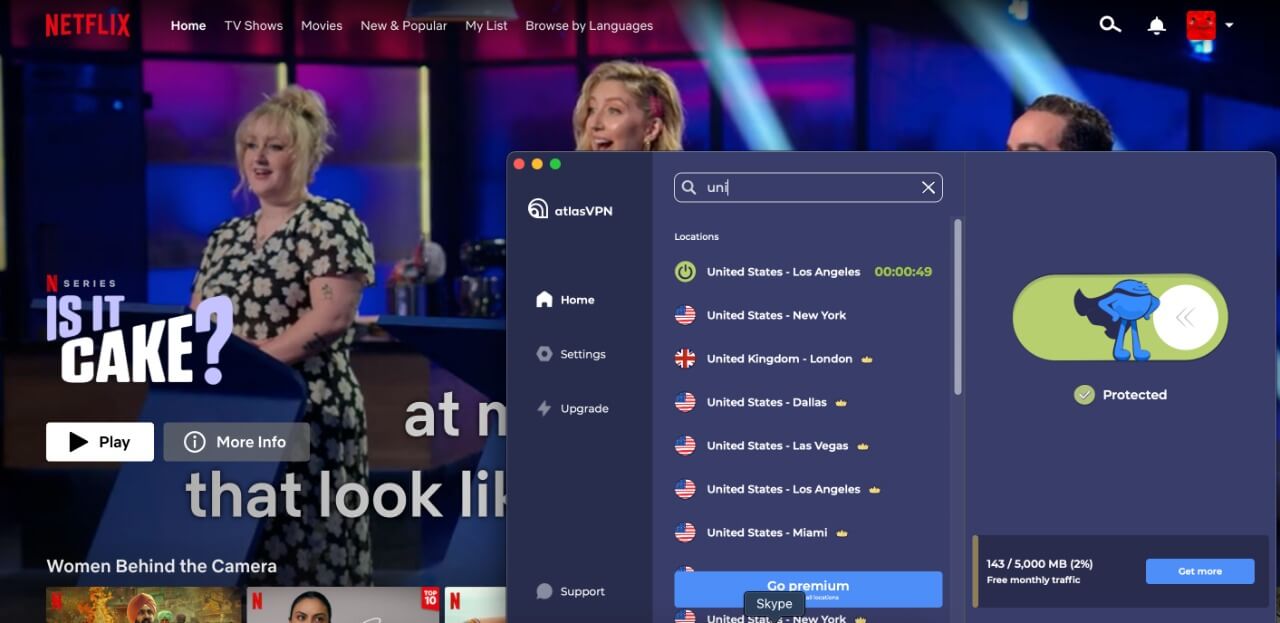
Atlas VPN’s premium plans could successfully unblock some of the most well-known streaming services, including Netflix.

atlas-vpn-unblocked-netflix

We could even bypass the geo-blocks of Hulu and HBO Max easily with this VPN, which allowed us to access both services’ entire catalogues. We were very pleased with these results, considering how notoriously geo-restrictive HBO Max is.

Additionally, it was simple to watch the often banned NBA videos on YouTube TV in a number of different regions.

Even its free version could unblock Netflix for us, which was super-cool, and the streaming-optimized servers performed exceptionally well.

Is Atlas VPN good and safe for torrenting?

Atlas VPN is a solid option for torrenting, unless you’re an expert user in need of advanced features like port forwarding.

It allows torrenting on all its 750 servers, and permits P2P activity even on the free ones. Your ISP won’t be able to see any of your torrenting activity, thanks to the VPN’s kill switch and strict logging policies.

For testing Atlas VPN, we used a variety of torrent applications, including qBittorrent and uTorrent. In every test, it took us about 6 minutes to download a 1GB torrent file.

Atlas VPN features

Atlas VPN offers a few features that the VPN is proud of. They are as follows:

SafeBrowse

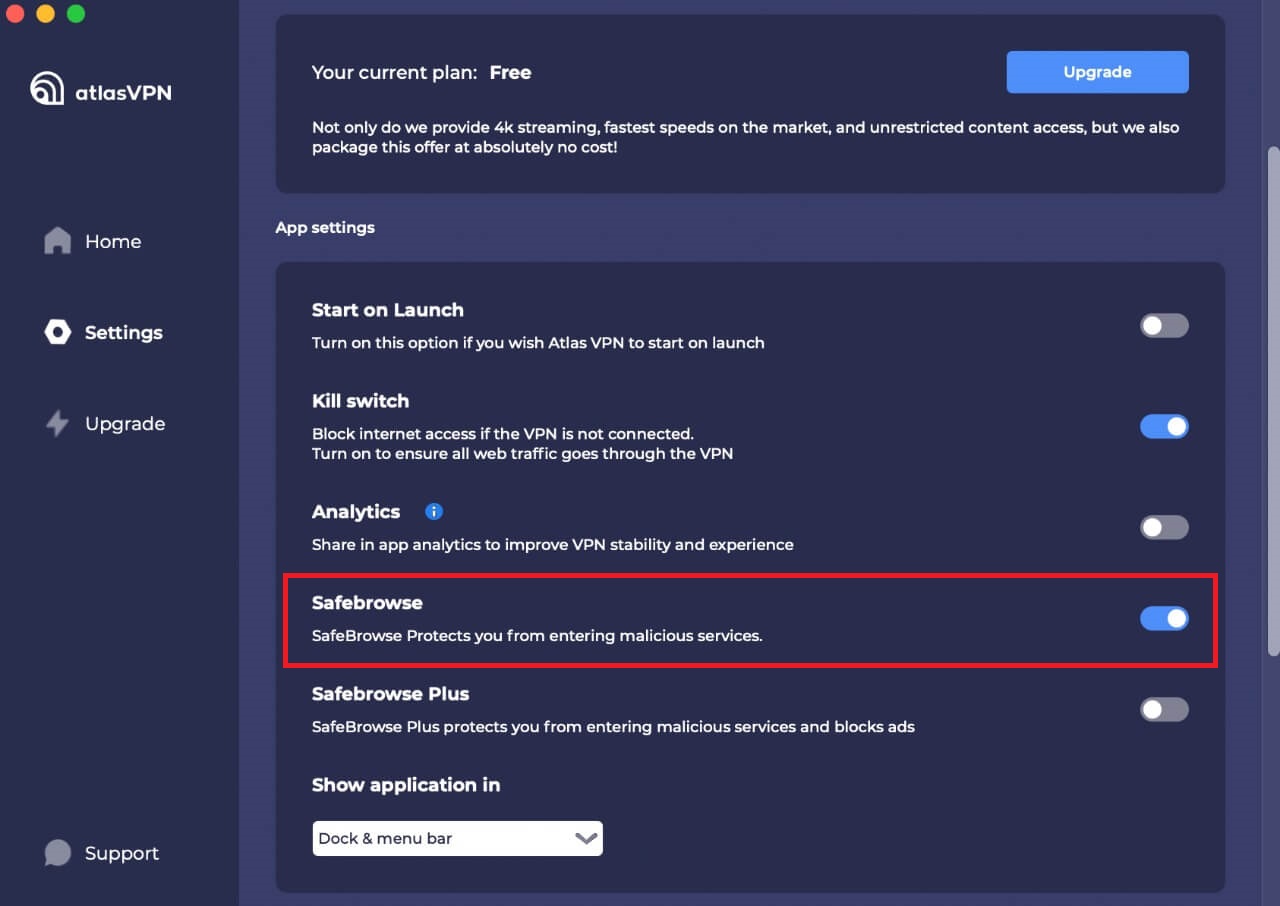
This VPN is somewhat like ExpressVPN’s Threat Protection feature, which protects you from opening all malware and virus-infected websites and apps.

However, please note that you’ll have to enable this feature from its app as it’s not enabled by default. The SafeBrowse toggle is located in the app settings option on macOS.

atlas-vpn-safebrowse-feature

SafeSwap

This feature rotates a user’s IP addresses without disconnecting/reconnecting to another server, ensuring user anonymity at all times.

There are several IP addresses assigned to each SafeSwap, not just one. These are shared by users, hence the IP rotations are unpredictable. You won’t be aware of the IP address changes unless you carefully check. This has no adverse effect on speed drops.

Data Breach Monitor

Although it may seem like cutting-edge technology, this tool only checks to see whether any data breaches have exposed your personal information. Since that is a premium feature, free users cannot use it.

You would receive bullet points with the types of data that was leaked if your data has become a victim of such a data breach. You can easily determine whether your credentials were also compromised or if only your email address was exposed.

Is Atlas VPN safe and secure?

Atlas VPN offers mediocre security to its users. Let’s look at what it offers below:

Encryption and tunneling protocols

Atlas VPN specifically uses the AES-256 cipher, which is currently the industry standard for data safety and is offered by many governmental and financial institutions.

Additionally, it has added the ChaCha20 cipher and Poly1305 authenticator to assure next-generation security.

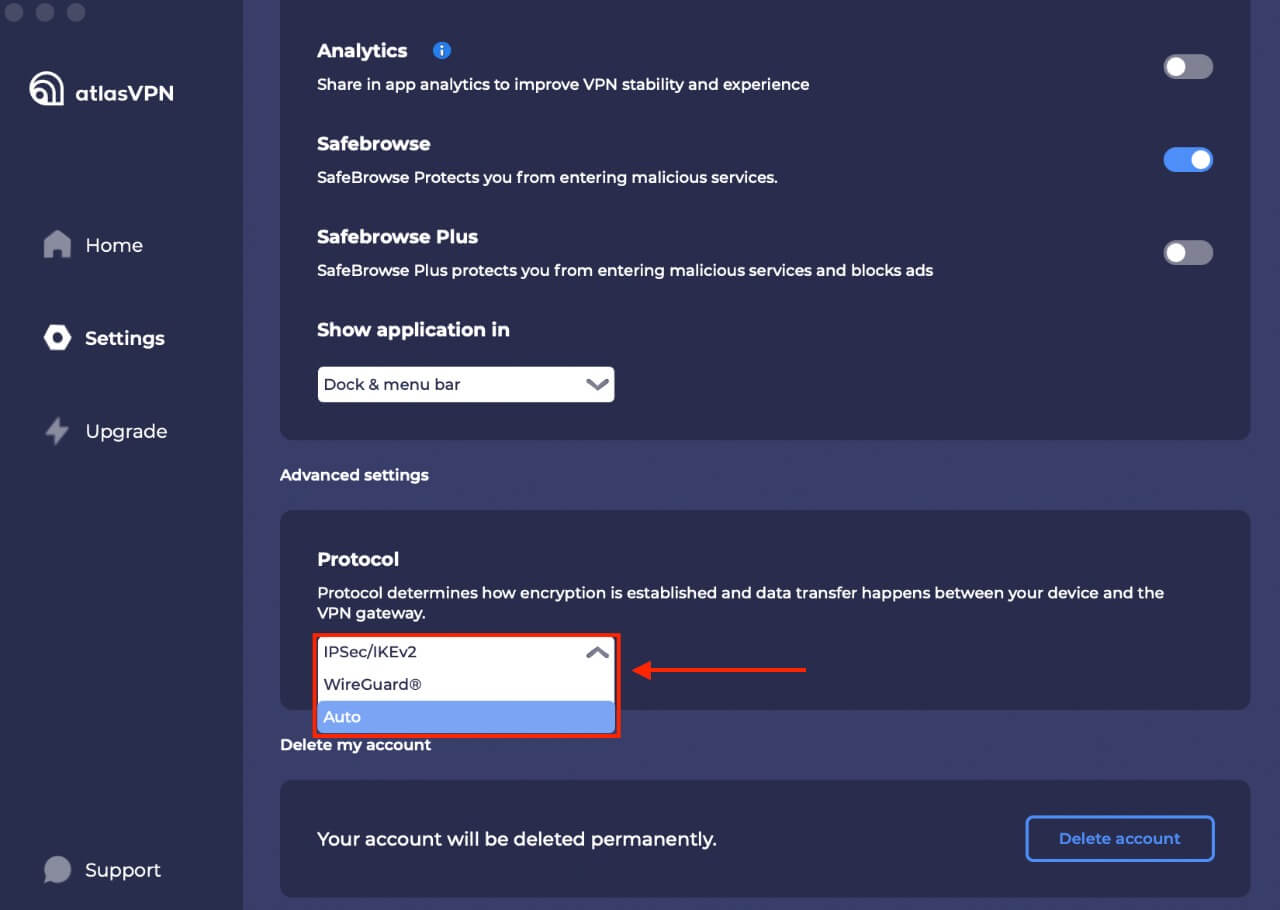
There are two choices for tunneling protocols: IPSec/IKEv2 and WireGuard. The latter, which is Atlas VPN’s newest offering, guarantees quicker speeds and lower ping.

atlas-vpn-encryption-protocols

Logging

Atlas VPN is headquartered in Delaware, United States. Unfortunately, this isn’t one of Atlas VPN’s selling factors because the US is a leading member of the Five Eyes alliance and is not generally a privacy-friendly state.

However, Atlas VPN does adheres to a no-logs policy, just like other VPN providers. According to the policy, it doesn’t collect any sensitive data. Although it isn’t stated officially, it appears that the no-log policy also applies to the free version.

Kill switch

Data breaches are less likely to occur, now that Atlas VPN has incorporated a kill switch. This feature disconnects you from your Wi-Fi network if the VPN connection suddenly drops.

By limiting the connection from a router and stopping background VPN operations, we run three tests to see how it functions. While it worked perfectly, our only complaint was that we were not informed when the kill switch is activated.

The 2FA Login Process

Atlas VPN also uses two-factor authentication when you connect to new devices. You will be prompted to validate a code provided to your email if you attempt to access your account from an unidentified device. Knowing that your credentials cannot be used without your permission gives an extra layer of protection.

Atlas VPN servers and locations

Atlas VPN offers 750 servers in 44 locations. You can choose from 7 cities in the US: Miami, Las Vegas, Phoenix, New York, Los Angeles,  and Dallas.

If you don’t have a server nearby, then latency will increase, even though it doesn’t always reflect the overall quality of the service. The top North American and European markets, however, offer a wide range of choices.

Moreover, only the Netherlands and the USA will be available to you in the free edition of Atlas VPN.

Does Atlas VPN work in China?

Atlas VPN’s support representatives informed that because the VPN doesn’t use any cutting-edge obfuscation technology, they  cannot guarantee that it will get past the Great Firewall.

Despite this, Shanghai, China was accessible by 80% of the Atlas VPN servers we tested. We advise connecting to the Singapore or Japan server locations for a more reliable connection.

You can use Atlas VPN to access Chinese streaming services and websites while you are outside of the country because it has servers in Hong Kong.

Plans and pricing

Plans Price
Free –
1-month $10.99/mo
1-year $3.29/mo
3-year $1.99/mo

We believe the cost to be reasonably priced, particularly for the three-year plan. Additionally, you can take advantage of its 82% off on this plan, which increases the value of the subscription even further.

Atlas VPN also offers a free version with no data limits or requests for personal information. However this plan’s drawbacks are server limitation and speed restrictions.

A more sensible choice would be to test out its premium version, which is supported by a 30-day money-back guarantee.

Interface and ease of use

Atlas VPN supports Mac, Android, iOS, Windows, and Amazon Fire TV. However, it lacks the ability to be installed on Linux or a router. Let’s check how it performs on its apps mentioned below:

Desktop versions

The Atlas VPN Windows and macOS apps are fairly simple to use, and may appeal individuals who don’t want to be overwhelmed with complicated features.

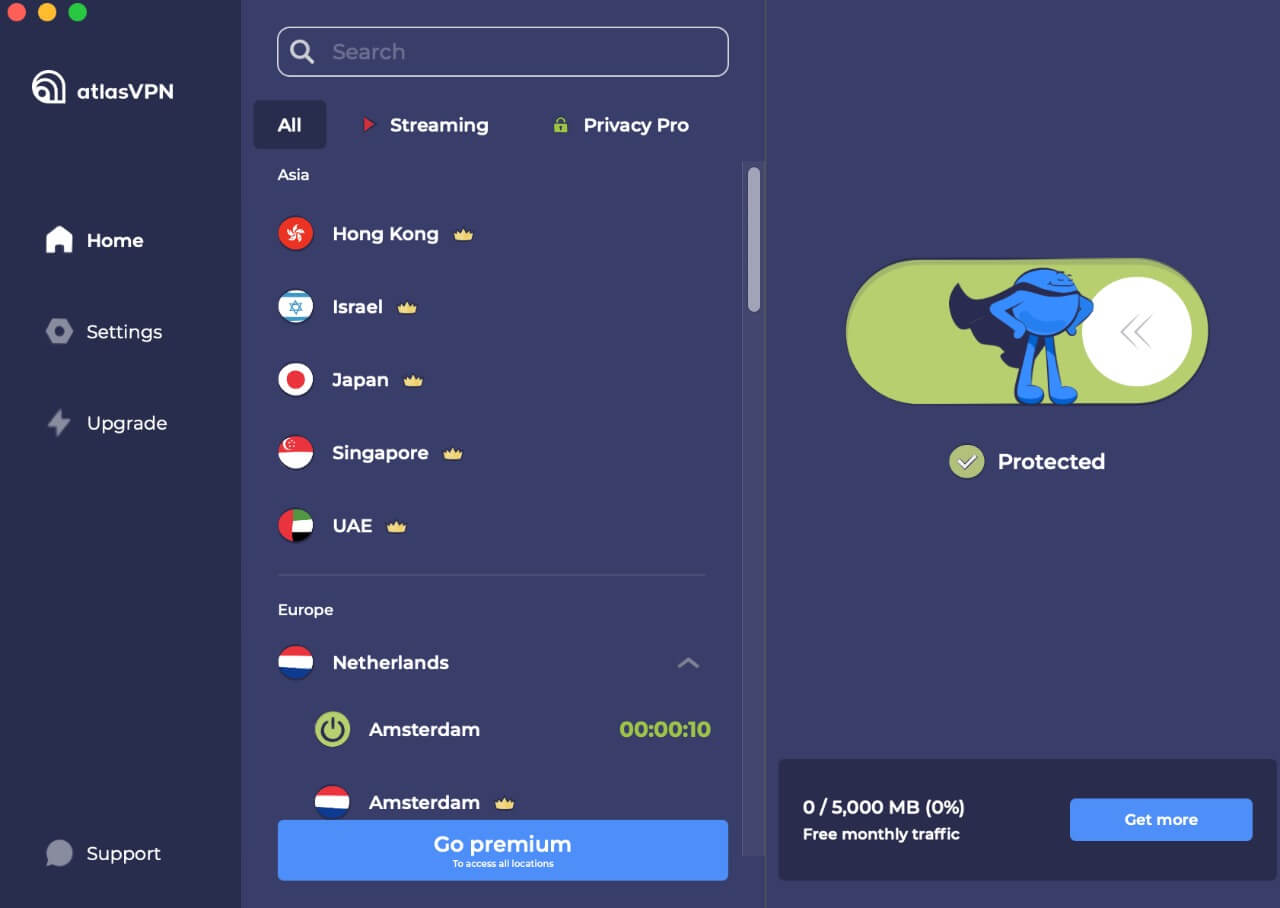
When you launch the app, you’ll see the basic features of any VPN, such as a Connect/Disconnect button, and a list of locations to connect to.

atlas-vpn-mac-app

With this VPN, you have the option of connecting to standard, streaming-friendly, and Privacy Pro servers.

This Privacy Pro servers are further divided into SafeSwap and MultiHop. The kill switch, protocols, and connectivity options are all found under Settings. As soon as you open the app, the Auto-Connect feature will activate the VPN.

Mobile apps

The Android app of Atlas VPN is actually superior to its Windows counterpart. The location list is arranged alphabetically by country, and there are separate categories for servers that are best for streaming, which improves the UI.

Under the ‘Assistant’ tab of the app, you can access the settings for Tracking Blocker and Data Breach Monitor, both of which appeared to work well.

With the exception of a kill switch and WireGuard protocol, the iOS app was great as well.

Customer support

Atlas VPN’s support section has added a lot of new content and makes an effort to address the most fundamental installation, usage, and troubleshooting issues of its users.

Moreover, it offers round-the-clock live chat support if you need instant help.

We tested the chat support by saying that we’re unable to connect to the VPN server, and they responded immediately and told us to uninstall the app, download, and install the most recent version of the app.

Conclusion

Atlas VPN offers both – an amazing free VPN as well as a reasonably priced premium VPN service. Even though we were quite pleased with the security and speed it offers, there are a few minor technical issues that can be fixed.

In our Atlas VPN review, its desktop and mobile apps performed efficiently at unblocking streaming services and browsing the internet.

We also loved the fact that it doesn’t log user data, such as IP addresses and browser history, so you can rely on it to protect your privacy.

In short, Atlas VPN has all the things you need in a great VPN provider!

FAQs

Is Atlas free VPN good?

Atlas VPN is a great free VPN with tons of features and user-friendly app interface. In fact, it’s one of the top free VPNs we’ve tested. It works with all torrent clients and is safe and secure.

Does Netflix block Atlas VPN?

No, Netflix does not block Atlas VPN. Since the VPN offers 750 servers in 44 locations, you can unblock more than 10 Netflix libraries pretty easily.

How do I use Atlas VPN for free?

Follow the steps below to use Atlas VPN for free:

  1. Search for the dedicated Atlas VPN app for your device and click ‘Download Free.’
  2. Install the app and sign in using your credentials.
  3. Enjoy free usage or upgrade to a premium version anytime.

    Some more VPN reviews for you!

Categories
Best VPNs

Best VPNs for Safari in 2026

Apple devices including the iPad, iPhone, and Mac all come with a default Safari web browser. Although it’s the most efficient browser choice for Mac users, it isn’t the most private or secure.

Thus, we advise getting one of the VPNs listed below if you want to use Safari with any of these devices. A VPN improves the security of your browsing experience by preventing your data and IP address from being seen by other users of the internet.

Therefore, in this best VPN guide, we jot down the best VPN for Safari – one that offers top-notch security features, assures complete privacy, and has the power to block even the most obtrusive advertisements and unsafe websites.

Best VPNs for Safari; Quick Overview

  1. Surfshark – Affordable Safari VPN. Budget-friendly VPN costing only $2.30/month and offering the best security, privacy, and unblocking capabilities on iOS and Mac amongst the lot.
  2. ExpressVPN – Best premium VPN. Works great with MacOS and iOS. Offers connections that are safe and private. Easily unblocks geo-blocked content and is excellent for streaming.
  3. NordVPN – Secure VPN for Safari. Incredibly fast servers for streaming and browsing. Strong security and privacy. 30-day money-back guarantee is included.
  4. CyberGhost – Easy-to-Use VPN for Safari. Offers optimized servers for streaming, torrenting, and browsing activities on macOS and iOS apps.
  5. IPVanish – Great VPN app and Price. Compatible with iOS and Mac devices. Offers decent speeds, privacy, and secure connections.

The best VPNs for Safari– Full Disclosure

Here is a list of the top 5 VPNs that we evaluated after examining a large number of them.

1. Surfshark – Affordable Safari VPN

surfshark vpn

Surfshark is the best VPN for Safari that is quite reasonably-priced. This VPN provider’s macOS app comes with a ton of features that enhances and improves your Safari browsing experience.

Along with that, the VPN also boasts 3200+ servers across 95 countries.

Although Surfshark doesn’t offer a Safari browser extension, it is simple to launch the VPN app from your Mac’s dock.

The VPN offers tons of security features, including 256-bit encryption, a kill switch, and defense against WebRTC, IPv6, and DNS breaches. With the CleanWeb function, harmful websites and ads are blocked, and trackers are disabled. This function is a lifesaver given Safari’s terrible stance toward ad-blocking.

The best part is that you may connect as many devices as you like to this service, ensuring that you never have to browse the internet unsecured.

You get all this with Surfshark at a price of only $2.30/mo, backed by a risk-free 30-day money-back guarantee. Read our full Surfshark review for more details.

2. ExpressVPN – Best premium VPN

expressvpn

ExpressVPN meets the entire criteria to be the best Safari VPN. Installing the VPN app lets you to use it to secure your entire device. All of the operating systems that Safari is compatible with, including Mac OS X, macOS, and iOS, have a dedicated ExpressVPN app.

It should be noted that ExpressVPN’s software does indeed function flawlessly with Safari and offers top-notch security for iOS and Mac browsers.

ExpressVPN offers a wide variety of servers: more than 3,000 servers spread across 160 locations in 94 different countries.

Military-grade encryption is a requirement if you want to access the internet in repressive countries, which is something ExpressVPN offers. A kill switch is one of the security features that will stop all of your device’s apps from connecting to the internet if the VPN connection drops.

If you frequently use wi-fi networks in public places, then the ExpressVPN app also offers automatic wi-fi protection, which is crucial.

In short, it’s a great choice and the best VPN for Safari and Mac due it its user-friendly app. It comes at a price of only $8.32/mo along with a 30-day money-back guarantee. Read our full ExpressVPN review for more details.

3. NordVPN – Secure VPN for Safari

nordvpn

NordVPN is another best VPN for Safari, due to its strong encryption and robust privacy features that all combine and protect you on the browser.

To secure your Safari browser, you need to download the NordVPN app for Mac OS X, macOS, and iOS. You can manually install the VPN on Linux desktops and similar devices, and there is also an app accessible for Windows and Android.

There is no Safari browser plugin available from NordVPN. So, you can download it on the device you have the Safari browser on to make it work.

In order to keep all of your data secure and inaccessible to others, NordVPN uses military-grade AES-256 encryption. If a secure connection is lost, there is also a kill switch that will prevent you from accessing the internet.

It further offers a CyberSec feature for your Safari browser. When turned on, CyberSec prevents trackers, harmful websites, and advertisements.

NordVPN is available at a price of only $3.49/month, and has a 30-day refund policy in store to test all its features. Read our full NordVPN review for more details.

4. CyberGhost – Easy-to-Use VPN for Safari

cyberghost

CyberGhost is a user-friendly VPN service. Although CyberGhost can be installed on Mac OS X, macOS, and iOS, it does not have a Safari browser extension. Additionally, there are Windows and Android apps available, and Linux desktops and routers can manually install the VPN.

The service allows you access to a vast and secure server network in more than 80 countries. Moreover, it offers dedicated streaming, torrenting, and gaming servers for optimized speeds on Safari.

Through its 256 AES encryption, which protects against risks lurking in cyberspace, CyberGhost offers a safe connection to the internet. The VPN also offers a kill switch and automatic wi-fi protection, so your data never leaks on public wi-fi.

Moreover, you also get an ad-blocker to block all intrusive ads appearing on the sites you visit.

This VPN is available at a price of only $2.29/month and offers a 45-day money-back guarantee, which is way more than what the other VPNs on our list offer.

5. IPVanish – Great VPN app and Price

ipvanishIPVanish offers a reliable VPN app and offers servers in 75+ locations.

Although it doesn’t have a Safari extension, it does provide an app for Mac OS X, macOS, and iOS operating systems that, if installed on those devices, will secure your browser traffic.

The VPN is situated in the United States, where data interception by law enforcement organizations like the NSA is well known.

However, you can put your trust in IPVanish when it comes to online security. To protect the privacy and security of all of your data, it provides a powerful 256-bit AES encryption.

The fact that the VPN service keeps no logs is a crucial privacy element. Kill switch and automatic wi-fi protection are features of the IPVanish apps that will stop internet snoopers from identifying your actual IP address.

This VPN comes at a cost of only $3.75/month, along with a 30-day money-back guarantee.

How did we choose the best VPNs for Safari?

We put multiple VPNs to test in order to uncover the best VPNs for Safari. After all, not every VPN provides browser-compatible apps. Some can seem to be too slow or unsecure. Here are all the factors we chose to test our list of VPNs on:

  • iOS and macOS compatibility: Since all of the VPNs in this article offer iOS and Mac apps, they can all be used to encrypt both Safari browser traffic and apps on these devices. In case you want to safeguard a few additional devices, they also include applications for Windows, Linux, and Android.
  • Server network: To circumvent censorship and geographic restrictions, many people use VPNs. As a result, it’s critical that a VPN offer servers in numerous countries, including the UK, US, and Australia.
  • Unblocking: It’s more difficult to unblock some websites and services than others. Due to the fact that some VPN IP addresses are actively blacklisted. Our research has revealed the top Safari VPNs for getting around the strictest restrictions, including those imposed by streaming services like Hulu and HBO Max.
  • Speeds: Some VPNs have speed differences that are quite noticeable. When streaming or downloading, you’ll notice the difference even though it might not seem like much of a change when you’re just surfing. This is why ensured listing down only the VPN services offering fast speeds to users.
  • Security: The internet traffic between your browsing device and the Internet is supposed to be secured by a VPN. Surprisingly, some people don’t succeed in doing this! You can be confident, though, as each of the VPNs listed above offers a kill switch, AES 256-bit encryption, and DNS leak protection. 

Do you really need for VPN for Safari?

This internet is not a safe place as it is. And therefore, you need a VPN for Safari. Here are all the reasons for this:

  • Privacy: Like most popular search engines, Safari records all your browsing activities. Even if you enable Private Browsing, your ISP and everyone else can see what you accessed. This is why you need a VPN for Safari. A VPN will encrypt all you data and make it invisible for everyone.
  • Security: It’s pretty dangerous when you connect to a public Wi-Fi network. Even if you’re performing harmless activities, your data is always at high risk. It’s very easy for hackers to steal your credit card details or use your device for crimes. A VPN adds an extra layer of security so it’s difficult for everyone to intercept your traffic.
  • Ad-blocking: The best VPN for Safari, like Surfshark offers an ad-blocking feature. And you actually need the functionality after Apple’s update on the ad-blocking policies of Safari in 2018. Since most ad-blocking extensions were discontinued, it’s crucial using a VPN with an ad-blocker to avoid annoying ads and trackers.

How do you use a VPN with Safari?

Here is how you can use a VPN with Safari:

  1. Select a VPN that offers a dedicated macOS or iOS app. We recommend Surfshark.
  2. Download and install the VPN on your Mac/iOS device.
  3. Connect to any VPN server.
  4. Launch Safari and enjoy!

FAQs

Can I use a free VPN with Safari?

Avoid using free VPN services whenever possible. There is no best free VPN extension for Safari that will fully preserve your privacy. Some free VPNs are frauds that gather your personal information through their VPN apps and sell it to marketers rather than securing it.

Without encryption, a VPN is not a VPN, yet strangely, many free VPNs offer no encryption at all. These services deceive you into believing you are safe while actually being risky.

Free VPNs are alluring, but they typically waste time. We do not advise wasting valuable internet time looking for the best free VPN for Safari.

If you really want to use a VPN without any cost, then you can try out our best VPN for Safari free by opting for its 30-day money-back guarantee.

Is there a built-in VPN in Safari?

Yes, even though Safari has Apple Private Relay as a built-in VPN, a separate VPN service may still be preferable.

While you can’t get the best VPN extension for Safari since most VPNs do not offer any, you can simply download a VPN app on your device and keep yourself secure on the Safari browser.

Some more blogs for you!

Categories
Best VPNs

Best VPNs for PS4 & PS5 in 2026

ISPs have a history of throttling network connections, which may be a nightmare for games that demand quick reflexes. The major activities on which network throttling can be an issue include streaming, torrenting, and online gaming.

However, you can increase your speeds, gain access to geo-restricted content, and decrease input latency on PlayStation using a reliable and speedy VPN service.

Please note that find the best VPN for PS4/PS5 can be challenging, since it’s difficult to set up a VPN on gaming consoles.

But, the team of bestvpncomparisons.com evaluated more than 100 VPNs and jotted down only 5 best VPNs that provide excellent security, compatibility with PlayStation, and can even bypass geo-blocks.

Best VPNs for PS4; Quick Overview

  1. Surfshark – Affordable PS4 VPN. The best inexpensive VPN for PS3, PS4, and PS5. A robust VPN with multiple security features, no connection limit, great speeds, and ability to unblock geo-restricted games and streaming platforms.
  2. ExpressVPN – Best premium VPN. Combines excellent unblocking capabilities with a wide range of cutting-edge security features.
  3. NordVPN – Secure VPN for PS4. Prioritizes user security while maintaining speed and offering excellent unblocking abilities.
  4. CyberGhost – Easy-to-Use VPN for PS4. Excellent for lag-free gaming, secure streaming, or even just regular browsing because it is quick and simple to use.
  5. IPVanish – Great VPN app and Price. With this VPN, it’s easy to secure your PlayStation, thanks to its trust-worthy high-speed connections, zero-logs policy, and unlimited bandwidth.

The Best VPNs for PS4 – our detailed list:

1. Surfshark – Affordable PS4 VPN

surfshark vpn

Surfshark is affordable and the best VPN for PS4 that gives you access to 3200+ servers in 65 countries, ensuring that you have a low-latency connection wherever you are in the world.

For connecting it to your PlayStation, you can use its Smart DNS feature. However, configuring the VPN on your router will give you the complete experience.

Surfshark has outstanding unblocking capabilities, enabling you to access websites like Netflix US and Hulu from other countries. We even connected to BBC iPlayer and faced no errors.

unblock-bbc-iplayer-with-surfshark

Moreover, with this VPN, you can connect as many devices as you like as you get an unlimited number of simultaneous connections on a single subscription.

To keep you secure, the VPN offers 256-bit encryption, no-logs, kill switch, and RAM-only servers. Additionally, it can block advertisements and viruses using its CleanWeb feature.

Finally, Surfshark is quite reasonably priced. It’s one of the best VPNS available, costing only $2.30/mo. Moreover, with a 30-day money-back guarantee, you can test the VPN risk-free.

For more details, check out the latest Surfshark review.

2. ExpressVPN – Best premium VPN

expressvpn

Another great VPN choice for your PlayStation is ExpressVPN. This VPN lives true to its name and provides quick speeds for all your streaming and gaming needs with 3000+ servers spread throughout 94 countries.

With its MediaStreamer feature, which is effectively a Smart DNS function, ExpressVPN provides a simple method for connecting your PS4 to stream geo-blocked platforms.

Moreover, it offers custom firmware that makes the router installation procedure easier if you’d want to connect through router.

Moreover, ExpressVPN can unblock a number of streaming services including Netflix, HBO Max, and Hulu that are blocked by most VPNs.

expressvpn-works-with-netflix

ExpressVPN protects your traffic at all times with 256-bit AES encryption, DNS/IPv6 leak protection, TrustedServer technology, and a kill switch that halts all traffic when your connection is lost.

This VPN is a good option for those who care about privacy because it doesn’t store any information that might be used to identify you.

ExpressVPN is fairly pricey when compared to other VPN services, costing $8.32/mo.  Try it out, and if you decide it’s not for you, you can always cancel its subscription through its 30-day money-back guarantee.

For more details, check out the latest ExpressVPN review.

3. NordVPN – Secure VPN for PS4

nordvpn

The next pick for a PlayStation VPN is NordVPN. This VPN offers a vast server network and stringent security, which is simply incredible.

SmartPlay, a feature of NordVPN, is a Smart DNS option. If you only want to unblock TV shows and movies, this is the easiest way to connect your PS4 or PS5 to geo-restricted streaming services.

You can also set up NordVPN on your router as an alternative. You can also use guidelines provided by NordVPN to walk you through the process, so setting it up shouldn’t be too difficult.

As for unblocking, NordVPN is fantastic because the service does a terrific job at accessing streaming websites. We were able to enjoy Hulu, HBO Max, Netflix, and BBC iPlayer easily with the VPN.

nordvpn-unblocked-hbo-max

Compared to most other VPNs, NordVPN allows consumers more flexibility in setting up their security. It offers 256-bit encryption, CyberSec, kill switch, obfuscation, and more. You can also choose to utilize Tor over VPN or Double VPN to stay secure.

Finally, this secure VPN for PS4 costs only $3.49/month and comes with a 30-day money-back guarantee.

For more details, check out the latest NordVPN review.

4. CyberGhost – Simplest VPN for PS4

cyberghost

CyberGhost was created with beginners in mind, making it as simple as possible to get around geo-restrictions, share files, or surf anonymously.

You can set up a VPN-enabled hotspot or your router if you wish to install a fully functional VPN on your PlayStation. You can also purchase one of CyberGhost’s pre-configured FlashRouters and save time by using it rather than manually configuring your router.

This service delivers quick speeds, manages a network of more than 7,000 global servers, and allows users to quickly unblock a number of popular streaming services like Netflix and Hulu.

unblock-netflix-with-cyberghost

To keep your information secure at all times, CyberGhost uses AES 256-bit encryption, an automatic kill switch, and the WireGuard protocol. Moreover, it doesn’t log any personally identifiable information.

The cost of CyberGhost is only $2.29 per month. Moreover, you also get a 45-day money-back guarantee for testing the VPN.

5. IPVanish – Great VPN app and Price

ipvanish

Due to its excellent multi-platform support and fast speeds, IPVanish is well-liked by consumers who enjoy streaming online. The VPN allows you to choose the best server location for your gaming needs from more than 2000 servers spread across 75+ locations.

There are just two options available for router installation: OpenVPN and L2TP/IPSec. Therefore, you won’t achieve fantastic speeds unless your router has a robust CPU. Thanks to instructions in the support center, installation is simple.

In terms of unblocking streaming websites, IPVanish isn’t the greatest because it doesn’t have a Smart DNS option. However, it can still unblock BBC iPlayer, Hulu, Netflix, and Amazon Prime for you.

ipvanish-unblocked-netflix-australia

Even though this service has a reputation for being lightweight, security is a top priority. Users have the option to obfuscate their OpenVPN traffic, restrict local traffic, and switch IP addresses frequently in addition to the 256-bit encryption and kill switch that are all included by default.

We already highlighted how inexpensive IPVanish is. It costs only $3.75/month, and you can cancel your subscription if you change your mind within the first 30 days for a full refund.

How we chose these VPNs

When looking for the best VPN for PS4, always test multiple options on a variety of factors. Doing the same, we chose the VPNs on our list based on the following metrics:

  1. Easy to set up on PS4/PS5: Select a VPN that includes Smart DNS if you wish to unblock streaming apps or is compatible with your router to get the most out of your console. Each of the VPNs mentioned above provides comprehensive and simple instructions for setting up routers. You can also connect your PlayStation using your Mac/PC by configuring a Wi-Fi hotspot.
  2. Fast Speed: Speedy connections are essential for the best experience when using your PlayStation for gaming and streaming. The last thing you want is a sluggish game, or a show that keeps buffering. Because of this, we chose VPNs that are reputed to provide a variety of fast servers.
  3. Massive network of servers: You should look for a VPN that offers thousands of servers across numerous countries. You are less likely to encounter overloaded servers if there are more of them. Additionally, you’ll have faster speeds and less lag in the game if the server is closer to you.
  4. Security: It’s crucial to protect yourself against risks online even while gaming. VPNs can mask your IP address and provide the most stringent security features, such as military-grade encryption, DNS leak protection, and a kill switch.
  5. Efficient customer service: You can solve your issues more easily if you receive good customer service. Regardless of your time zone, all of the VPNs on this list provide live chat assistance that is available 24/7.

Why do I need a VPN to play on PlayStation?

You might be surprised by how many ways using a VPN to support your PlayStation 4 can make your life better. In no particular order, here are the top five. The best VPN for PS4 gaming can be utilized for:

  1. Playing games before others: PlayStation games frequently have region-specific release dates. Before they are released in the USA, many games first appear in Japan and even Australia. You can connect to a server location of those countries and play games just by using a VPN.
  2. Prevent DDoS attacks: You may have heard tales of gamers hiring hackers to assault their rivals’ systems or launch DDoS attacks to slow down their internet. However, a VPN connection is difficult to hack, and because VPN servers have extremely fast connections, they are significantly more immune to DDoS attacks than your home internet service.
  3. Unblock geo-restricted streaming services: On your PS4/PS5, you can add apps of all your favorite streaming services, but you can only access the local content library. However, you can circumvent geo-restrictions and access content from any location by setting up a VPN!
  4. Offers low pings: If you enjoy playing video games, you are probably aware of how important low ping or latency is. When ISPs notice that you are playing games, some of them restrict the speed of your connection. However, your ISP won’t be able to reduce your speed if you use the best VPN for gaming on PS4 pro.

How to set up a VPN on a PlayStation console

On PlayStation, there are 3 ways to set up a VPN. Let’s check each of them out below:

Setting up a VPN on a router

It is beneficial to set up a VPN directly on your router since every device that connects to your network will automatically benefit from the VPN.

However, this router installation can be a little challenging, and you’ll need to carefully follow the instructions to prevent your router from being harmed. Additionally, you’ll discover that the real procedure varies depending on the VPN.

As previously mentioned, our top-rated VPNs include comprehensive guidelines to make the process as simple as possible for you.

Sharing a VPN connection over a Wi-Fi router

You can share a VPN connection by converting your computer into a virtual router and using its Wi-Fi to connect your console to your PC (or an ethernet cable).

Although installing a VPN via this approach may be a little simpler than doing it directly on your router, the VPN’s performance will be noticeably inferior. Find the instructions below for both Windows and macOS.

Sharing a VPN connection on Windows 10

  1. Download and install the VPN you prefer on your Windows PC (We recommend Surfshark).
  2. Then, visit Settings. Navigate to Network & Internet > Mobile Hotspot.
  3. Turn the toggle On.
  4. Visit the Settings > Network & Internet. From there, click Change adapter options.
  5. Look for the adapter of your VPN, then right-click on it to launch Properties > Sharing.
  6. Tap on the  Allow other network users to connect through this computer’s internet connection option.
  7. Under Home Networking Connection, choose you hotspot connection.
  8. Open your VPN app and connect to a server.
  9. Fire up your PS4 and visit its Settings. Then, go to Network > Connect to the internet. After that, click Use Wi-Fi and choose your mobile hotspot.
  10. Finally, play your favorite games and unblock geo-restricted easily on your PS4/PS5.

Sharing a VPN connection on macOS

  1. Look for the account credentials of the VPN you selected.
  2. Configure L2TP/IPsec on your macOS.
  3. Visit System Preferences and then Sharing.
  4. Launch the Internet Sharing menu.
  5. From the dropdown, choose your VPN connection.
  6. Tap the  “To computers using” Wi-Fi box.
  7. In the Wi-Fi options menu, create a password.
  8. Go back to Internet Sharing, and click Enable.
  9. Open your VPN and connect to a server.
  10. Visit your PS4 and connect to your Mac-enabled Wi-Fi connection.

Using Smart DNS

For each VPN service, there will be somewhat a different process for setting up Smart DNS. The generic steps are as follows:

  1. Install a VPN you prefer (Surfshark is our top choice).
  2. Register your IP address in the Smart DNS or DNS settings sections of the VPN dashboard.
  3. You ought to now receive a DNS code; write it down.
  4. Turn your PS4/PS5 on and visit Settings > Network. Then, click Custom.
  5. Choose either Wi-Fi or LAN cable depending on how you desire your PS to be connected to the internet.
  6. Choose Automatic > Do Not Specify > Manual.
  7. Insert the DNS codes that you previously jotted down.
  8. Visit Automatic > Do Not Use. After that, click  Test Your Internet Connection.
  9. Start your PS5 or PS4 again.
  10. Now, you ought to be ready to go! You can access a brand-new library of entertainment on your PlayStation by opening a streaming app, which you couldn’t do before.

Conclusion

Your PlayStation experience can be enhanced with a swift and reliable VPN. Because they aren’t immediately compatible, VPNs aren’t the simplest to set up and use on gaming consoles, which is the issue.

Surfshark, however, is the best VPN for PS4 because it’s quick and simple to set up and use with the device. Once connected, you can unblock geo-blocked games and streaming services, and secure your online gaming experiences.

FAQs

Can I use a free VPN for PS4/PS5?

You can use the best free VPN for PS4 and PS5, just like other VPNs, but that’s a poor idea. Since free VPNs are pros at selling your data, all your personal information is at stake with the VPN.

This is why we recommend opting for Surfshark’s 30-day money-back guarantee, and using this best VPN for PS4 free for an entire money!

Does changing DNS help PS4?

For your PS4, using the incorrect DNS server might significantly increase your ping time or, worse yet, reduce your connection speed. Actually, the majority of gamers simply use the ISP’s (internet service provider) assigned default DNS servers, which are almost never the quickest DNS servers.

Some more blogs for you!

Categories
Best VPNs

Best VPNs for Tor in 2026

Tor is a privacy-oriented browser that helps you get around internet censorship by anonymizing your internet traffic. Tor encrypts all incoming and outgoing data so that anyone intercepting it cannot read it.

However, both your ISP and governmental organizations are able to detect your use of Tor. This is not ideal since, despite the fact that Tor has many legitimate purposes, it is known for being used for criminal conduct.

This is why using a VPN with Tor is a good idea. However, it can be difficult to find the best VPN for Tor browser that will genuinely keep you safe. So, we did our research, and came up with a list of secure VPNs for you.

Best VPNs for Tor; Quick Overview

  1. NordVPN – Most Secure VPN for Tor. AES 256-bit encryption with Tor Over VPN servers. Money-back guarantee of 30 days.
  2. ExpressVPN – Best premium VPN. Fast and experienced VPN provider with an Onion site and Bitcoin support. Excellent for internet surfing, torrenting, and streaming.
  3. Surfshark – Affordable VPN for Tor. Good speeds, unlimited simultaneous connections, and powerful unblocking capabilities.
  4. CyberGhost – Easy-to-Use App. User-friendly apps with no-logs and decent speeds.
  5. IPVanish – Great VPN app and Price. Offers quick servers and no logs. Works great with streaming websites as well.

The Best VPNs for Tor – Full Disclosure

Here is a complete list of all the best VPNs for Tor that you can use in 2026:

1. NordVPN – Most Secure VPN for Tor

nordvpn

Our top choice for a Tor VPN is NordVPN. It is a stalwart in the market and provides incredibly fast speeds in addition to a sizable worldwide server network.

Hails to its Tor over VPN feature, your traffic will be automatically redirected over the Tor network. This is excellent if you want to use Tor with applications other than a web browser.

Other beneficial security features offered by NordVPN include the Double VPN, which routes your traffic over two VPN servers. However, as double encryption slows down connections, we advise sticking with NordVPN’s standard or obfuscated servers if connection speed is a concern.

It also offers DNS leak protection, no-logs policy, split tunneling, and the Nordlynx protocol.

The provider has an excellent global server network, with around 5,500 servers spread across 60 nations. By connecting to these servers, NordVPN prevents outsiders from viewing your personal information.

Along with the Tor browser, NordVPN is compatible with iOS, Firefox, Windows, Chrome, macOS, Android, and routers.

You can get NordVPN at a cost of only $3.49/month, along with a 30-day money-back guarantee.

For more details about the provider, go through our NordVPN review.

2. ExpressVPN – Best premium VPN

expressvpn

ExpressVPN is the most secure and another best VPN for Tor browser. It offers a number of features that make using it with The Onion Router simpler and safer, and it goes above and beyond to honor its privacy obligations to its customers.

Recently, ExpressVPN introduced a .onion version of their website for users who want to sign up for an account without being identified.

The company is situated in the British Virgin Islands and follows a rigorous no-logs policy. When the VPN connection drops, the automatic kill switch (also known as “network lock”) shuts down your internet traffic to stop leaks that would inform your ISP that you are using Tor.

Additionally, ExpressVPN’s TrustedServer technology, which runs all servers entirely from RAM and writes no data to actual hard drives, is used on all of its servers.

ExpressVPN offers a large number of IP addresses to choose from thanks to its over 3000 servers located all over the world.

ExpressVPN works with a variety of common operating systems and devices, including Android, macOS, routers, Windows, Safari, Chrome,  and more, in addition to the Tor browser.

You can get ExpressVPN at a cost of only $8.32/mo along with a 30-day money-back guarantee.

For more details about the provider, go through our ExpressVPN review.

3. Surfshark – Affordable VPN for Tor

surfshark vpn

Surfshark is a fantastic cheap option. Despite that, you can access the Tor network with Surfshark to browse the internet anonymously and get around geo-blocks and censorship easily.

To use the Tor browser in restricted areas, Surfshark offers the NoBorders mode. For increased anonymity, you can also use its MultiHop capabilities and Camouflage mode.

Surfshark also offers a wide range of other security features, including Military-grade 256-bit AES encryption, a kill switch, DNS leak prevention, and ad blocking. Thanks to a no-server-logs policy and a bitcoin payment option, your privacy is adequately safeguarded.

Surfshark’s global server network is substantially bigger now than it was a few years ago, with over 3,200 servers spread across 95 different countries.

Surfshark supports an infinite number of devices simultaneously and offers apps for Fire TV, Android, Windows, macOS, iOS, and Linux.

You can get this best VPN for Tor at only $2.30/mo, along with a 30-day money-back guarantee.

For more details about the provider, go through our Surfshark review.

4. CyberGhost – Easy-to-Use App

cyberghost

Because of its unique NoSpy servers, CyberGhost is a great option for Tor. These are RAM-only servers that wipe your data and browsing history off when you disconnect from the VPN.

Additionally, to avoid interference from third-parties, CyberGhost directly manages these servers. You can utilise The Onion Router without being concerned that your data will be compromised because of this.

Every user of CyberGhost receives a special anonymous ID, and the email address you enter to register is encrypted. As a result, users’ email addresses cannot be linked to their CyberGhost accounts by third parties. Moreover, there are no data logs kept by CyberGhost.

With more than 7,700 servers located across more than 90 countries, the provider has a sizable global server network.

You may connect up to seven devices at once with a single account, and there are apps available for the macOS, Android, Linux, Windows, and iOS platforms.

CyberGhost is available at a cost of only $2.29/month along with a 45-day money-back guarantee.

5. IPVanish – Great VPN app and Price

ipvanish

If you need to use Tor to secure a large number of devices, IPVanish is a good choice.

With IPVanish’s Scramble feature, you can get around VPN restrictions and securely surf the Dark Web. It also includes necessary security features like an IP/DNS leak protection, automated kill switch, and military-grade AES 256-bit encryption.

The obfuscation feature included in IPVanish’s apps makes your VPN traffic look like as regular internet traffic. If you want to increase speed, WireGuard protocol are also available.

However, if you want to make an anonymous purchase, look elsewhere because it does not accept bitcoin.

You can get IPVanish at a cost of only $3.75/month, along with a 30-day money-back guarantee.

Why use Tor over VPN?

Following are a few reasons why you should use Tor over VPN:

  • Best privacy and security possible.
  • Bypass ISP restrictions on access to Tor.
  • Complete security to keep you safe while you browse.
  • Use a VPN to get all the best security features.

How does Tor or Onion over VPN work?

To make Tor/Onion over VPN work, you need a VPN as well as a Tor browser. However, in most cases, you’ll just be using the Tor Browser. Follow the steps below for it:

  1. Subscribe to a VPN service. We recommend NordVPN for this as it offers anonymous payment options.
  2. Download and install the VPN on your device.
  3. Connect to any server offering fast speeds.
  4. Download the Tor Browser, launch, it and connect to the Tor Network.
  5. Enjoy surfing on the Tor browser.

VPNs with built-in Onion over VPN feature

Only a small number of VPNs offer Tor functionality as part of their offerings.

With its integrated Onion over VPN capability, NordVPN is the market leader in this regard. It can be used without any further setup being added. The configuration is already done for you to browse anonymously right away, without needing Tortilla or the Tor browser.

Pros and cons of using Onion over VPN

The following is a thorough overview of the pros and cons of utilising Onion over VPN:

Pros Cons
Multi-layer encryption Your connection can get cut off since Tor’s exit nodes get blocked randomly
Actual IP remains unidentified even if Tor network is compromised Due to various intermediary servers, your speeds below extremely slow
The VPN service and ISP cannot view your activities
Various ISPs block Tor networks, so the only technique to access them is by a VPN
VPNs offer features like a kill switch so you stay protected in every case

Onion over VPN vs. Double VPN

Please note that Onion over VPN isn’t the only solution to remain unidentified. In fact, Tor isn’t the only way to interconnect multiple secure connections.

Using multiple VPNs is also possible. Your traffic is twice encrypted and is routed through many servers in this way.

Every VPN service offering this built-in feature calls it by a different name. These names include DoubleVPN, MultiHop, and Nested VPN.

Another option is to try setting it up by yourself by configuring a VPN on your router, and then further connecting a VPN server to your device. The final method is to use virtual computers, where the host acts as the router.

FAQs

Is Onion over VPN safe?

The Onion network is susceptible to a cyberattack, just like other cybersecurity tools. However, even if the network is compromised, your real IP address will remain hidden if you use Tor in conjunction with a VPN.

Do you need a VPN for Tor?

Although not necessary, a VPN is quite helpful when using Tor. Your entire traffic is encrypted and hidden from your ISP. To put it simply, using Tor with a VPN is significantly safer.

However, we highly recommend not to think of using the best free VPN for Tor browser. That’s because free VPNs would put your data at risk, instead of protecting you on Tor.

How to use Tor over VPN?

Here’s how you can do that:

  1. Download a reliable VPN while making sure that you select the correct version for your preferred device, and then launch it.
  2. Open its app and connect to your preferred server.
  3. Once you connect to the VPN, launch your Tor browser.
  4. That’s it!

Should I use Tor bridges instead of a VPN?

You have the choice to connect through Tor bridges when utilising the Tor network. Similar in operation to relays, bridges are private and do not show up in the main Tor directory.

Finding one, though, can be difficult. Although it’s not simple, you could set one up on your own.

Tor bridges might provide your browsing experience more freedom. There are specific variations of them, such as disguised tor bridges, which might be helpful for gaining access to blocked content. In most circumstances, your ISP cannot obstruct private Tor bridges.

Some more blogs for you!

Categories
Reviews

HideIPVPN Review: Is It Worth It?

hideipvpn-review

Choosing a VPN might be challenging because you are unsure of what you will receive for your money.

Amongst all VPNs in the industry, there’s HideIPVPN – a VPN and Smart DNS combo – that claims to provide super-fast speeds and highest level of security at an affordable cost.

Moreover, it has several commendable features, that are perfect for unblocking streaming platforms that you might find appealing.

However, by the looks of it, it also offers a limited variety of servers and fewer simultaneous connections per subscription.

In this VPN review, let’s address multiple factors of this VPN to check if it lives up to our criteria and can be called a great choice for all your activities.

So, let’s get right into the HideIPVPN review!

HideIPVPN pros and cons

HideIPVPN offers many incredible features. It does, however, have drawbacks, just like any other VPN. Let’s examine the VPN’s advantages and disadvantages for a quick overview:


Pros Cons
Offers a Smart DNS service Small server network
Fast speeds Located in the US
Unblocks Netflix, Hulu, and other streaming platforms
Multiple security protocols
Offers P2P support on some servers
Unlimited bandwidth
3-day free trial
Doesn’t require users to enter a payment method on its free trial
5 simultaneous connections

Speed and performance: Is HideIPVPN fast?

We conducted all speed tests after setting up the VPN protocol to OpenVPN (UDP). While testing, we faced no lags, thanks to HideIPVPN’s fast connection speeds.

However, it’s a fact that the average download/upload speed will inevitably slow down due to the great proximity between your physical location and the server, regardless of which server you choose.

We established a connection to its UK3 server to evaluate its performance. On this server, our speeds dropped slightly on our 100 Mbps connection, but still managed to offer 78.21 Mbps download and 60.72 Mbps upload, which is FAST considering we live far from the United Kingdom.

hideipvpn-speed-test-on-uk-server

We then tested its local US1 server, which gave off a 81.27 Mbps download speed and a 68.82 Mbps upload speed. That’s literally what you expect from a top VPN!

Overall, HideIPVPN is great if all you need is anonymity and fast connections.

Streaming: Does HideIPVPN work with Netflix?

With only 20+ servers, we were amazed that HideIPVPN could unblock a variety of well-known streaming services.

While testing, we were able to unblock Netflix, Channel 4, Hulu, Amazon Prime, BBC Player, and HBO Max with HideIPVPN, but we couldn’t access Disney+ at all. The best aspect is that watching the content in HD didn’t cause any buffering, which is fantastic.

hideipvpn-unblocked-bbc-iplayer

However, with the SmartDNS feature, we weren’t as fortunate. We couldn’t unblock Netflix, but we were able to access geo-restricted YouTube videos.

Is HideIPVPN good and safe for torrenting?

HideIPVPN allows torrenting on just a few servers, located in the Netherlands and Germany.

For our HideIPVPN review, we connected to a server in Germany and were able to download a 1.2GB file on Bittorrent in 7 minutes.

We then established a connection to a server in the Netherlands, using which we successfully downloaded a 2GB file on uTorrent in about 12 minutes. 

Even though we were happy with the torrenting performance, HideIPVPN should mention more clearly that only servers in Germany and the Netherlands are supported.

HideIPVPN features

HideIPVPN offers a few cutting-edge features to all its users. Let’s check them out in detail below:

Application Killer

An essential component of a VPN service is a kill switch. When the connection suddenly drops, it serves the purpose of protecting your data.

HideIPVPN doesn’t offer a regular kill switch. Its macOS and Windows apps offer ‘Application Killer’, which stops particular apps when there is a network instability. However, the apps need to be manually added.

hideip-vpn-app-killer

Smart Location

HideIPVPN makes it simpler for you to choose a VPN server if you are unsure. The quickest and closest server to you is automatically selected by Smart Location when you click the button. If speed is your main concern, then this is that right option for you.

hideipvpn-smart-location

Smart Location is not consistently precise. During testing for our HideIPVPN review, it occasionally picked a far-off server over a nearby one. However, the majority of the time, it optimized speed flawlessly.

Smart DNS

A Smart DNS solution enables you to access geographically restricted online material. It doesn’t change your IP address or encrypt your internet connection, unlike a VPN.

It only modifies your device’s DNS to send requests to its own DNS servers.

Although HideIPVPN offers the functionality, you can also buy it separately. Using Smart DNS, you can unblock Hulu, Amazon Prime, and Netflix pretty easily.

Is HideIPVPN safe and secure?

Yes, this VPN is pretty safe to use, thanks to its robust encryption, protocols, and secure logging policy. Read more about it in detail:

Protocols

HideIPVPN offers 5 VPN protocols: OpenVPN, L2TP/IPSec, SoftEther, SSTP, and PPTP, with corresponding 128-bit and 256-bit AES encryptions.

hideip-vpn-protocols

According to us, OpenVPN is the most reliable choice. It is an open-source implementation of a protocol that many people have already inspected. You should choose this when given the option because it is secure and has been proven effective.

Juridiction

A downside of this VPN is that it registered in the anti-privacy state of Delaware in the US.

But, many VPNs headquartered in the US do offer a strict no-logging policy. So, we decided to look through HideIPVPN’s policy thoroughly in the section below.

Logging Policy

HideIPVPN adheres to a strict no-logs policy, which is a promising beginning. However, it hasn’t gone through any independent audits to support the policy. You have to accept HideIPVPN’s statement without an audit to back it up.

In accordance with its privacy policy, HideIPVPN gathers the information required to access DNS and VPN servers. However, it doesn’t clarify what it means by “necessary data.”

HideIPVPN servers and locations

The VPN offers 24 servers across 12 countries. These include 6 servers are located in the United States, 1 in Canada, 5 in the United Kingdom, 1 in Germany, 2 in the Netherlands, 3 in Poland, 1 in Russia, and more.

Additionally, subscribers get access to a Smart Location feature that chooses the best server for you.

Does HideIPVPN work in China?

Yes, HideIPVPN works in China. The VPN service provider made some improvements to its service back in 2009, in order to allow users from China to circumvent its infamous Great Firewall.

Plans and pricing

Plans Price
1-month $6.99
12-month $4.99/mo
24-month $2.99/mo

HideIPVPN is reasonably-priced, as can be seen from the table above. And, truth be told, the cost really does represent the true worth of the service.

The SmartDNS is a bonus that comes with every package, which is amazing. We were relieved to see that you can use JSB, Discover, MasterCard, Bitcoin, PayPal, Diners Club, VISA, and Amex to pay for its service.

Interface and ease of use

HideIPVPN is compatible with several operating systems, including iOS, Windows, Linux, Mac, Android, and more. You can also use HideIPVPN with TP-Link, D-Link, and DD-WRT routers.

But, how do its apps perform? Let’s see below:

Desktop versions

The Windows client has an easy-to-use interface, a server list that lets you choose locations within each country, and a simple Favorites option that lets you organize your frequently-used servers.

hideipvpn-windows-interface

Your nearest server is immediately connected via “Smart Location,” which works pretty smoothly. We tested it from the US and instantly got connected to a Canadian server.

Moreover, it offers numerous protocols and DNS leak protection. There is a kill switch somewhere, but it’s application-based, so you have to configure the apps to shut down when the connection breaks.

Mobile apps

HideIPVPN recently updated the Android/iOS software, which has now become extremely easy to navigate and efficient to use. We tested its Android app and were able to install it easily on our device, as well as connect to a server within seconds.

Customer support

HideIPVPN’s customer support includes email, ticketing, and live chat. You don’t get phone support. But, the most efficient option in case of any queries is its live chat.

Moreover, the provider offers an extensive knowledgebase and FAQs on its website. There are setup instructions to assist you in getting HideIPVPN on a variety of platforms, including Windows, routers, Linux, etc.

We discovered that customer service agents’ were pretty supportive and responded quickly when we first tried it. But, when we tested it again the next couple of times, there was simply no reply to our messages.

Conclusion

HideIPVPN is a great VPN service that unblocks practically everything, offers adequate security, and is affordable. Even though its servers connections are smaller in number, its download and upload speeds are phenomenal.

With HideIPVPN, we were able to enjoy a secure connection for as much as we’d like.

In short, we recommend you try this VPN. In case you’re not up for paying the full amount instantly, you can try the VPN out through is 3-day free trial.

Categories
Reviews

ALTVPN Review: Is It Worth Its Price?

ALTVPN is a great VPN service offering robust encryption and a strict no-logging policy. This VPN, with its roots in Ukraine, claims to be absolutely committed to keeping the online security of users intact.

Another impressive feature of this VPN is its ability to bypass restrictions imposed by China’s Great Firewall as well as streaming services.

While operating on a global scale, ALTVPN shows some consideration for users in Eastern Europe and underlines the necessity of using VPNs to access information that is prohibited in the post-Soviet republics.

In this ALTVPN review, the team of bestvpncomparisons tests this VPN’s speeds, unblocking abilities, security, server network, and efficiency before recommending the VPN to you.

So, without any delays, let’s get started!

ALTVPN pros and cons

Every VPN has unique distinguishing characteristics and trade-offs, and ALTVPN is no different. Let’s examine the benefits and drawbacks of this VPN review to see how it works:

Pros Cons
Very fast Doesn’t offer a native Windows app
Super-affordable Website is in Russian
Unblocks various streaming platforms
Offers a free trial

Speed and performance: Is ALTVPN fast?

We tested this VPN on a 100 Mbps test connection using our Windows device, and the results were quite impressive.

The first VPN server we tried was in Toronto, and it gave us an average speed of 76.70 Mbps. The next was in New York, and it gave us a slower but still extremely fast speed of 72.16 Mbps.

altvpn-speed-test-on-us-server

We further tested the server down under – the Sydney server, and received a speed of 69.23 Mbps. A server in Singapore, located on the other side of the globe, performed admirably by delivering 67.19 Mbps, which is deemed fast.

altvpn-speed-test-on-singapore-server

In short, ALTVPN offers super-fast speeds on all its servers, be it short or long-distance.

Streaming: Does ALTVPN work with Netflix?

According to our ALTVPN review of Netflix, the VPN can easily unblock 8+ libraries of the streaming platform. That’s not all. ALTVPN can also unblock geographically restricted content of other popular streaming services, including Hulu and BBC iPlayer.

The latter is particularly challenging for many VPNs, but we were able to access all of the BBC iPlayer content without any problems by simply choosing a server in the UK. You can check out the screenshot below to confirm this:

altvpn-unblocked-bbc-iplayer

Is ALTVPN good and safe for torrenting?

Yes, ALTVPN is extremely safe for torrenting purposes. The VPN allows accessing multiple P2P clients like uTorrent, BitTorrent, and Vuze safely, and lets you download torrents, something many VPN providers are occasionally dubious about.

Is ALTVPN safe and secure?

The next aspect that we covered in our ALTVPN review was that if it’s safe and secure to use from anywhere across the globe. We tested multiple features of this VPN, which are as follows:

Protocols:

Security protocols are essential to stay secure while using a VPN. Therefore, a VPN should provide all the suitable protocols, including the latest ones for its users. ALTVPN offers the IKEv2, OpenVPN (UDP/TCP), and L2TP/IPSec protocols to its users.

altvpn-protocols

Logging:

ALTVPN offers a zero-logs policy, giving them a significant advantage over many other VPNs on the market. This means that the VPN will not store your IP address, DNS requests, session logs, or any other personal information.

Encryption:

The VPN offers the 2048-bit encryption which protects your data completely and keeps you anonymous. Using this encryption method, users can access any content they desire without worrying about strangers hacking or spying into their data.

Additionally, the VPN also provides you the choice to use the PGP (Pretty Good Privacy) keys, a further data authentication method and cryptographic layer that keeps you anonymous.

Proxy server:

ALTVPN creates an extra VPN redirection through a proxy server, such as Shadowsocks and SOCKS5, so you can further increase your anonymity and circumvent geo-restrictions in countries with stringent network restrictions.

altvpn-proxy

ALTVPN servers and locations

This VPN offers 70+ servers in 23 countries, which is small when compared to the best VPNs in the market.

Although they only have servers in a few places right now, they are constantly expanding, and their servers are quite reliable.

Does ALTVPN work in China?

Yes, ALTVPN specifically mentions that it works in China, and keeps users protected from the stringent Great Firewall of the country.

This is a big deal since only a few VPNs in the industry can actually work in that highly censored country.

Plans and pricing

Plans Price
1-month 699 r. per month ($11.70/mo)
6-month 283 r. per month ($4.74/mo)
1-year 192 r. per month ($3.21/mo)

ALTVPN is one of the most affordable VPNs in the market like Surfshark, that offers three different pricing plans: 1-month 6-month, and 1-year.

But, we were happy to see that this service offered a free trial that lasted for a whole day, allowing us to test out the VPN and discover what it’s all about.

A 7-day money-back guarantee was also offered, although it excludes personal IP addresses that are bought separately from the main account.

App Support

ALTVPN only has an app for Windows, macOS, and Android, while other operating systems/devices, including iOS, Linux, and routers are set up using its built-in VPN settings and specific protocol types.

You can try to use the provider’s setup guides on the website, but you’ll need to use the Google Translate option in your browser as the guides are only available in Russian.

Its Windows app is dark in color, with a feature-rich home screen and a big connection button in between. Unlike most VPN’s interfaces, it’s smaller and clean.

altvpn-windows-interface

At the top-right, you’ll find the settings where you can locate whatever you want easily and customize the VPN.

Customer support

As for support, ALTVPN offers a separate FAQ section, which answers a variety of general and technical queries of its users in Russian.

Moreover, if you looking for a quick response, then you can also leave a quick message to the support team and they’d get back to you with an informative and satisfactory solution in no time.

Conclusion

Now that we’ve reviewed every possible thing of this VPN, it’s time to conclude our ALTVPN review.

Even though this VPN is fast and reasonably priced, it still needs to improve a bit if it wants to compete with the top VPN services. But, if we currently look at what the VPN offers, then it’s great overall.

You get fast speeds, excellent unblocking capabilities, robust security features with the latest protocols, and dedicated apps and settings for all popular OSes/devices.

Liked our review of ALTVPN? Stay tuned for more!

Some more VPN reviews for you!