Categories
Best VPNs

Best VPNs for School in 2026

Network administrators frequently restrict access to social media sites like Twitter, Facebook, and Instagram as well as streaming services like Netflix, Hulu, and HBO in schools. The concept of torrenting on school wi-fi networks is mostly just a daft idea for students.

However, you can get around these limitations in the simplest way possible – by using the best VPN for school. VPNs make it seem like you’re using the internet from a different location. This way, you can access websites that your school restricts quite easily.

But, which VPN should you opt for? ExpressVPN is the best school VPN. It includes good security measures, such as a kill switch. Additionally, it is simple to use, has fast connections, and offers limitless bandwidth.

Want to detailed guide to our best VPN services? Let’s go!

Best VPNs for School; Quick Overview

  1. ExpressVPN – Best premium VPN. Bypasses geo-restrictions like a breeze with its speedy servers.
  2. Surfshark – Affordable School VPN. Offers fast speeds, excellent unblocking capability, and unlimited device connections at a price of only [Surfshark-without-discount url=”https://bestvpncomparisons.com/go/surfshark-bvcomparison/”].
  3. NordVPN – Secure VPN for School. Doesn’t log user data and secures online activities through obfuscation technology and AES 256-bit encryption.
  4. CyberGhost – Easy-to-Use VPN for School. Optimized servers for bypassing school wi-fi restrictions for streaming, gaming, and torrenting purposes.
  5. IPVanish – Great VPN app and Price. Reliable service with good security and speeds at an affordable price.

The Best VPNs for School – Full Disclosure

You will find the best VPN for school wi-fi mentioned below after being tested on multiple factors, such as unblocking, speeds, logging, and device compatibility. Without further ado, let’s get into the list!

1. ExpressVPN – Best premium VPN

expressvpn

ExpressVPN is a premium option for school. It has more than 160 server locations spread across 94 countries. Using these locations, this VPN can be an excellent option to access geo-blocked websites.

ExpressVPN can help you speed up your school network similarly to Surfshark. Thanks to Express’s unlimited bandwidth, you may stream as often as you choose without limitations.

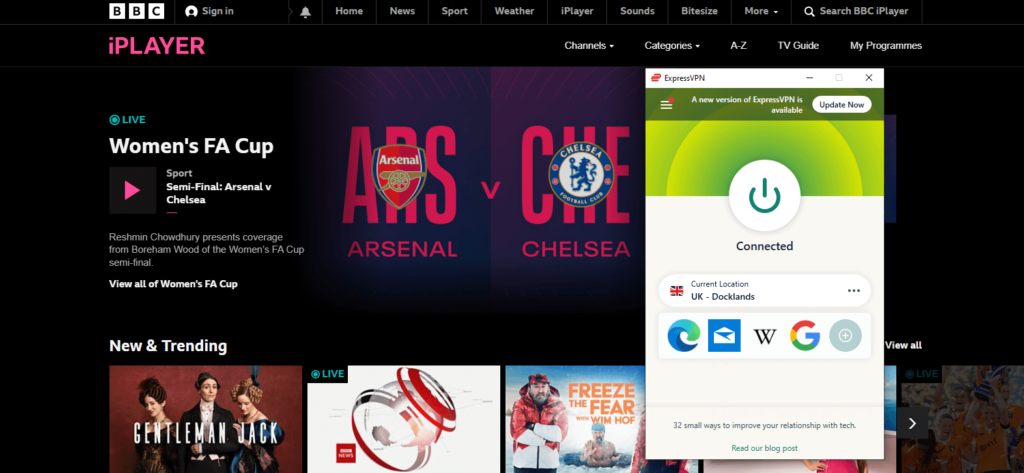
The USP of ExpressVPN is its RAM-only servers, which can bypass even the trickiest censorship and blockades. This means that you can unblock Khan’s Academy, social media sites, and all your favorite streaming platforms, like Netflix, Hulu, and HBO Max easily in school.

expressvpn-works-with-netflix

ExpressVPN by default employs the OpenVPN encryption option with 256-bit AES-CBC. Both perfect forward secrecy and HMAC authentication are supported. Additionally, if the connection drops, an internet kill switch briefly halts online traffic.
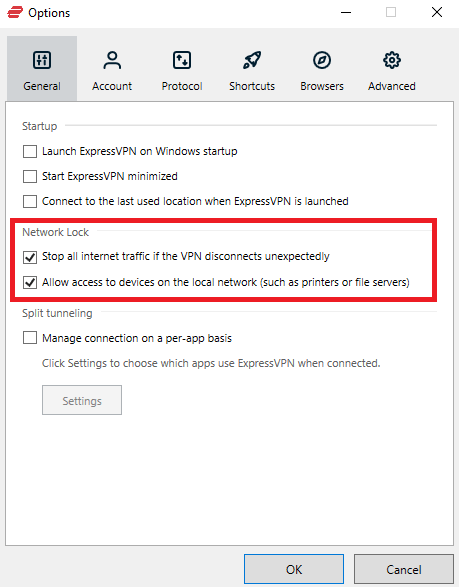
expressvpn-kill-switch

ExpressVPN offers simultaneous use on 5 devices. Additionally, you get a wide range of native browser extensions, mobile and desktop apps with this VPN.

If you don’t have a tight budget and want to use a VPN in school, we’d suggest ExpressVPN. Due to its fast connections, it justifies being the most costly VPN on this list.

You can get ExpressVPN at a cost of only [ExpressVPN-without-discount url=”https://bestvpncomparisons.com/go/expressvpn-bvcomparison/”] along with a 30-day money-back guarantee. For a much more detailed analysis, go through our ExpressVPN review.

2. Surfshark – Affordable School VPN

surfshark vpn

Surfshark is a budget-friendly VPN that can handle all your school network problems. It can boost connection speed in addition to unblocking websites on your school’s Wi-Fi.

With Surfshark, you can get rid of all throttling and take advantage of your network’s natural speed. In one of our testing, Surfshark significantly increased the network speed by 20%.

For those wishing to view content from Hulu, Netflix, or BBC iPlayer during school breaks, Surfshark is a great option as it offers 3200+ servers in 95 countries.
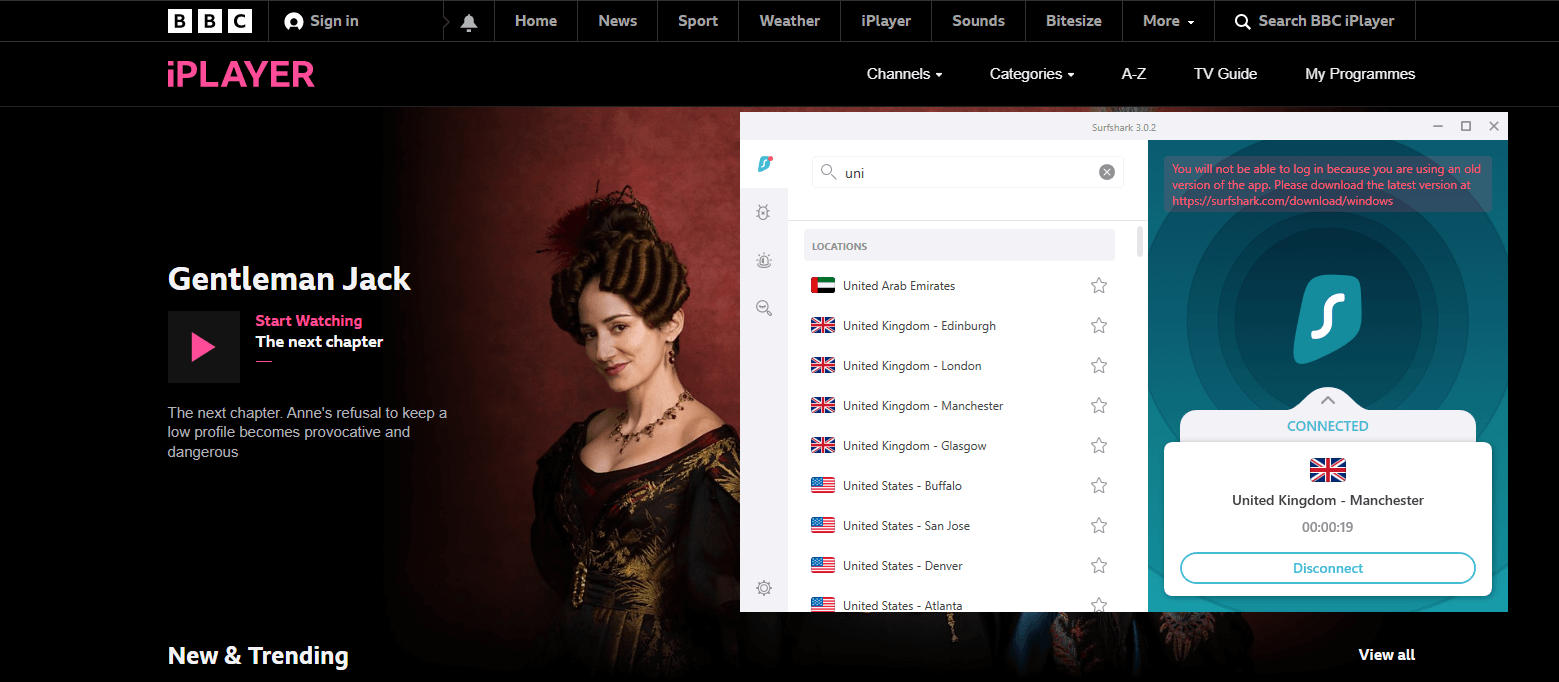
unblock-bbc-iplayer-with-surfshark

As for security, it also adheres to the AES-256 encryption standard, which we enjoy. With these standards, nobody know what you are accessing online, not even the IT specialist at your school.

Moreover, it has a NoBorders Mode, which is a one-click answer to your unblocking needs, and the MultiHop capability offers multi-encryption.
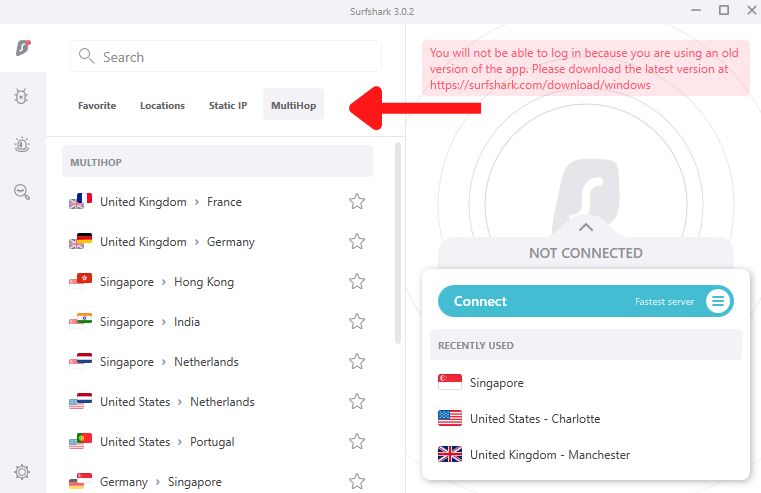
surfshark-multihop-servers

You can connect as many devices as you’d like with Surfshark. It provides user-friendly software for Windows, Linux, Android, iOS, and macOS.

When tested, Surfshark worked flawlessly on every mobile and desktop device. However, the consumer journey on mobile was much better.

As one of the most affordable VPNs available, Surfshark is a fantastic option for students. You can get Surfshark at a price of only [Surfshark-without-discount url=”https://bestvpncomparisons.com/go/surfshark-bvcomparison/”] if you don’t want to blow your entire allowance.

This VPN further offers a 30-day money-back guarantee so you can try the best VPN for school free for a month. For a much more detailed analysis, go through our Surfshark review.

3. NordVPN – Secure VPN for School

nordvpn

NordVPN is a secure VPN for school. It bypass the network firewalls of your school all while keeping you safe and unidentified.

With NordVPN, you get excellent speeds, just like the VPNs above. We were able to enjoy HD streaming to high-bandwidth downloads without seeing any noticeable lag.

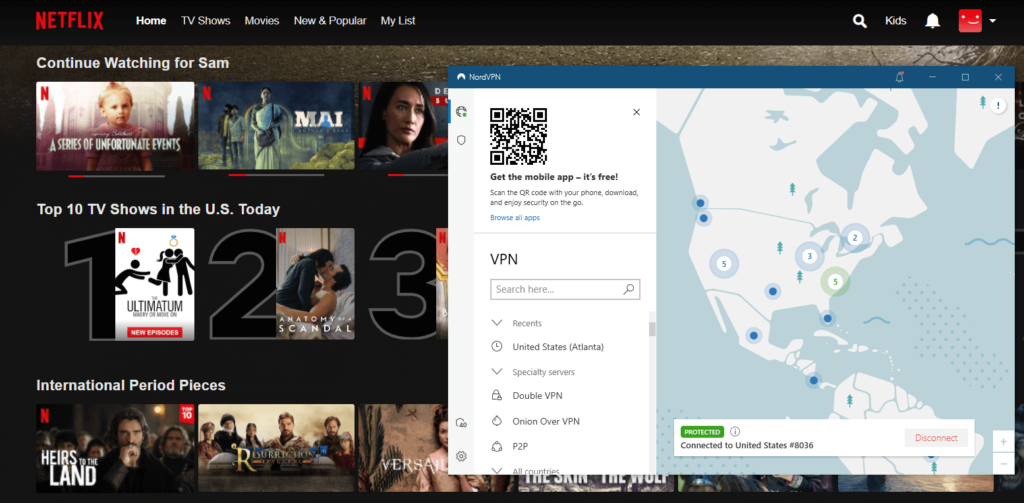
More than 5,500 servers spread throughout around 60 countries make up its network. You can unblock the research websites of institutions in other countries, along with streaming services like Hulu, BBC iPlayer, CraveTV and Netflix by using this VPN.
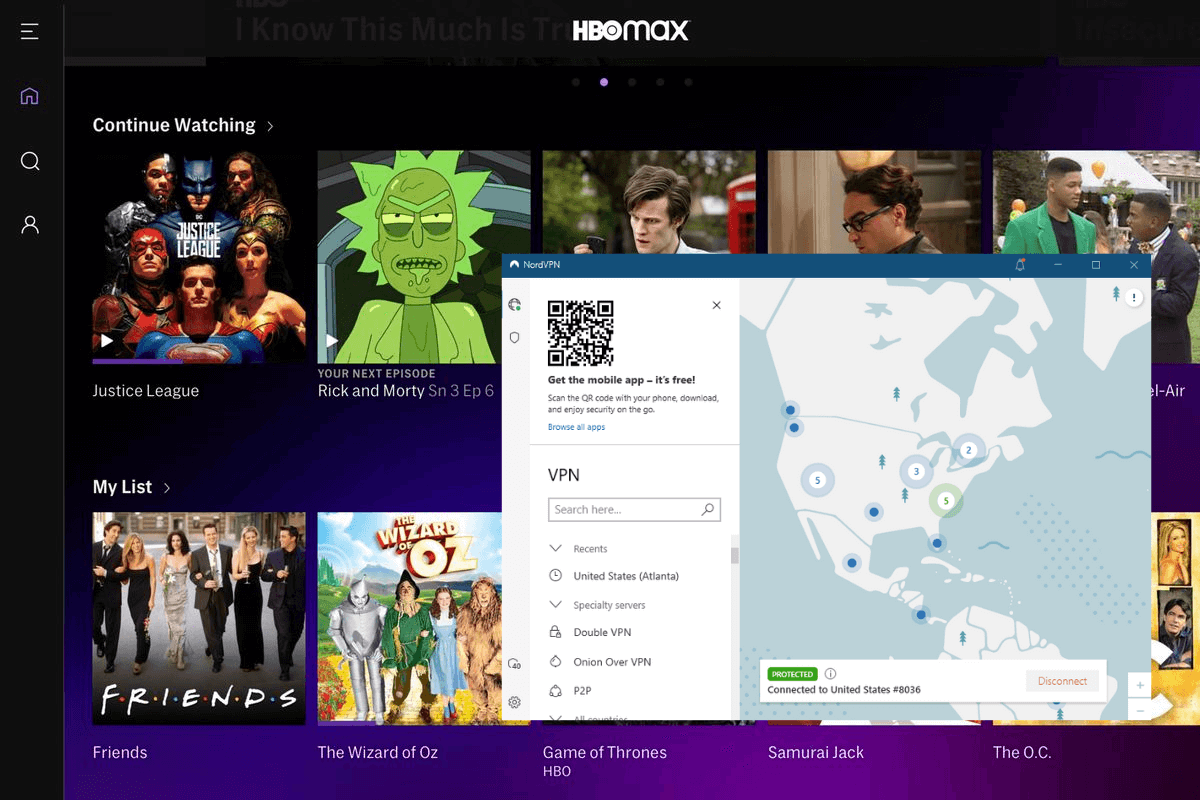
nordvpn-unblocked-hbo-maxAs for security, NordVPN provides a Kill Switch, Double VPN, military-grade encryption, and obfuscation to keep you safe from any attacks on your school Wi-Fi network.
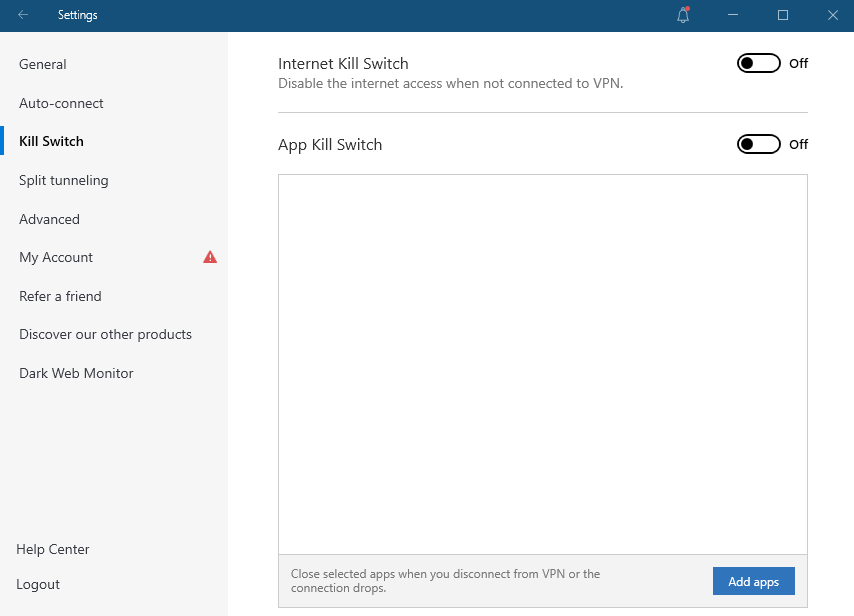
nordvpn-kill-switch

You may connect up to 6 devices at once, so no matter what device you use for school, NordVPN will be compatible. It works on Android, iOS, Mac, and Windows desktops.

Priced at [NordVPN-without-discount url=”https://bestvpncomparisons.com/go/nordvpn-bvcomparison/”], you can say good-bye to network congestion and site blockages of all kinds on your campus with a NordVPN membership. For a much more detailed analysis, go through our NordVPN review.

4. CyberGhost – Easy-to-Use VPN for School
cyberghost

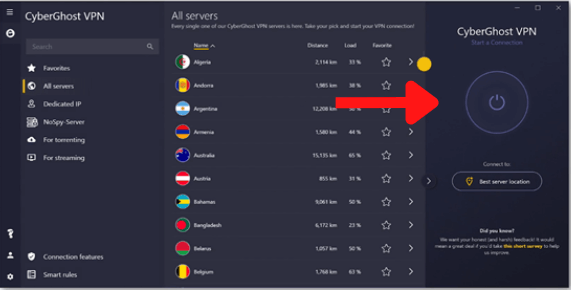
CyberGhost is a user-friendly option for all beginner VPN users at school. Even though the UI initially requires some getting used to, CyberGhost is simple to use.

CyberGhost offers specialized servers for streaming, torrenting, and gaming, so users can get fast speeds while performing any of their favorite activities.

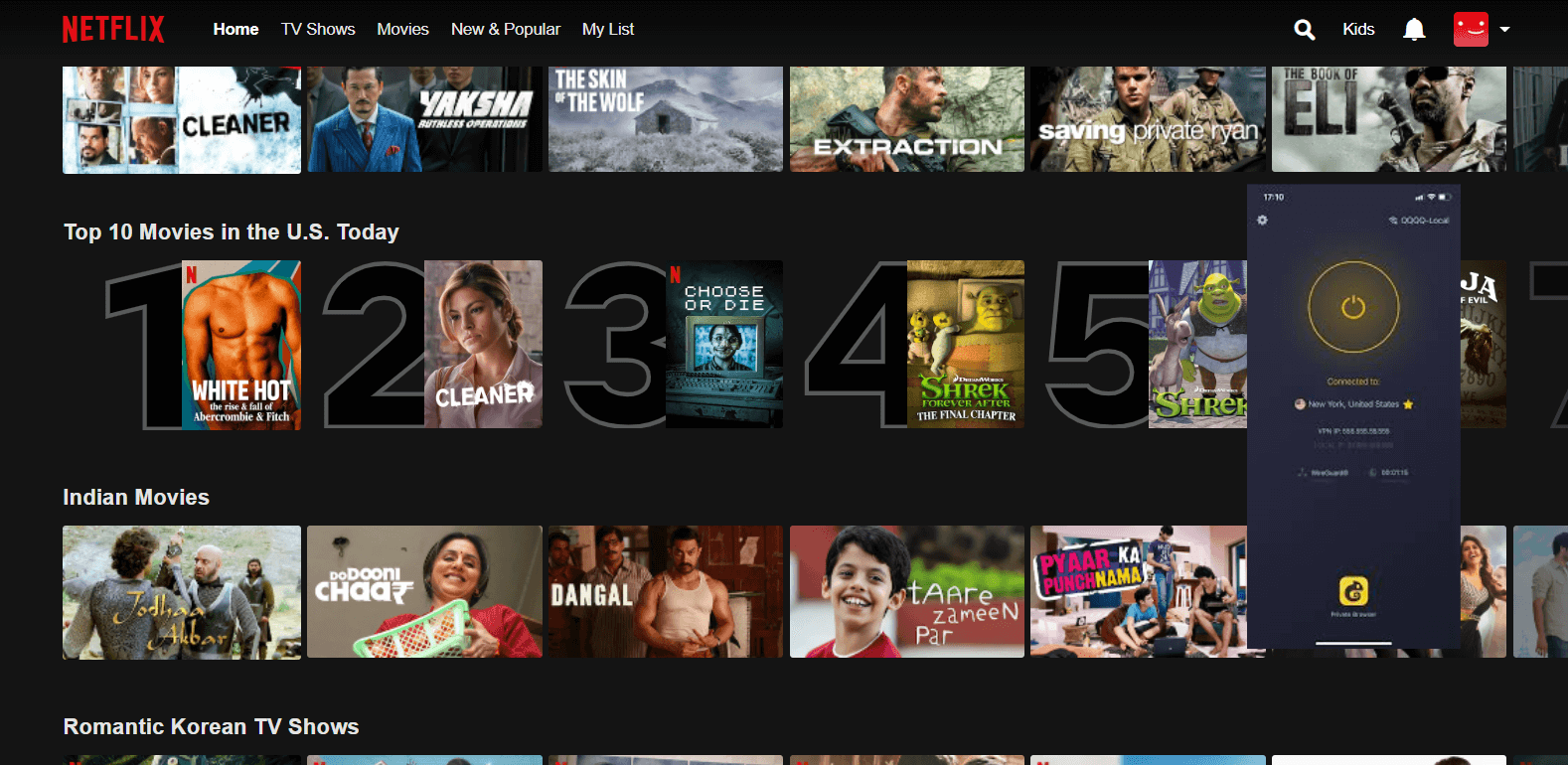
It includes over 7700 in 90 countries. That’s around half of the planet. Furthermore, this VPN can unblock any website or streaming platform you like. These include Hulu, BBC iPlayer, fuboTV, Sky Sports, and Netflix.
unblock-netflix-with-cyberghost

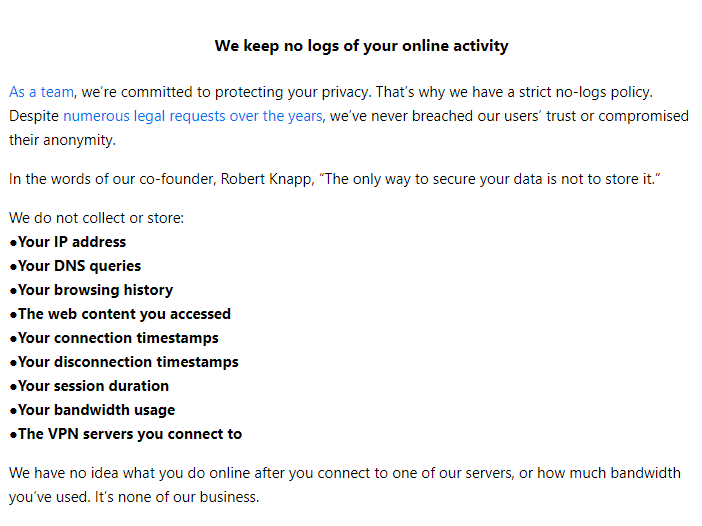
CyberGhost employs the 256-bit AES encryption and has excellent security. You also get a kill switch that is always on to keep you safe. Additionally, the VPN doesn’t record your activity.
cyberghost-no-logs

The VPN works with Windows, macOS, Android, and iOS, and you may connect up to seven devices simultaneously if you have more than one.

Only CyberGhost offers a 45-day money-back guarantee among all VPN services. This way, you can use this best VPN for school wi-fi free for over a month.

It comes at a price of $2.29/month, which is quite good. While the price is very similar to Surfshark, you might want to check which is the better option through our CyberGhost vs Surfshark comparison.

5. IPVanish – Great VPN app and Price
ipvanish

IPVanish is an all-rounder reliable option for school. It offers more than 2,000 servers across 75+ locations.

For students, this is the best option because to its speed and smooth communication. The drawback of IPVanish is that it occasionally fails to unblock geo-restricted content on well-known streaming services like Netflix and BBC iPlayer.

However, it’s ideal for students who enjoy listening to music at school.
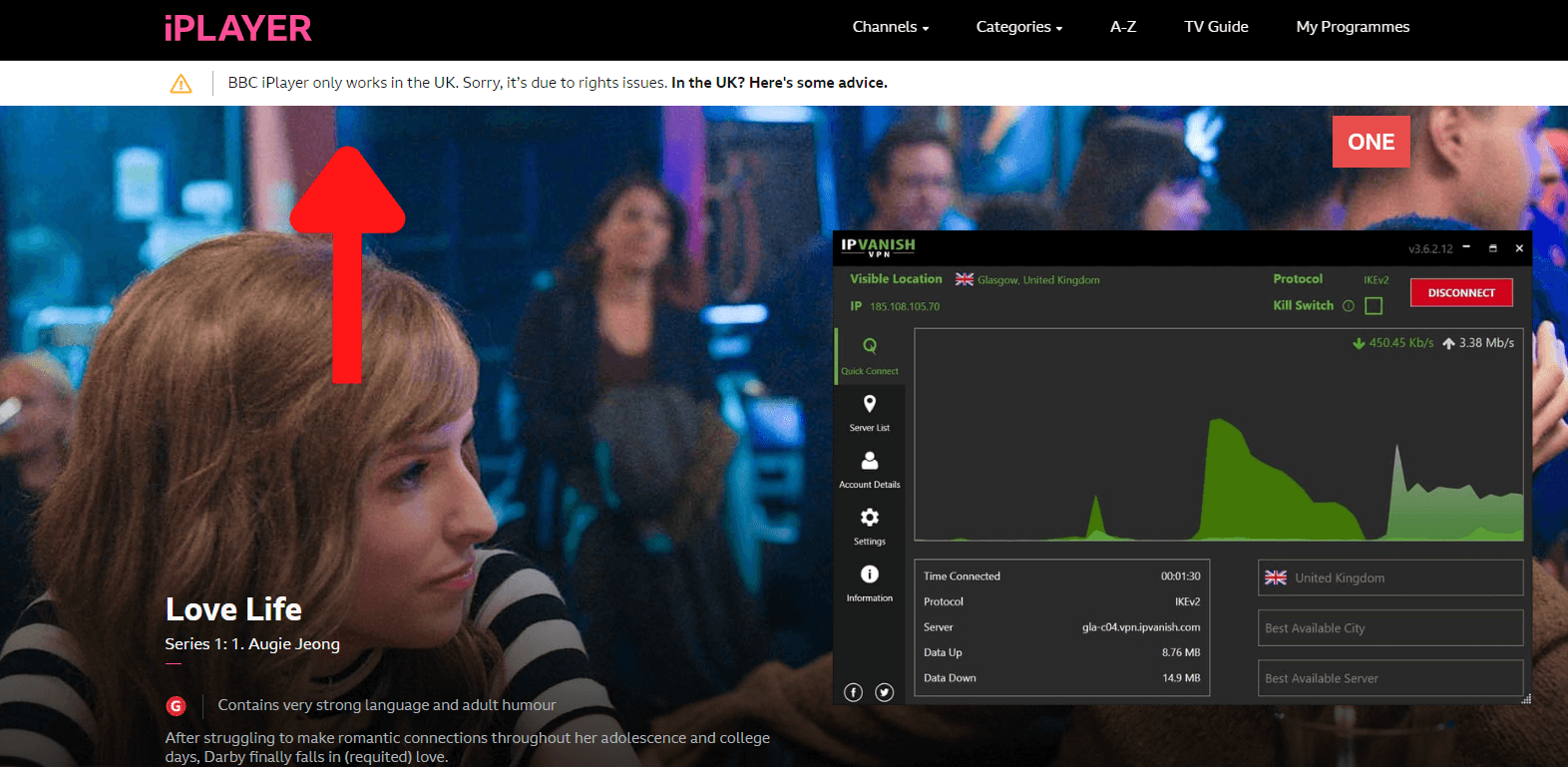
ipvanish-could-not-unblock-bbc-iplayer

There is zero retention of any data or web traffic records with IPVanish. Standards for encryption are equally strict. It employs DHE-RSA 2,048-bit key exchange with perfect forward secrecy. A kill switch for the internet will stop any data leaks.
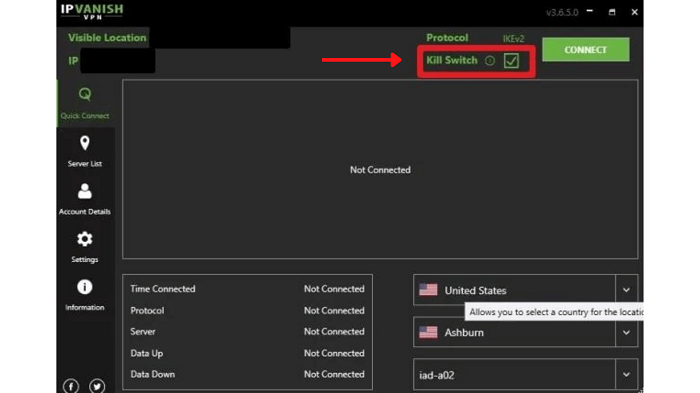
ipvanish-kill-switch

It further offers the ability to connect as many devices as you like, similar to Surfshark (Compare Surfshark with IPVanish to see which is better). This means that you can download it on macOS, Windows, Android, and iOS easily.

Being the final VPN on our best VPN for school list, IPVanish is a decent choice. It costs only $3.75/month, and offers a 30-day refund policy, just like the rest.

What to Look for in a VPN for School?

While selecting the best VPN for school, make sure you choose a VPN with advanced encryption standards. Without reducing your speeds or bandwidth, a decent VPN guarantees that your connection remains private.

However, despite using a VPN, you should always exercise caution online. VPNs are powerless to stop you from visiting sketchy websites or downloading malicious software.

While ExpressVPN should be your top choice as a school VPN, if you still desire testing the VPN yourself, then here is a list of factors you should look into when choosing a VPN for school:

  1. Price: Paying for a premium VPN isn’t always necessary given the pressure of student loans. In this case, we do not recommend looking for the best free VPN for school as well. So, select a VPN that provides student plans or something similar to keep your costs low. The majority of providers do provide money-back guarantees. If you want to the fastest VPN in the industry, opt for ExpressVPN.
  2. Servers: For a school VPN, a robust and large server network is essential. You may use it to unblock any website or app on the planet. Therefore, the more servers there are and the more evenly they are distributed, the better.
  3. Unblocking: Not every VPN can get past restrictions. The best VPN for school have thousands of IP addresses, and some can even mask VPN activity as conventional web traffic. They can navigate blocks more reliably as a result.
  4. Speed: If you want to unlock your school’s Wi-Fi, high speeds is a no-brainer. When you watch episodes of your favourite show in between assignments, you don’t want to experience a low-resolution or buffering screen. So, pick a fast VPN app that provides high-speed connections and the most servers nearby.
  5. Security and Privacy: An essential component of a school VPN is security. A feature that improves security is a kill switch. If the VPN malfunctions, it will fully cut off your connection, protecting you from prying eyes and preventing your school from learning what you are up to. Also, ensure that the VPN service provider doesn’t maintain activity logs.
  6. Compatibility: It’s nice for a VPN to offer support for popular operating systems including macOS, iOS, Windows, Android, and Linux. For a flawless experience at school, the software should work on every common device. The VPN should also permit multiple devices to connect at once.

Why Do You Need a VPN for School?

The security that a VPN offers is its key advantage. You don’t have to be concerned about possibly unsafe public Wi-Fi or network limits at school when your data is encrypted. Your private details will be safe even if the router security at your educational facility is subpar.

The majority of schools in the US and other countries usually impose limitations on their Wi-Fi network. Websites and applications that they believe will not support the purpose of education are blocked from being accessed.

Students are not allowed to visit those websites as a result. Sometimes the network is also subject to bandwidth restrictions to stop students from downloading excessive amounts of data. The main purpose of this is to evenly divide the available bandwidth across all Wi-Fi users in school.

To get around these restrictions imposed by the school administration, you need a VPN. With the best VPN for school on iPhone or any other device, you can increase download speeds and bypass bandwidth limitations. Your device, data, and communication are all well-protected by this excellent privacy tool.

Please note that we do not recommend using the best free VPN for school wi-fi despite a low budget, as it won’t offer any of the features above. Instead, opt for a budget-friendly VPN like Surfshark for school.

Why Do Schools & Colleges put Restrictions on Websites and Apps?

The straightforward explanation for this is to prevent students from being distracted during class. If you’re watching hilarious puppy videos or looking at Snapchat stories, you can’t claim to be entirely focused.

Despite your frustration, even well-intentioned websites get blacklisted by schools. Email servers and educational tools can also get caught in the net.

Blocks are additionally enforced to control bandwidth usage. The network wouldn’t be able to manage it if kids were continuously downloading games like PUBG, streaming videos, or consuming other forms of online entertainment.

The problem of torrenting is another aspect. It is not permitted in schools, and for good reason. Textbook PDFs are frequently shared by students, but schools must abide by the Digital Millennium Copyright Act. Students who are found to be breaking school rules may face punishment, but a VPN will assist you from being caught.

Wrapping it up!

While you’re at school, you can bypass network restrictions and protect yourself from online threats by using a VPN. However, if you’re a student, finding one that satisfies your demands while staying in your budget can be challenging.

This is why we recommend you the most budget-friendly option on our list – Surfshark.

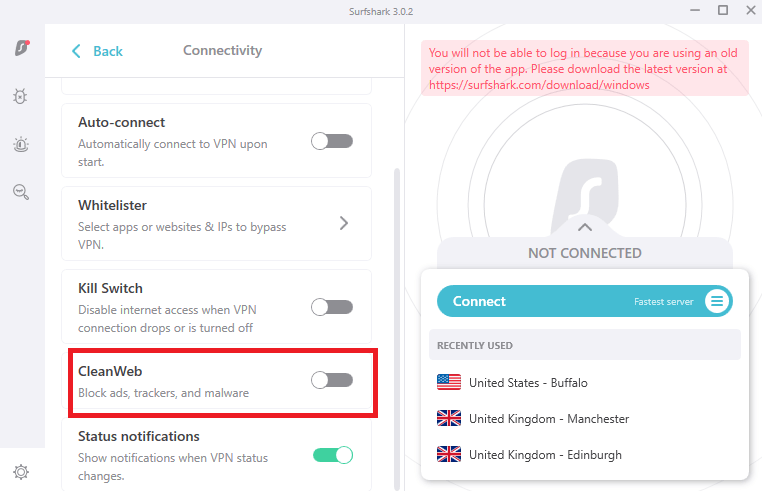
Despite being affordable, Surfshark offers 3200+ servers in 95 countries, advanced security features like MultiHop, kill switch, and CleanWeb, and ability to stream, torrent, and play games in school without being caught!

We hope you liked our best VPN for school guide. Stay tuned for more!
Best VPN blogs other than School

Categories
Compare

Surfshark vs. NordVPN: An Extensive Comparison

When it comes to choosing a solid VPN, you may be overwhelmed with options. Surfshark and NordVPN are both fantastic services. Both of these VPNs are at the top of our list of the best VPNs.

But who do you pick if you narrow the field even more? Which is safer and more suitable for streaming? Which of the two definitely has the upper hand?

In this NordVPN vs. Surfshark comparison, the team of Best VPN Comparisons will compare their speed test results, features, security strength, apps, and customer service quality to figure out which VPN has an edge over the other.

NordVPN and Surfshark announced their merger in early February 2022. The firms say they will continue to function as independent entities with different VPN infrastructures.

As a result, you still need to decide amongst the two, and the information in our overview section below remains valid.

So, without further ado, let’s get started.

Surfshark vs NordVPN  – Summed up

According to our results, Surfshark is a clear winner, all thanks to its consistent service, fast speeds, and how can we forget the unlimited simultaneous connections and cheap price?

However, here is a quick comparison of both VPNs before we get into the deets:

Surfshark NordVPN
3200+ servers in 65 countries 5600+ servers in 59 countries
Offers lightning fast speeds on all servers Speeds are fast on most servers
Equipped with a strict no-logging policy Its no-logs policy ensures to not leak any data
Unblocks Hulu, Amazon Prime, HBO Max, YouTube TV, Disney Plus, and more Allows you to unblock various streaming services, including Disney+ HBO Max, Vudu, and more
Security features include: WireGuard protocol, Whitelister, CleanWeb, MultiHop, AES 256-bit encryption, and more Security features include: Nordlynx, obfuscation technology, kill switch, DNS leak protection, and more
Unlimited simultaneous connections Six simultaneous connections
Costs $2.30/month on its 2 years plan + 2 months free plan Costs $3.49/month on its 2 years plan

Pricing Analysis

Surfshark vs. NordVPN Prices and Plans Surfshark NordVPN
Periods 1 month 1 month
6 months 1 year
2 years 2 years
Special offers and discounts 82% off on 2 years + 2 months plan 70% off on the 2-year plan
Lowest price per month $2.30/month $3.49/month
Highest price per month $12.95/mo $11.95/mo
Annual price
Money-back guarantee 30 days 30 days

The pricing structures for VPNs are usually very straightforward. The longer your subscription, the more money you’ll save.

Surfshark is less pricey. Surfshark’s greatest price is a two-year package that costs $2.30/month. This plan even includes two months of free service. NordVPN, on the other hand, charges $3.49 for a two-year contract. Both provide a money-back guarantee of 30 days.

Final Result: Surfshark is the Winner!

Payment Policy

Supported Payment Methods Surfshark NordVPN
Credit/Debit Cards Almost all are supported Almost all are supported
PayPal Supported Not Supported
Giropay Supported Supported
Cryptocurrency Supported Supported

As you can see, both the VPNs accept payments through multiple payment methods. However, a drawback with NordVPN is that it has stopped accepting payments through PayPal – one of the most widely used payment methods in the world. So, our winner was clear in this regard.

Final Result: Surfshark is the Winner!

Refund Policy

Refund Policy Surfshark NordVPN
Policy Duration 30-day money-back guarantee 30-day money-back guarantee
Free Trial 7-day free trial on iOS, Android, and Mac 7-day free trial on Android (requires credit card information)
Refund Receiving Duration 5-7 working days 5-7 working days

Surfshark and NordVPN offer similar refund policies to users. You can either test them out using their risk-free 30-day money-back guarantee, or use the free trial on limited devices.

Final Result: It’s a Tie!
Features

Features Surfshark NordVPN
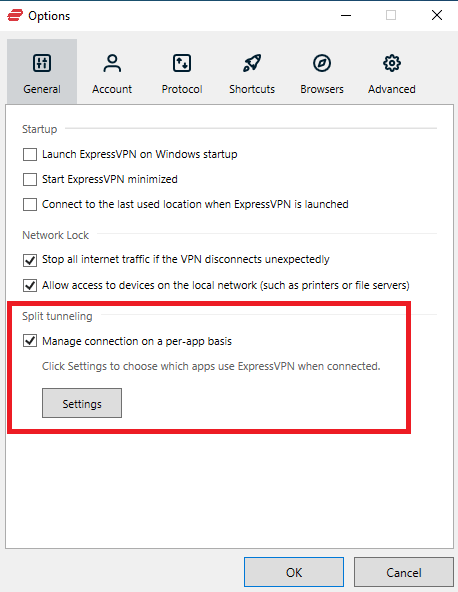
Split tunneling Yes Yes
Obfuscation technology Yes Only on Windows
DNS leak protection Yes Yes
Kill switch Yes Yes
SmartDNS Yes Yes
RAM-only servers Yes Yes
Encryption AES 256-bit AES 256-bit
Obfuscation technology Yes Yes
Browser extensions Firefox, Edge & Chrome Chrome & Safari
Compatible apps iOS, Android, macOS, Windows, FireStick, and more macOS, Android, iOS, Windows, FireStick, and more
Simultaneous connections Unlimited Six
Additional features MultiHop, CleanWeb, 24/7 live chat support No-logs, ad-blocker, live chat support
For more information, do check out Surfshark review NordVPN review

Both VPNs have their advantages when it comes to beneficial features. With NordVPN, you can connect up to six devices at once with a single account.

Surfshark has no restriction, making it a perfect choice for business owners who may need to give their account to a variety of people. All in all, both the VPNs offer quite similar features.

Final Result: Surfshark is the Winner!
Geo-Unblocking Capabilities

Streaming Channels Surfshark NordVPN
Netflix Unblocks 12+ Netflix content libraries, including US, UK, Canada, Australia, India, Mexico, and more Multiple libraries, including Canada, India, Australia, Ireland, and Malaysia
Amazon Prime

Video

Yes Yes
CBS Yes Yes
Hulu Yes Yes
BBC iPlayer Yes Yes
Disney Plus Yes Yes
Hotstar Yes Yes
HBO Max Yes Yes
ABC Yes Yes
Channel 4 Yes Yes
DAZN Yes Yes
NBC Yes Yes

Both these VPNs perform very well in unblocking and streaming geo-restricted channels in HD quality. Both of them could bypass geo-blocks easily and allow users to enjoy their favorite TV shows and movies.

Final Result: It’s a Tie!

Surfshark vs. NordVPN  – Torrenting

Torrenting is another popular use for VPNs, which both Surfshark and NordVPN can handle. Both feature extremely well-optimized P2P servers that enable you to download torrents at incredible speeds with no limits.

We tested two of the most significant things required for torrenting – speeds and IP leaks.

Surfshark Torrenting Speeds

Surfshark Servers Torrenting Speeds
Australia – Melbourne 78.21 Mbps
UK – Manchester 77.65 Mbps
Canada  – Vancouver 79.12 Mbps

NordVPN Torrenting Speeds

NordVPN Servers Torrenting Speeds
UK – London 80.01 Mbps
Canada – Toronto 81.56 Mbps
Australia – Sydney 79.23 Mbps

Surfshark IP Leak Test

surfshark-ip-leak-test

NordVPN IP Leak Test

nordvpn-ip-leak-test

Final Result: It’s a Tie!

Surfshark vs. NordVPN  – Netflix Unblocking

You may access Netflix libraries of over a dozen countries using NordVPN and Surfshark, including the United States, Canada, Japan, the United Kingdom, Australia, and the Netherlands.

Surfshark allows you to access Netflix in the United States, Japan, France, India, the United Kingdom, and the Netherlands.

Final Result: It’s a Tie!

Surfshark vs. NordVPN – China Unblocking

China has some of the most extensive internet restrictions in the world, and most VPNs are outright blocked. Regardless, both of these VPNs operate in China once they’ve been correctly installed.

To browse anonymously in China, Surfshark users only need to enable the NoBorders function. For NordVPN customers, the method is similar, though you must explicitly notify the app that you want to utilize its specialized obfuscation servers and then select one from the main page.

Access to the NordVPN and Surfshark websites is presently blocked by the Great Firewall. This means you’ll need to set up your preferred service before traveling to China.

Final Result: It’s a Tie!

App User Interface & Usability

App Interface and Usability Surfshark NordVPN
Selection of servers List-based List and Map based
Auto-updates Available Available
Mobile-friendly apps Available Available
Auto-setup wizard iOS, Windows, Android, Linux, and Mac Windows, Linux,  iOS, Android, Mac

Final Result: It’s a Tie!

Servers

Servers Surfshark NordVPN
Server count 3200+ servers 5600+ servers
Number of countries 65 countries 59 countries
Virtual servers Yes No
Obfuscation  Yes Yes
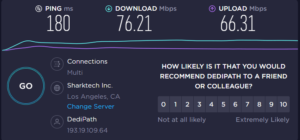
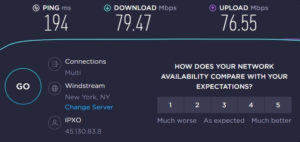
Speeds 76.21 Mbps 79.47 Mbps

There is a clear winner when it comes to servers. NordVPN has a total of over 5600+ servers located in 59 different countries. Surfshark, on the other hand, has 3200+ servers spread over around 65 countries. Although the selection is excellent, nothing compares to what NordVPN has to offer.

High number of servers mean the network as a whole has less strain. This increases your chances of getting a high-speed, low-latency connection, allowing you to browse easily without interruption.

Surfshark provides a solid connection, however NordVPN is less likely to have any problems during high hours. We confirmed this by testing both VPNs during peak hours and here are the results:

Surfshark vs. NordVPN Speed Tests

surfshark-speed-test

Here is a speed test of NordVPN:

nordvpn-speed-test

Final Result: NordVPN is the Winner!

Surfshark vs. NordVPN – Security Policy

Surfshark vs. NordVPN – Privacy & Security Features Surfshark NordVPN
Jurisdiction British Virgin Islands Panama
Encryption AES 256-bit AES 256-bit
Logging policy No-logs No-logs
Kill switch Available Available
DNS leak protection Available Available
Tunneling protocols  IKEv2, OpenVPN, WireGuard, Shadowsocks PPTP, IKEv2,

OpenVPN, L2TP/IPSec, SSTP

WebRTC Leak Yes No

Surfshark is situated in the British Virgin Islands, while NordVPN is based in Panama. There are no data retention rules in either of these nations, making them suitable locations for hosting a VPN.

Furthermore, neither service will keep any records of your internet activities. In terms of security, both services include a kill switch that stops all data transfers if you lose your connection unexpectedly. This ensures that you never use the internet without being protected.

They both feature private DNS servers as well, ensuring that no one else has access to your online traffic.

Final Result: It’s a Tie!

Customer Service

Customer Service Surfshark NordVPN
Email/Ticketing Yes Yes
Live chat Yes Yes
Video guides Yes Yes
Phone support No No

Regardless of which service you choose, you’ll have a lot of customer care choices if you have any problems. Both feature updated customer support pages that include tutorials and FAQs.

If you prefer a more direct method or need to speak with a live person, NordVPN and Surfshark both offer live chat 24 hours a day, 7 days a week. As a result, you’ll be able to get assistance even in the wee hours.

Even if your question proves to be more difficult, it will be converted into a ticket, and you will receive an email with a solution in a short time. So, any service you choose, you can expect excellent customer service.

Final Result: It’s a Tie!

FAQs

Surfshark vs NordVPN, which one is better for gaming?

Amongst the two, NordVPN is better for gaming as it offers better speeds than Surfshark. These speeds result in no delays and low pings, which are excellent for gaming.

Is Surfshark VPN better than NordVPN?

Well, yes. Surfshark is definitely a better VPN than NordVPN, considering its price, reliability, unblocking capabilities, and features such as MultiHop, CleanWeb, and more.

Is ExpressVPN better than NordVPN?

If we compare ExpressVPN and NordVPN, then the former is definitely better in speeds, security, and unblocks Netflix libraries easily. Not only does it work in China, but it also accepts payments through PayPal, which the latter doesn’t.

Final Takeouts

After comparing both VPNs on 11 tests, here are the results of which is better in Surfshark vs. NordVPN comparison – it’s Surfshark! However, that clearly doesn’t mean that NordVPN isn’t worthy of your attention.

With both services, there are some incredible benefits. While Surfshark has several excellent security features and is slightly less expensive, NordVPN has fast speed but a higher cost.

It all basically comes down to what you need from a VPN in the end. Both VPNs provide a 30-day money-back guarantee, which you should use.

Read more Comparisons!

Categories
Compare

ProtonVPN vs Surfshark – Which has the best value for money?

ProtonVPN and Surfshark are two of the most popular VPN brands. When you look at both companies separately, you’ll notice that they both have amazing features. You can see that both firms’ teams put in a lot of effort.

So, we compared Proton VPN vs Surfshark to learn about all of the companies’ efforts side by side. You can then choose between them based on the results of this investigation.

So, without any further delays, let’s get right into the comparison!

ProtonVPN vs Surfshark: A Face Off!

Surfshark ProtonVPN
Trustpilot Rating: 4.2 2.6
Servers: 3200+ servers in 95 countries 1700+ servers in 63 countries
Logs policy: No logs No logs
Pricing: Starts from $2.30/month Starts from €4.99/month
VPN protocols: WireGuard, OpenVPN, IKEv2, L2TP/IPSec, Shadowsocks OpenVPN, IKEv2/IPSec, and WireGuard
Streaming Compatibility: BBC iPlayer, Disney+, Hulu, Netflix, and Hotstar Hulu, YouTube, Netflix, and more
Platforms: Firefox, Windows, macOS, Linux, Edge, Chrome, iOS, and Android Mac, iOS, Windows, and Android
Simultaneous connections: Unlimited devices 10 devices
Support: FAQs, knowledge base, 24/7 live chat, email support knowledge base, email support

Speed comparison: ProtonVPN vs Surfshark VPN

While all VPNs slow down your internet, the best VPNs ensure that the lag is as minimal as possible.

The ProtonVPN vs Surfshark speed test was conducted by us on both VPNs’ WireGuard protocol using the 100 Mbps download speed/100 Mbps upload speed formula and the results are as follows:

Protocols Surfshark ProtonVPN
WireGuard 84/65 79/56

Surfshark’s download, upload, and latency speeds are all excellent, so it’s no wonder it made our top five list. ProtonVPN, on the other hand, did not make the cut for a reason.

Despite having the greatest download speeds and upload speeds that are nearly equal to Surfshark, the latency was quite high.

In short, although ProtonVPN is a good option, purchasers should look at Surfshark.

Final Result: Surfshark is the Winner!

ProtonVPN vs Surfshark streaming capabilities; Which one unblocks more?

Surfshark unblocks all prominent streaming services on the first try, but ProtonVPN requires many tries to gain access to the majority of them. Also, videos using ProtonVPN take a long time to load and buffer, whereas we didn’t encounter that problem with Surfshark.

unblock-netflix-uk-with-surfshark

With Netflix viewing, the story is the same with VPNs. While Surfshark only makes one attempt to gain access to Netflix, ProtonVPN requires you to change servers to discover one that can unblock Netflix.

Final Result: Surfshark is the Winner!

Torrenting

The P2P network is responsible for torrent downloads. All of Surfshark’s servers are P2P compatible, and the download speed was consistently promising in our tests.

P2P is also supported by ProtonVPN. The app displays a P2P symbol next to the server name while connected. Despite the fact that ProtonVPN does not have as many supported servers as some other VPNs, even connecting to a standard server allows you to download torrent files.

Final Result: It’s a Tie!

Features overview

Both Surfshark and ProtonVPN delivered on the features we’d expect from a premium VPN. Let’s check them out in detail below:

Double VPN

Double VPN means that the provider routes your VPN traffic through more than a single server for the ultimate protection.

While both VPNs do not offer the functionality by this name, Surfshark performs the Double VPN function through its MultiHop feature.

Similarly, Secure Core VPN is a feature of ProtonVPN that works similarly to Surfshark’s MultiHop, but only for a limited number of servers.

Split tunneling

Both VPN services provide all of the usual VPN capabilities, such as split tunneling for Windows and Android users.

While both app and IP-based split tunneling are supported, Surfshark has the advantage of allowing URL-based split tunneling.

Ad-blocker

Both Surfshark and ProtonVPN offer an ad-blocker called CleanWeb and NetShield.

By blocking advertisements, trackers, and viruses, ProtonVPN’s NetShield secures your devices and allows faster browsing. When activated, it prohibits your browsers from loading files from sites that contain malware, spyware, or other harmful software. By default, malware prevention is enabled.

In addition to malware, it bans advertising and the web trackers that marketing businesses use to target you. However, keep in mind that this feature isn’t available on ProtonVPN’s free plan.

CleanWeb is one of Surfshark’s most popular feature, and it comes standard with all of their subscription plans. It’s a function that protects you from fraudulent advertisements and websites.

surfshark-cleanweb

With CleanWeb turned on, the browser will display fewer advertising and trackers will be disabled. Not to mention that you’ll be safe from phishing efforts.

Specialty servers

As for specialty servers, Surfshark comes with a list of MultiHop, Statis IP, and P2P servers, all of which offer robust service to users.

However, ProtonVPN doesn’t lack in this regard either. It offers free, Plus (streaming-optimized servers), Tor (optimized for using Tor), P2P (recommended for torrenting), and Secure Core servers.

Final Result: It’s a Tie!

ProtonVPN vs Surfshark security: which is a better option?

In this category, we look into VPN protocols, encryption standards, and privacy profiles to see how well Surfshark and ProtonVPN do.

Encryption and tunneling protocols

On all significant desktop and mobile operating systems, ProtonVPN and Surfshark offer IKEv2, OpenVPN, and WireGuard protocols. Let’s keep in mind that the open-source Shadowsocks proxy is also supported by Surfshark.

ProtonVPN’s IKEv2 protocol, however, is only available on Android and iOS platforms.

Moreover, all of Surfshark’s protocols utilize the AES-256 encryption. ProtonVPN, on the other hand, uses ChaCha20 encryption with WireGuard and supports AES-256 with OpenVPN and IKEv2.

There’s no need to be concerned about any sort of encryption because they’re both unbreakable.

Logging

As far as the ProtonVPN vs Surfshark logging policies are concerned, then Surfshark has a zero-logs policy in place to keep your online activity private, and they only keep minimal diagnostic logs to assist them improve their service.

Although ProtonVPN is situated in Switzerland, which is not a member of the 5 Eyes Alliance, it does collaborate with the other 5 Eyes Alliance members on law enforcement data demands. For privacy-conscious users, ProtonVPN publishes a transparency report that details demands for information from both internal and external law enforcement.

ProtonVPN likewise maintains a stringent log policy, simply logging the timestamps of the connection requests of users.

protonvpn-no-logs

Kill Switch

Both providers include an internet kill switch in their apps, which disables your connection if your VPN goes down. If you’re downloading torrents and don’t want your ISP to know about it, this is a good option.

protonvpn-kill-switch

If your VPN connection goes down, your complete internet connection shuts down to prevent being tracked.

Final Result: It’s a Tie!

Plans pricing

Prices and Plans Surfshark ProtonVPN
Periods 1 month 1 month
6 months 1 year
2 years 2 years
Special offers and discounts 82% off on 2 years + 2 months plan –
Lowest price per month $2.30/month €4.99/month
Highest price per month $12.95/mo €9.99/mo

Even though ProtonVPN is the most affordable option on a monthly basis, Surfshark takes the lead on prolonged plans. The two-year subscription from Surfshark is only $2.30/mo, way cheaper than ProtonVPN’s Plus package (€4.99 = $5.22/mo), which is amazing.

When it comes to money-back guarantees, both VPN companies provide a 30-day money-back guarantee.

Final Result: Surfshark is the Winner!

China and countries with restricted internet access

China is now one of the harshest regions in the world when it comes to preventing VPNs from entering their country.

Those connecting directly from China are blocked from accessing instant messaging services, social media apps, and many other sites unless they use a VPN.

The NoBorders mode of Surfshark makes it one of best VPNs for bypassing China’s numerous restrictions. ProtonVPN, on the other hand, discontinued circumventing China’s limitations in 2019.

Final Result: Surfshark is the Winner!

Server locations

Surfshark has built an impressive network of over 3,200 servers across 65 countries. On this front, ProtonVPN has let novelty get in the way, and it presently only has roughly 1700+ servers in 63 countries. Its free package gives you access to over 80 servers across 3 countries.

In terms of server count and geographic spread, Surfshark is the clear winner. Furthermore, the supplier provides free static VPN servers, unlike ProtonVPN that does not provide static or dedicated IP servers.

Final Result: Surfshark is the Winner!

ProtonVPN vs Surfshark device compatibility: Interface & Ease of Use

ProtonVPN Surfshark
OS supported  Mac, Windows, iOS, and Android Linux, Mac, Windows, iOS, and Android
Other devices and operating systems Fire TVs & Android TVs Fire TV devices, Kodi, and Android TVs
Browser extensions Safari, Chrome, Edge, Firefox, Opera Chrome & Firefox
Simultaneous connections Ten Unlimited

Each of these VPNs makes it extremely simple for new users to be set up and connected on both their desktop and mobile devices. However, we reviewed both VPNs in detail on all significant operating systems, and here is what we gathered:

Desktop apps

Surfshark has a simple user interface (UI), making it one of the best VPNs for novices. Every Surfshark VPN function is designed to be simple to use, and you won’t have any trouble changing servers, protocols, or other options.

surfshark-interface

ProtonVPN’s UI, on the other hand, includes a world map, which adds to the visual clutter. On the plus side, it uses color coding to indicate server load, making it easy to choose the best VPN server.

protonvpn-desktop-interface

Unfortunately, certain options in ProtonVPN’s interface aren’t labelled, making them harder to locate for new VPN users. Overall, ProtonVPN’s desktop UI isn’t as polished and well-organized as Surfshark VPN’s, which makes it more difficult to use.

Mobile apps

Surfshark’s mobile apps, like its desktop counterparts, are simple to use. The sole criticism is that the iOS app lacks a split tunneling feature, however this is due to an iOS limitation instead of the VPN itself.

The mobile apps for ProtonVPN are more organised than their desktop counterparts, with clearly labelled features that make these easier to use.

protonvpn-mobile-app

Nevertheless, we have to give Surfshark the edge because of its simple UI, which makes it very easy to use than ProtonVPN.

Final Result: Surfshark is the Winner!

Customer support

Both VPN services offer thorough knowledgebases, FAQs, and email support when it comes to customer support. In addition, Surfshark VPN has a live chat feature, which is a quick assistance route for issues that require a human touch, which ProtonVPN does not.

ProtonVPN uses social media to compensate for the lack of live chat support, providing outstanding assistance via Twitter and Reddit, however not as quickly as a 24/7 live support. As a result, we must award the victory to Surfshark.

Final Result: Surfshark is the Winner!

ProtonVPN vs Surfshark – The Winner?

ProtonVPN has a lot of things going for it in terms of features, speed, and keeping your internet activity private, but it couldn’t compete with Surfshark’s full-featured VPN.

Both VPNs provide apps for all main platforms, connections are stable, and each VPN bypasses geo-restricted content effectively. The benefits of ProtonVPN, on the other hand, end there.

Surfshark is the overall best option; its 24/7 customer service provides it an advantage over ProtonVPN’s 2-day ticket and email support wait period, which is critical when it comes to internet security.

Surfshark’s Camouflage Mode outperforms ProtonVPN’s zero cloaking capabilities, giving it a viable option for unrestrained internet in China and access to sites that use VPN scanners to block VPNs.

So, if you’re still thinking which is better: ProtonVPN vs Surfshark? Then it’s definitely Surfshark!

FAQs

Is ProtonVPN good for gaming?

Proton VPN reduces lag and disturbance, making it a good choice for gaming. Everyone who uses Proton VPN has access to the lightweight and fast WireGuard protocol, which, when paired with our VPN Accelerator technology, may boost VPN speeds by over 400%.

Is ProtonVPN better than Surfshark?

Well, Surfshark is a better option than ProtonVPN. It has more complex features, more servers, more security and privacy, and is also more user-friendly.

Read more Comparisons!

Categories
Compare

IPVanish vs. NordVPN: which one is better?

IPVanish and NordVPN are two of the most popular VPN services on the market. Nonetheless, the two are vastly distinct. IPVanish is a smaller VPN that has a good reputation and a large user base, but it’s not as recognized as NordVPN.

In this top VPN comparison, we’ll compare IPVanish vs NordVPN in a variety of categories, including speed, security, functionality, and streaming capabilities.

We’ll also announce the winners in each category, so be prepared for some surprises.

IPVanish vs. NordVPN: Head to Head Comparison

Want a quick overview to determine which is better in NordVPN vs IPVanish? Well, check the table below make your decision:

NordVPN IPVanish
Trustpilot Rating: 4.4 4.6
Servers: 5600+ servers in 59 countries 2000+ servers in 75+ VPN locations
Logs policy: No logs No logs
Pricing: Starts from $3.49/month Starts from $3.75/month
VPN protocols: OpenVPN, L2TP/IPsec, IKEv2, Nordlynx OpenVPN, L2TP/IPSec, PPTP, IKEv2
Streaming Compatibility: Netflix, BBC iPlayer, HBO Max, Hulu, and more Netflix, Hulu, YouTube, and more
Platforms: Linux, Windows, Firefox, Chrome, macOS, iOS, and Android iOS, Mac, Windows, and Android
Simultaneous connections: 6 devices Unlimited devices
Support: knowledge base, FAQs, 24/7 live chat, email support knowledge base, 24/7 live chat, FAQs, email support, phone support

IPVanish vs. NordVPN: Speed Test

The following figures indicate average download and upload speeds of servers located in the United Kingdom, the United States, Argentina, India, Japan, Canada, and Australia, respectively after being tested using different protocols:

The speeds are mentioned in this pattern: download speeds/upload speeds

Protocols NordVPN IPVanish
Nordlynx/WireGuard 87/58 80/24
IKEv2 80/41 69/10
OpenVPN (TCP) 83/36 70/15
OpenVPN (UDP) 79/44 65/29

We compare the WireGuard protocol from IPVanish to NordVPN’s NordLynx version. IPVanish keeps up with NordVPN here, with download and upload speeds that are remarkably similar.

IKEv2 is supported by both VPNs. IPVanish and NordVPN have almost identical download speeds, while the latter has a better upload speed.

UDP is the quicker but less secure variant of OpenVPN. Although the upload speed differential is minimal, NordVPN certainly dominates in the download sector.

OpenVPN TCP is more stable, but it has lower performance, limiting its use. IPVanish is substantially faster than NordVPN in this scenario.

Final Result: NordVPN is the Winner!

Which one has the best features?

Both services have all of the essential features of a premium VPN. NordVPN, on the other hand, offers something more that IPVanish does not. Take a look at the feature list and decide for yourself:

Stealth VPN

When an app or service discovers that you’re using a VPN, this function helps you avoid being blocked.

Obfuscated servers is a NordVPN feature that can be found in the Specialty Servers section. When you enable it, your traffic will appear to be HTTPS traffic.

In the case of IPVanish, you need to enable traffic obfuscation by checking the Scramble box under OpenVPN settings, which activates the XOR cipher that handles the rest.

However, IPVanish’s Stealth VPN appears to be having difficulty unblocking the internet in China, therefore this award goes to NordVPN.

Final Result: NordVPN is the Winner!

Split tunneling

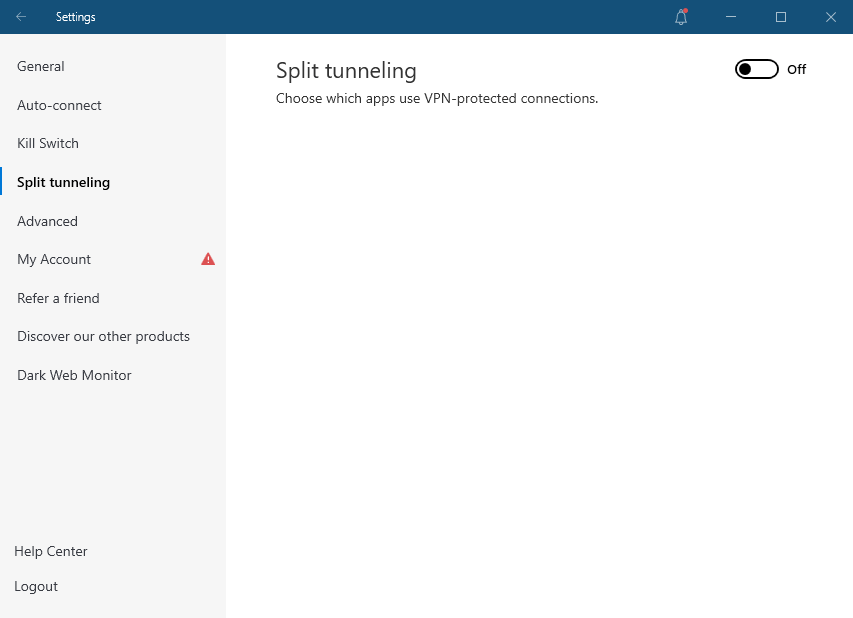
Split tunnelling is a handy feature that lets you choose which apps use the VPN tunnel and which connect straight to the internet.

nordvpn-split-tunneling

Because of its compatibility, NordVPN wins this round as it offers split tunnelling on Windows and Android, whereas IPVanish only supports Android and FireOS.

Final Result: NordVPN is the Winner!

Free SOCKS5 proxy

Torrenting favors the SOCKS5 proxy in particular. Setting it up in your torrent client will essentially disguise your IP address without encrypting your traffic. You gain some privacy as well as full-speed downloads this way.

All prominent P2P clients support SOCKS5 proxy configuration. However, keep in mind that your ISP might still monitor your activities if they so choose. Finally, IPVanish has a little edge over NordVPN in that it allows for scraping using SOCKS5.

Final Result: It’s a Tie!

Exclusive features

SmartDNS is the first of the NordVPN’s exclusive features. It unblocks Netflix and other entertainment platforms without encrypting communications when switched on.

Most significantly, SmartDNS is a “SmartPlay” function that allows you to access content on most game consoles, smart TVs, and other media devices.

There are also a number of security-related alternatives. CyberSec from NordVPN eliminates advertisements and viruses, while Double VPN (multi-hop) provides additional security by connecting to two VPN servers, and Onion Over VPN adds Tor relays on top for unrivaled privacy.

Read more about its features in our NordVPN review.

nordvpn-interface

IPVanish is perhaps the only premium VPN service that offers encrypted cloud storage. For a nominal monthly price, SugarSync allows you to upload up to 500 GB. You can even transmit files through email, which comes in handy when your inbox storage runs out.

Final Result: NordVPN is the Winner!

IPVanish VPN vs NordVPN: which is more secure?

When it comes to IPVanish vs Nordvpn security, both VPNs offer a variety of features to keep users private and secure. Although IPVanish provides good security and privacy, NordVPN’s service is superior.

Let’s check out a few of their security metrics to determine which is a better option over the other:

Jurisdiction

NordVPN is based in Panama, which has no data retention regulations and is not affiliated with the 5 Eyes monitoring alliance.

IPVanish is currently headquartered in the United States. This country is a founder member of the Five Eyes alliance, which poses a number of privacy concerns for digital companies.

This means that under the Electronic Communications Privacy Act, the US government can compel any corporation to acquire data.

Final Result: NordVPN is the Winner!

Logging

As per the NordVPN vs IPVanish logging policies, they do not collect any user data.

NordVPN’s no-logs policy has been independently audited. That basically sums it up. IPVanish boasts a no-logs policy, although it hasn’t been audited in quite some time. Furthermore, unlike NordVPN, they do not allow users to pay with anonymous methods of payment (such as crypto).

Final Result: NordVPN is the Winner!

Encryption Protocols

Both VPNs support OpenVPN, IKv2, and L2TP/IPsec. NordVPN also has its own “NordLynx” protocol, which is based on WireGuard and is the quickest and most secure protocol available. Since IPVanish has also started to offer WireGuard now, we’ll keep this round a tie.

Final Result: It’s a Tie!

Netflix and other streaming platforms

NordVPN unblocks more regional Netflix libraries than IPVanish and works quite well. We’ve tried this extensively and discovered NordVPN to be among the finest options for a reliable Netflix VPN with access to multiple regional libraries.

nordvpn-unblocked-american-netflix

NordVPN, unlike IPVanish, provides access to a variety of Netflix libraries from across the world. With this VPN, you can watch Netflix in the United States, the United Kingdom, Canada, France, Germany, Spain, the Netherlands, India, Japan, Australia, and Italy.

Furthermore, NordVPN is compatible with other streaming platforms such as BBC iPlayer and Amazon Prime.

As for the rival, IPVanish was previously restricted by Netflix, it now provides limited Netflix support in the United States. Additionally, IPVanish promotes itself as an excellent choice for Kodi VPNs, with specific Kodi streaming apps.

However, unlike NordVPN, IPVanish has trouble unblocking BBC iPlayer, Hulu, and Amazon Prime. It has often been blocked for us.

ipvanish-could-not-unblock-bbc-iplayer

Final Result: NordVPN is the Winner!

Torrenting and P2P

For torrenting, IPVanish and NordVPN are excellent choices. Both offer a free SOCKS5 proxy, allowing you to download without having to worry about encryption slowing down your connection.

The primary difference is that IPVanish permits P2P on all of its servers, whereas NordVPN only allows it on a selected few. They do, however, have nearly three times as many servers, so overcrowding should not be an issue.

Final Result: It’s a Tie!

Plans and pricing

Prices and Plans NordVPN IPVanish
Periods 1 month 1 month
1 year 3 months
2 years 1 year
Special offers and discounts 70% off on the 2-year plan 65% off on 1-year plan
Lowest price per month $3.49/month $3.75/month
Highest price per month $11.99/mo $10.99/mo

Both the VPNs offer similar prices on their long-term plans. However, if you’re into smaller commitments, then you should opt for IPVanish. Otherwise, NordVPN’s 2-year plan comes at a great price along with commendable service.

Final Result: It’s a Tie!

Server locations

Well, it’s true that NordVPN offers thrice as many servers as IPVanish – 5600+ servers in 59 countries. This global server network can definitely not beat IPVanish’s 2000+ servers in 75+ locations.

Also, the quality and service of the former’s servers is great. NordVPN does not use virtual servers and majority of its servers are RAM-only, unlike IPVanish, which has its own physical servers.

However, if you’re checking out the server networks of all the well-known VPNs, then do compare IPVanish vs ExpressVPN vs NordVPN – our favorites – before making any decisions.

Final Result: NordVPN is the Winner!

NordVPN vs IPVanish: device compatibility

IPVanish NordVPN
OS supported Windows, Mac, iOS, and Android Windows, Mac, Linux, iOS, and Android
Other devices and operating systems Fire TV devices & Android TV Kodi, Fire TV devices, and Android TVs
Browser extensions Chrome & Firefox
Simultaneous connections Unlimited Six

NordVPN offers great compatibility, whereas IPVanish deprives its users from a Linux app and browser extensions. However, we did get into the details of both. Let’s check them out below:

Desktop apps

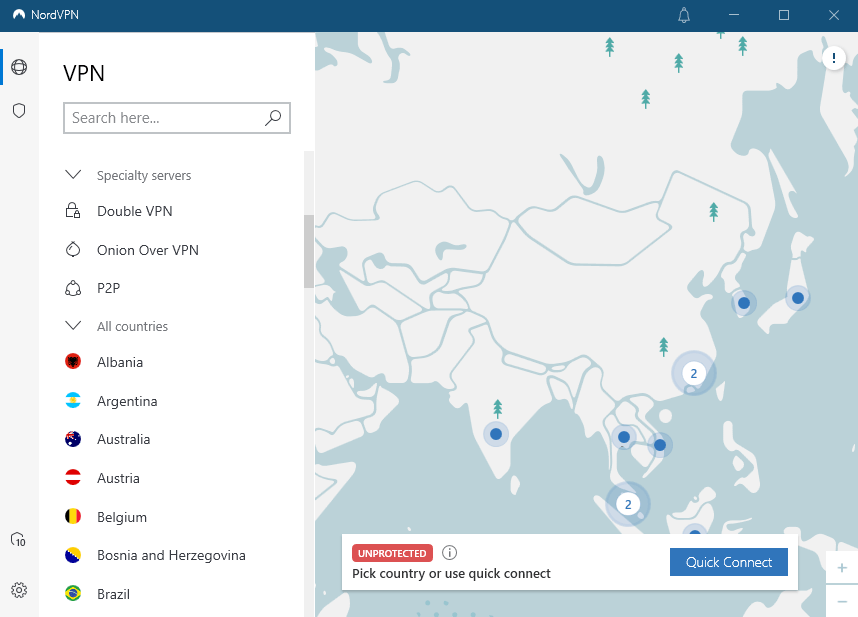
Each service has Windows and Mac apps that are comparable in appearance. You get a mid-sized window that can be maximized, and you can choose from a list of servers or the map that takes up the most space.

nordvpn-interface

It’s also worth mentioning that NordVPN offers two macOS apps. The NordLynx and other protocols are supported by the App Store version, while the other version only supports OpenVPN but has more capabilities.

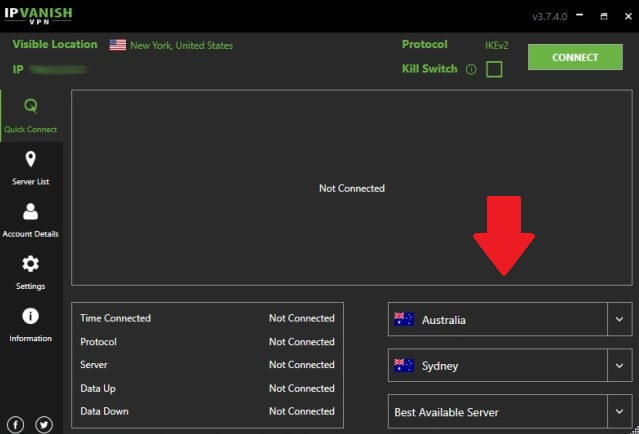
Advanced users will appreciate IPVanish’s features. By clicking Alt + C, you can activate keyboard shortcuts and connect, or by using Alt + L, you can see the server list.

ipvanish-windows-interface

There’s also a Diagnostics option under Settings that can help you debug problems on your own or with the help of customer service.

Final Result: It’s a Tie!

Mobile apps

IPVanish’s mobile apps are uninteresting, whereas NordVPN’s apps appear like their well-designed desktop equivalents.

Although the iOS clients offer less functionality than the Android clients, NordVPN does an excellent job of keeping their apps on par. Most notably, the iOS version provides an always-on kill switch, whereas IPVanish lacks this critical feature.

On Android, IPVanish offers split tunneling, Stealth VPN, insecure network notifications, and port selection, among some other features. OpenVPN and IKEv2 are two protocols that are available in the beta version.

Although NordVPN for Android lacks IKEv2, it compensates with NordLynx. Split tunneling, a custom kill switch, Stealth VPN, tapjacking protection, CyberSec, Onion Over VPN, and Custom DNS are all available. In comparison to IPVanish, there are more options to toggle and customize.

Final Result: It’s a Tie!

Customer support

Both companies offer 24/7 live chat support. The agents are friendly and helpful, and the wait periods are small.

Email is another option to contact IPVanish and NordVPN. While NordVPN replied within a few hours, IPVanish took two days to respond to our question.

Finally, each service offers access to a well-maintained knowledge source. FAQs, setup manuals, and troubleshooting sections can all be found here. IPVanish’s Support Center page provides system status at the top, which we liked.

So, if you’re having problems connecting, check to determine if the issue is truly on your end.

Final Result: It’s a Tie!

IPVanish vs. NordVPN: which one is better?

Despite the fact that IPVanish is a good VPN, NordVPN outperforms it in practically every aspect. NordVPN has a larger server network, greater security measures, a zero-logs policy that has been audited, faster torrenting, and works with loads of streaming sites.

IPVanish is simple to use, and provides excellent performance for lag-free gaming. We particularly like that you may secure an infinite number of devices with a single subscription and seek a refund without having to contact customer service.

Despite these advantages, NordVPN continues to provide the best online privacy and security, as well as reliably unblocking practically any streaming site for lag-free TV and movies. It also outperformed IPVanish in multiplayer games and has a far larger server network.

FAQs

Is IPVanish faster than NordVPN?

When most tunneling protocols are compared, NordVPN is quicker than IPVanish. IPVanish, on the other hand, is rather fast and doesn’t lag far behind – its speeds are more than adequate for streaming and torrenting.

Is NordVPN good for gaming?

NordVPN offers the fastest VPN service on the market, making it the best VPN for gaming. It also safeguards your data transmission without causing any obvious slowdowns.

Read more Comparisons!

Categories
Compare

Surfshark vs Windscribe | Equally Affordable – Which is Better?

Two choices come to mind when considering inexpensive yet dependable VPNs: Windscribe and Surfshark.

Both Windscribe and Surfshark VPN are inexpensive VPNs that offer an unlimited number of connections. To choose one VPN service over another, you would need to look past their shared features and consider how they differ.

VPNs are a necessary evil when it comes to protecting your privacy and security online, but with so many to choose from, how do you know which one is right for you?

In this comparison, we’ll take a look at two of the most popular VPN providers: Surfshark and Windscribe. We’ll compare their features, pricing, and overall performance to help you decide which one is best for you. So, let’s get started!

Surfshark vs Windscribe – A Face-Off!

Before we dig into our detailed Surfshark vs Windscribe comparison, here is a quick features summary to help you figure out which is better:

Factors Surfshark Windscribe
Trustpilot Rating: 4.2 4.8
Servers: Offers 3,200+ servers in 95 countries Offers servers in 69 countries
Logs policy: No logs No logs
Pricing: Starts from $2.30/month Starts from $4.08/month
VPN protocols: WireGuard, OpenVPN, IKEv2, L2TP/IPSec, Shadowsocks OpenVPN, IKEv2 and WireGuard.
Streaming Compatibility: Can unblock multiple geo-locked streaming services such as Netflix, BBC iPlayer, Disney Plus, HBO Max and Amazon Prime Video Can unblock some geo-restricted streaming services. Takes several attempts to unblock Amazon Prime Video, HBO Max, and BBC iPlayer
Platforms: Firefox, Windows, macOS, Linux, Edge, Chrome, iOS, and Android Windows, macOS, Linux, Chrome, Firefox, Edge, iOS, Android, Blackberry, FireTV, Nvidia Shield, and more
Simultaneous connections: Unlimited devices Unlimited devices
Support: FAQs, knowledge base, 24/7 live chat, email support knowledge base, setup guides, FAQs, Bot-based live chat

Speed Comparison: Surfshark vs Windscribe

Both VPNs provide speeds quick enough for HD streaming. However, Surfshark takes the top spot in this category, outpacing Windscribe’s average speeds.

With servers located in 63 nations and 110 cities, Windscribe doesn’t have a strong VPN infrastructure when compared to Surfshark. Surfshark offers way more servers (3200+) all over the world. As a result, their servers are less crowded – offering faster speeds.

Needless to say, you should have little latency and a fast connection with Surfshark, which will allow you to stream and browse uninterrupted. For what it’s worth, Windscribe gives remarkable speeds, albeit theoretically, it might struggle to offer decent speeds during peak hours.

Here is brief speed test table covering the speeds of both VPNs:

Server Locations Surfshark Windscribe
US 87.5 Mbps/100 Mbps 57.7 Mbps/100 Mbps
UK 81.51 Mbps/100 Mbps 71.91 Mbps/100 Mbps
Canada 76.65 Mbps/100 Mbps 74.23 Mbps/100 Mbps
Australia 78.97 Mbps/100 Mbps 65.17 Mbps/100 Mbps
Germany 77.98 Mbps/100 Mbps 69.32 Mbps/100 Mbps

Final Result: Surfshark is the winner!

Surfshark vs Windscribe Streaming Capabilities: Which One Unblocks More?

Despite not having the fastest download speeds, Surfshark made it onto our list of the best VPNs for streaming, but Windscribe didn’t, and it’s clear why.

With Surfshark, you can instantly access all the major streaming services, including Disney Plus, HBO Max, Netflix, BBC iPlayer, and Amazon Prime Video.

unblock-bbc-iplayer-with-surfshark

In contrast to Surfshark, Windscribe’s streaming quality is inconsistent. While it managed to unblock Disney Plus immediately during testing, it took several tries to unblock Amazon Prime Video, HBO Max, BBC iPlayer and ABC.

windscribe-didn't-unblock-abc

Here’s a table covering the streaming and unblocking capabilities of both Surfshark and Windscribe:

Streaming Services & Channels Surfshark Windscribe
Netflix Multiple libraries, including UK, Canada, Australia, Japan, and Korea Multiple libraries, including Canada, India, Australia, Ireland, and Malaysia
Amazon Prime

Video

Yes Yes, but after multiple attempts
CBS Yes Yes, but after multiple attempts
Hulu Yes Yes, but after multiple attempts
BBC iPlayer Yes Yes, but after multiple attempts
Disney Plus Yes Yes, but after multiple attempts
Hotstar Yes Yes
HBO Max Yes Yes, but after multiple attempts
ABC Yes No
Channel 4 Yes Yes
DAZN Yes Yes
NBC Yes No

Final Result: Surfshark is the winner!

Surfshark vs. Windscribe – Torrenting

One of the most significant uses of a VPN is downloading torrents from P2P sites like PirateBay. When it comes to testing which VPN is better for torrenting, one needs to test its speeds and IP leaks.

So, first off, we tested both the VPNs for speeds. On a 100 Mbps internet connection, we downloaded a 3GB Linux test torrent file while using both VPN services. We anticipated Windscribe to outperform Surfshark due to its faster download speeds, however, our test results proved otherwise.

Check out the table below:

VPN Torrent download speed Download time
Windscribe 5 Mbit/s 80 minutes
Surfshark 12 Mbit/s 33 minutes

Surfshark’s download speed was quite constant throughout the testing process. It constantly downloaded torrent files faster than Windscribe. Hence, it earned a spot on our list of the best VPNs.

Final Result: Surfshark is the winner!

Features overview

With both VPNs, you can expect to get quality security features.  Let’s check them out in detail below:

Kill switch

Both Surfshark and Windscribe come with a kill switch. In case of abrupt disconnection, both VPNs can automatically shut down your web traffic as a failsafe measure to protect your privacy.

Apps for different OSes & devices

Both VPNs offer excellent compatibility for popular OSes such as Windows, macOS, Android, and iOS. Additionally, they are both compatible with smart TVs, gaming consoles, and routers.

Split tunneling

Both VPNs also support split tunneling. They both allow app, IP, and URL-based split tunneling. But regrettably, Windscribe doesn’t allow split tunneling on macOS devices, and Surfshark doesn’t offer it in both iOS and macOS apps.

windscribe-split-tunneling

Encryption & MultiHop

​​Both VPNs use AES-256 for encryption and support multi-hop. This allows data packets to move through multiple servers for added privacy. Overall, both VPNs are equally secure on paper.

Ad blocker

Both VPN services also offer extra VPN features like ad blockers. Surfshark calls its ad blocker CleanWeb while Windscribe calls it R.O.B.E.R.T. Ad blockers protect your devices and speed up browsing by preventing malware, trackers, and advertising.

surfshark-cleanweb

It prevents your browsers from loading files from websites that host malware, spyware, or other malicious software when it is turned on. On both VPNs, malware protection is turned on by default.

All in all, the two VPNs are comparable in terms of essential features. However, Surfshark has a slight advantage when cutting-edge features are taken into account.

In addition to offering an antivirus, it also has more sophisticated security features such as NoBorders mode, a feature provided by Surfshark which enables users to surf the internet without restriction in nations with harsh internet censorship.

Final Result: Surfshark is the winner!

Pricing Analysis

Given that Windscribe provides a free version, comparing the prices of these two VPNs can be a little confusing. However, Surfshark has the cheapest monthly price if we compare both VPN’s paid plans. We say this because while Surfshark’s 24-months plan costs $2.30/mo, Windscribe’s yearly plan costs $4.08/mo.

Another reason why we believe Surfshark is more affordable is that it offers 2-month’s worth of free subscriptions if you opt for its 24-months plan.

Here are the subscription plans of both VPNs:

Monthly Cost By Term Length Surfshark Windscribe
Free VPN 30-day free trial 10 GB/mo data and comes with servers in 10 countries
1 Month $12.95 $9
1 Year n/a $4.08
2 Years $2.30 n/a

Both Surfshark and Windscribe offer customer-centric payment options. However, Surfshark supports more payment options than Windscribe.

You can use any of the following to purchase a Windscribe Pro subscription: Credit cards, Paypal, VISA/Mastercard debit cards, cryptocurrencies, mobile in-app purchases, and gift cards (via Paymentwall).

Surfshark on the other hand, in addition to supporting Paypal, VISA/Mastercard debit cards, and cryptocurrencies, also supports Google Pay and Amazon Pay.

Final Result: Surfshark is the winner!

China and countries with restricted internet access

As long as the appropriate configuration is used, Surfshark is among the finest VPNs that function in China. Simply enable the NoBorders feature in Surfshark’s Settings to browse anonymously and safely in China.

We conducted extensive study, but were unable to determine whether Windscribe is functional in China. Windscribe should function from everywhere, according to their customer support team, who we had to contact.

Final Result: Surfshark is the winner!

Server locations

Of the two, Surfshark has the largest server network. In 95 countries, it has over 3200 servers. This is a network the majority of its rivals are unable to match.

With servers located in 63 countries and 110 cities, Windscribe is now a provider that is somewhat in the middle of the pack when compared to Surfshark.

Final Result: Surfshark is the winner!

Surfshark vs. Windscribe  device compatibility: Interface & Ease of Use

Windscribe Surfshark
OS supported Windows, Mac, iOS, Linux, and Android Mac, Linux, Windows, iOS, and Android
Other devices and operating systems Fire TVs, routers, & Android TVs Fire TV devices, Kodi, and Android TVs
Browser extensions Chrome & Firefox Chrome & Firefox
Simultaneous connections Unlimited Unlimited

Desktop apps

Both Surfshark and Windscribe perform brilliantly when it comes to user experience. However, Windscribe’s complicated interface might not be the best option for beginners.

There’s no need to fiddle about trying to navigate through the Surfshark desktop application.

You can skim through the servers or use the search bar to look up the server you wish to connect to. Additionally, for ease of access, each setting option has a clear label and is placed in a sensible location.

surfshark-interface

Whereas, Windscribe utilizes unclear menu icons that require you to linger over them in order to see what they do. In addition, while we value having all the information available at a glance, the cluttered nature of the app may be a turn off for new users.

windscribe-interface

Mobile apps

The mobile apps are equally user-friendly. For instance, Surfshark provides a feature-rich Android app with split tunnelling and a kill switch. Although the iOS app does not provide a split tunnelling function, it is just as simple to use.

Although Windscribe’s mobile apps have slightly better looks than its desktop counterparts, they omit some functions like firewall mode and have the same puzzling icons.

In the end, Surfshark excels in this category, thanks to its clear and simple user interface.

Final Result: Surfshark is the winner!

Customer support

Both VPNs take customer service seriously, making it simple for you to contact them and use their comprehensive, searchable knowledge base.

We discovered that Surfshark’s live help is available around-the-clock and replies to client questions quickly. If you are unable to access live chat support, for example if you are in China, you will quickly receive assistance via email support.

Windscribe provides live chat assistance through the chatbot Garry, that our testing revealed can reply in under a minute. In addition to a support ticketing system, you may access a knowledge base and FAQ section.

Final Result: It’s a Tie!

Surfshark vs. Windscribe – Which is Better?

In our Surfshark vs Windscribe comparison, Surfshark wins the battle. After thorough testing and examination, Windscribe received no points, compared to eight for Surfshark.

That’s because Surfshark offers a broader server network, lightning-fast speeds suited for streaming, and access to majority of well-known streaming services, including many that Windscribe is unable to access. Additionally, it performs superbly in countries like China.

FAQs

Which VPN is stronger than Windscribe?

Surfshark is a stronger VPN than Windscribe in terms of speeds, security, streaming, torrenting, and more.

Is Surfshark any good as a VPN?

Surfshark has been a top-notch VPN provider since years. In addition to offering rarely encountered split tunneling and MultiHop functionality, it boasts a generous unlimited devices policy that allows you to connect as many devices as you wish. The firm should also be commended for its open privacy policy and tamper-proof RAM-only servers.

Is Surfshark VPN better than ExpressVPN?

Both Surfshark and ExpressVPN are listed among our best 10 VPNs for 2026. ExpressVPN has a faster internet connection, but it is more expensive and only allows you to utilise five devices only. For a detailed review, check out our Surfshark vs ExpressVPN comparison.

Read more Comparisons!

Categories
Compare

CyberGhost vs. ExpressVPN: Face off!

Two of the most popular VPN providers in the globe are ExpressVPN and CyberGhost. They both have a wide range of features and are quite trustworthy.

However, if you’re reading this, it’s likely that you’re torn between two worthy rivals.

In this VPN comparison, we will thoroughly test every feature of these VPNs and list down which one works better at what aspect. In the end, we will announce one clear winner.

So, without further ado, let’s dive right into it!

CyberGhost vs. ExpressVPN – Summed Up

These VPN providers have the following basic features:

CyberGhost ExpressVPN
Offers 7700+ servers in 90+ countries Offers 3000+ servers in 94 countries
Compatible apps for Windows, macOS, Linux, Android, & iOS Compatible apps for iOS, Windows, Android, Mac, & FireStick
45-day money-back guarantee 30-day money-back guarantee
Seven multi-logins Five multi-logins
Offers IKEv2, OpenVPN, WireGuard Offers L2TP/IPsec, IKEv2, OpenVPN, Lightway
Unblocks Netflix easily Unblocks multiple streaming services like Netflix, Hulu, Amazon Prime, & BBC iPlayer
Costs $2.29/month (3 years plan + 3 months free) Costs $8.32/month (1 year plan)
For more information, check out our CyberGhost review. For more information, check out our ExpressVPN review.

CyberGhost VPN vs ExpressVPN: Which one is the fastest?

Both CyberGhost and ExpressVPN have a large number of servers and use the cutting-edge WireGuard and Lightway tunneling methods. In the table below, we’ll compare their performance on all of their protocols across our 100 Mbps connection:

Please note that the ExpressVPN vs. CyberGhost speeds will be tested and jotted down using the following formula: pings/download speed/upload speed.

Protocols CyberGhost ExpressVPN
WireGuard/Lightway 145/74/58 103/86/75
OpenVPN (UDP) 164/70/38 96/82/59

ExpressVPN’s Lightway outperforms CyberGhost’s WireGuard in terms of download speed, as shown in the table above. Similarly, ExpressVPN also works better when it comes to the OpenVPN (UDP) protocol.

Final Result: ExpressVPN is the Winner!

Features comparison

If your idea of utilizing a VPN extends beyond streaming Netflix, you’ll appreciate ExpressVPN and CyberGhost, which are both jam-packed with valuable features.

Let’s check out a few of them in our ExpressVPN vs. CyberGhost VPN comparison below:

Port Forwarding

The port forwarding option can be a lifesaver for more sophisticated users. It enables you to use your computer when away from home, host a tiny website, or set up a gaming server, for example.

As a result, ExpressVPN will assist you in accomplishing all of these goals, as well as others. This is because its router app enables port forwarding, allowing you to access your devices from anywhere. CyberGhost VPN, on the other hand, does not support this capability.

Final Result: ExpressVPN is the Winner!

Smart DNS or MediaStreamer

You’ll need the Smart DNS feature if you want to stream geo-restricted movies on a device that isn’t compatible with a VPN (such a smart TV or a gaming console). CyberGhost refers to it simply as My Smart DNS, whereas ExpressVPN labels it MediaStreamer.

Both VPN services include step-by-step instructions for setting up SmartDNS on a variety of devices, including routers, PlayStations, Xboxes, and Apple TVs.

Final Result: It’s a Tie!

Ad Blocker

Only CyberGhost users will have access to this function. It claims to block advertisements, dangerous websites, and internet tracking, among other things.

cyberghost-ad-blocker

However, our tests revealed that it was unable to block all advertisements on some of the URLs we visited. Even still, CyberGhost’s ad-blocker is preferable to doing nothing.

Final Result: CyberGhost is the Winner!

Special Servers

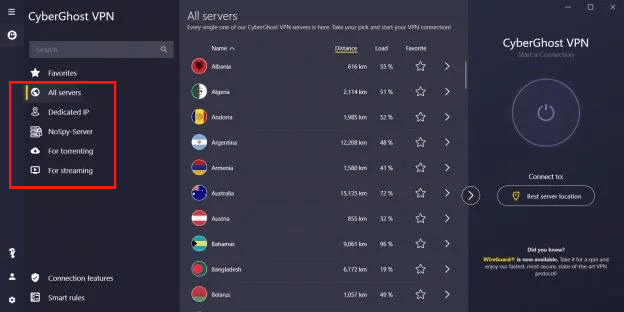
If you need a server for a certain task (such as torrenting), CyberGhost will instantly assist you in selecting the best one. This is due to the fact that it provides a list of dedicated servers for torrenting, streaming, and gaming. 

cyberghost-specialty-servers

It’s worth noting that torrenting servers display the estimated distance to the server, as well as the server’s user count and load.

In addition, for less than $1 a month, CyberGhost offers NoSPY servers. They give you additional bandwidth and privacy because they are located in a private data center in Romania.

Final Result: CyberGhost is the Winner!

Kill Switch

In many cases, a proper kill switch is the only thing that keeps your real IP address from being revealed. That’s because if your VPN connection is compromised, it disconnects you from the internet, effectively protecting your identity.

Both VPN services, thankfully, have one. ExpressVPN’s kill switch (called Network Lock) is extremely adjustable and compatible with Windows, Mac, Linux, and Android devices.

expressvpn-kill-switch

Meanwhile, CyberGhost’s kill switch is only available on its desktop clients and has no customizable options.

Final Result: ExpressVPN is the Winner!

CyberGhost vs ExpressVPN: Security Comparison

In terms of security, both ExpressVPN and CyberGhost are highly recommended. We do, however, require a winner.

Let’s check out, in ExpressVPN vs CyberGhost, which one offers more robust security features:

Encryption Protocols

When it comes to security, CyberGhost and ExpressVPN are both quite good. They use the ultra strong AES-256 encryption by default.

When using the Lightway protocol, ExpressVPN offers the ChaCha20/Poly1305 cipher in addition to AES-256.

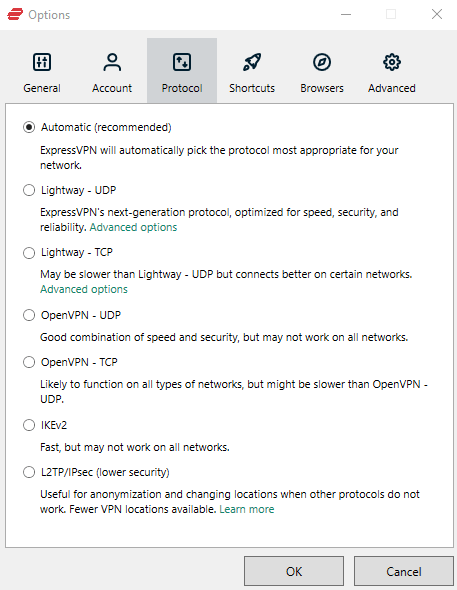
ExpressVPN has a larger selection of tunneling protocols than CyberGhost. They are OpenVPN (UDP/TCP), IKEv2, and L2TP/IPsec.

expressvpn-tunneling-protocols

Despite the fact that CyberGhost offers fewer protocols to choose from, they are all the ones you’ll need: WireGuard, IKEv2, and OpenVPN (UDP/TCP).

Final Result: It’s a Tie!

RAM only Servers

ExpressVPN goes a step further in terms of privacy by offering its TrustedServer technology. In layman’s terms, this means that all VPN servers run on RAM, which is wiped clean every time they are powered on and off. To put it another way, there is no method to save user logs.

Final Result: ExpressVPN is the Winner!

Jurisdiction

In terms of jurisdiction, both VPNs appear to have picked a suitable spot. ExpressVPN is headquartered in the British Virgin Islands, which is a privacy-friendly jurisdiction, but CyberGhost is based in Romania, which is not a member of the 14-Eyes Alliance and has strong privacy rules.

Final Result: It’s a Tie!

Transparency

ExpressVPN is a well-known VPN provider that prioritizes security and privacy. Several independent security and privacy audits have been conducted, and the organization has continuously passed with flying colors.

One of the biggest accounting companies, PricewaterhouseCoopers, audited the company’s no-logs policy. According to the study, ExpressVPN’s setting complies with the company’s privacy policies.

CyberGhost has had its service subjected to independent audits in the past, but none have been undertaken recently. The company, on the other hand, publishes a transparency report every three months that contains police demands, virus warnings, and DMCA complaints.

Final Result: ExpressVPN is the Winner!

Logging

ExpressVPN’s logging policy is rather basic. According to the firm, no activity logs such as browsing history or DNS queries are collected. 

It does, however, gather some information about how the VPN is used in general, such as data on successful VPN connections. Fortunately, you have complete control over this and can opt-out at any time.

It’s also worth noting that PricewaterhouseCoopers independently audited ExpressVPN’s no-logs policy, demonstrating its authenticity.

CyberGhost is now a no-log VPN as well. It claims not to gather your connection logs or information about your internet activities. Unfortunately, CyberGhost has yet to be audited independently.

Final Result: ExpressVPN is the Winner!

Which one is better for Streaming?

ExpressVPN is one of the best VPNs for streaming since it gives you access to Netflix and a variety of other streaming services throughout the world 24 hours a day, seven days a week.

We’re streaming American Netflix through ExpressVPN’s New Jersey – 3 server in the screenshot below. If you need a VPN to access Netflix, ExpressVPN is now one of our top choices.

expressvpn-works-with-netflix

It allows you to access Netflix regions all over the world and also works with a variety of other streaming providers. This VPN can be used to access Disney Plus, Hulu, Amazon Prime, and other streaming services.

We discovered that CyberGhost did not operate well with streaming in our most recent set of tests for the evaluation. Apart from minor connectivity troubles, we discovered that Netflix was blocking CyberGhost, even when connected to the special Netflix VPN server in the United States.

Because CyberGhost was blocked, we discovered that it is not a good VPN for Amazon Prime. Furthermore, because of the sluggish connections, it is not the ideal VPN for Hulu. CyberGhost advertises itself as a good VPN for streaming, however we didn’t find this to be the case in our testing.

Final Result: ExpressVPN is the Winner!

Torrenting Comparison

Both services are excellent torrent VPNs, and the comparison is considerably closer in this case than it is in streaming.

With CyberGhost, P2P support isn’t available on every server, but it is available on a large number of them, and it isn’t a subject of trial and error. It offers clever filtering for the finest torrenting servers, just like it does for streaming. You can also make the client open automatically when you start your torrenting software.

While ExpressVPN has fewer servers overall, each one is specialized for torrents, eliminating the need for filtering. You can choose the one you want and begin downloading immediately.

Final Result: ExpressVPN is the Winner!

ExpressVPN vs CyberGhost Price Comparison

Plans ExpressVPN CyberGhost
Monthly $12.95 $12.99
Six-month $9.99/mo
1-year $8.32/mo $3.95/month
2-year $3.15/month
3-year $2.29/mo + 3 months

It appears that no matter which provider ExpressVPN competes with, it always loses in the pricing category. It’s hardly surprising, given that the lowest feasible price for an annual subscription has been $8.32/month for a long time.

CyberGhost, on the other hand, charges $3.95 per month for the same yearly package. If you contemplate a three-year commitment, it can even be as cheap as $2.29 each month.

Final Result: CyberGhost is the Winner!

Server Locations Overview

ExpressVPN boasts servers in more countries and locations than any other VPN service.

CyberGhost outnumbers ExpressVPN by around 3000 servers, with 7700+ servers. When it comes to server distribution, though, ExpressVPN is significantly superior. ExpressVPN servers are scattered across 160 locations in 94 countries, whereas CyberGhost only provides 91 nations.

When it comes to selecting a server, CyberGhost organizes its servers into distinct user profiles, and these profiles are labeled to make it simple to do a certain purpose, such as streaming Netflix US.

While ExpressVPN lacks task profiles, it is simpler to select a server, and you can even select a specific city. Because of the numerous places, you’ll be able to unlock additional material.

Final Result: It’s a Tie!

Platform Compatibility & Interface Comparison

CyberGhost ExpressVPN
OS supported Windows, Linux, Mac, iOS, and Android Windows, Linux, Mac, iOS, and Android
Other devices and operating systems Manual setup only Fire TV devices, routers, Android TV
Browser extensions Chrome and Firefox Chrome and Firefox
Simultaneous connections Seven Five

Despite the fact that both VPN services provide excellent services, we pick CyberGhost in this category. It has a simple, dark-themed design that makes it easy to explore. It can allow 7 simultaneous connections, however ExpressVPN can only support 5.

Desktop

When it came to design, CyberGhost chose a completely different approach. The colours and structure of its desktop apps make them look a lot more modern, intuitive, and appealing. Surprisingly, CyberGhost’s macOS version has a few additional features.

cyberghost-windows-app

Regrettably, CyberGhost’s Linux version may benefit from some additional development time. It’s challenging to set up and even more difficult to utilize.

The ExpressVPN applications for Windows and Mac are practically identical. Although the style is simple, there are numerous functions and setting choices. Despite the lack of a map, it is not difficult to locate the necessary area.

expressvpn-interface

ExpressVPN also offers a Linux client that works with the Lightway protocol. During our testing, we found no issues in the ExpressVPN applications.

Final Result: CyberGhost is the Winner!

Mobile

CyberGhost’s mobile apps are both excellent. They are less complicated than the desktop applications, but they work better, as we discovered no issues throughout our testing.

The key distinction is the tunneling protocols supported: the Android app supports OpenVPN and WireGuard, whereas the iOS app supports WireGuard and IKEv2.

If you’ve seen one ExpressVPN app, you’ve seen them all: with the exception of being slightly taller, the Android and iOS apps are identical to their desktop equivalents. However, take in mind that there are some practical differences: the iOS app lacks a few functions such as split tunneling and a kill switch.

Final Result: CyberGhost is the Winner!

Customer support

ExpressVPN’s support is superior because it is available 24/7.

Customer support is available from both CyberGhost and ExpressVPN via live chat, email, troubleshooting guides, ticketing system, and FAQs. Both feature comprehensive tutorials, however unlike ExpressVPN, CyberGhost’s live chat help is limited to specific hours.

You may connect with an ExpressVPN representative at any time, and their ticket system is also much faster.

Final Result: ExpressVPN is the Winner!

ExpressVPN vs. CyberGhost – which one takes the cake?

Both ExpressVPN and CyberGhost offer top-notch security and speed to their subscribers. However, in our perspective, ExpressVPN still comes out on top, albeit by a razor-thin margin.

If money isn’t an issue for you, ExpressVPN is a good option. It provides faster speeds, unblocks more streaming sites, and has a no-logs policy.

Furthermore, ExpressVPN has passed independent audits, giving it a significant advantage in the trust category — an area where CyberGhost falls short.

So, if you’re thinking which is better, ExpressVPN vs CyberGhost, then you know it’s the former.

FAQs

Is CyberGhost VPN safe?

Yes, CyberGhost is a safe VPN service offering powerful encryption protocols like WireGuard and OpenVPN.

Is Cyberghost Cheaper than ExpressVPN?

Yes, CyberGhost is cheaper than ExpressVPN, whether you subscribe for a monthly, six-month, or an annual plan. Moreover, CyberGhost is actually three times cheaper than ExpressVPN if you get its annual plan, costing $3.95/mo as compared to $8.32/mo.

To read more about ExpressVPN, check out our ExpressVPN Review.

Read more Comparisons!

Categories
Compare

ExpressVPN vs VyprVPN: Which VPN is the Ultimate Champion?

Virtual Private Networks, or VPNs, have become an essential tool for internet users in today’s world of increasing online surveillance and hacking attempts. A VPN provides a secure connection by encrypting your online data and hiding your IP address, allowing you to browse the web privately and safely.

With numerous VPN options available in the market, choosing the right one for you can be challenging. In this article, we will compare two of the most popular VPNs in the market – ExpressVPN and VyprVPN.

This comparison aims to help you make an informed decision based on your specific needs and preferences.

Key Features

ExpressVPN and VyprVPN both offer a range of features that make them appealing to VPN users. ExpressVPN has a vast network of servers in over 90 countries, providing you with a broad range of options for accessing content and websites worldwide.

ExpressVPN also offers strong encryption and security features, including a kill switch, which will cut off your internet connection if your VPN connection drops to ensure your privacy remains intact. ExpressVPN is also compatible with various platforms and devices, including Windows, Mac, Linux, iOS, and Android.

VyprVPN also provides a large server network, with over 700 servers in 70+ countries. VyprVPN’s proprietary Chameleon technology is designed to bypass VPN blocking and censorship, giving you more freedom to access the content you want.

VyprVPN also uses strong encryption and security features, including a kill switch and its own encrypted DNS service. VyprVPN is compatible with Windows, Mac, Linux, iOS, Android, and router setups.

While both VPNs offer a range of quality features, ExpressVPN comes out on top in this category. With a wider range of server locations and a more robust security system, ExpressVPN provides a higher level of quality and effectiveness in terms of key features.

Performance

Regarding performance, both ExpressVPN and VyprVPN have their strengths and weaknesses. ExpressVPN is known for its fast speeds, making it ideal for activities like streaming and gaming. ExpressVPN’s servers are optimized to provide stable and fast connections, no matter where you are located.

VyprVPN also provides fast and reliable connections with a strong focus on security and privacy. However, some users have reported slower speeds with VyprVPN, especially when compared to ExpressVPN. VyprVPN’s performance can vary depending on the region you are located in and the type of connection you use.

In this category, ExpressVPN is the clear winner. Its fast and stable connections make it the ideal choice for activities that require high-speed internets, such as streaming and gaming.

ExpressVPN vs VyprVPN Speed Test

Speed is a crucial factor when it comes to VPNs. ExpressVPN and VyprVPN are both known for their fast and stable connections, but which one performs better in a speed test comparison?

To find out, we conducted several speed tests on both ExpressVPN and VyprVPN, measuring the download and upload speeds, as well as the ping. The tests were conducted on different servers, both long-distance and short-distance, to give an accurate representation of their performance.

ExpressVPN showed impressive results in our speed tests, with download speeds ranging from 70 Mbps to 100 Mbps and upload speeds around 20 Mbps. Its ping was also low, averaging around 20ms. On the other hand, VyprVPN had download speeds ranging from 40 Mbps to 60 Mbps and upload speeds of around 10 Mbps. Its ping was slightly higher than ExpressVPN’s, averaging around 30ms.

When it comes to long-distance servers, ExpressVPN continued to outperform VyprVPN. It was able to maintain fast download and upload speeds even when connecting to servers in other continents. On the other hand, VyprVPN’s speeds showed some slight degradation when connecting to long-distance servers.

In conclusion, ExpressVPN outperforms VyprVPN in speed tests, with fast and stable connections, low ping, and minimal speed degradation on long-distance servers. If speed is a top priority for you, ExpressVPN may be the better choice.

expressvpn-vs-vyprvpn-speed-test

Geo-Unblocking Capabilities

Both ExpressVPN and VyprVPN are strong in terms of geo-unblocking capabilities, as they both offer servers in various countries around the world. ExpressVPN has a larger server network with over 3,000 servers in 94 countries, whereas VyprVPN has 700+ servers in 70+ countries. ExpressVPN has more options for users who want to access geo-restricted content from different regions, but VyprVPN also performs well in this regard.

Torrenting

Both ExpressVPN and VyprVPN allow torrenting, but ExpressVPN has a more permissive policy, as it does not log user activity and has a kill switch feature to ensure privacy when downloading. VyprVPN allows torrenting but restricts it on some servers and logs user data. In this regard, ExpressVPN is the better choice for users who value privacy and security while torrenting.

Netflix Unblocking

Both ExpressVPN and VyprVPN are strong in terms of unblocking Netflix, but ExpressVPN has the edge, as it consistently unblocks Netflix libraries from various regions and is less likely to be detected and blocked. VyprVPN also unblocks Netflix but may face occasional issues with the platform detecting and blocking the VPN.

China Unblocking

ExpressVPN and VyprVPN both offer servers in China, but ExpressVPN has a larger server network and is generally more reliable for users who want to access the internet from inside China. ExpressVPN has a stealth server feature that helps users bypass the Great Firewall of China, making it a better choice for those who need to access restricted content from within China.

Gaming

Both ExpressVPN and VyprVPN offer fast and stable connections, making them suitable for gaming. However, ExpressVPN’s larger server network and more advanced security measures give it the edge for gamers who want to avoid lag and protect their online privacy.

Security

Security is one of the primary concerns for VPN users, and both ExpressVPN and VyprVPN take this very seriously. ExpressVPN uses military-grade encryption to protect your online data, and its no-logs policy ensures that your privacy remains intact. ExpressVPN also offers a range of security protocols, including OpenVPN, PPTP, L2TP/IPSec, and IKEv2, to provide you with a secure connection at all times.

VyprVPN also provides strong security features, focusing on bypassing VPN blocking and censorship. VyprVPN’s proprietary Chameleon technology is designed to encrypt your online data and protect your privacy, even in countries with strict internet censorship. VyprVPN uses 256-bit encryption and a range of security protocols, including OpenVPN and IKEv2.

In terms of security, both VPNs offer high-quality measures to protect your online privacy.

Logging Policy

Both ExpressVPN and VyprVPN are committed to user privacy, but ExpressVPN has a more permissive logging policy, as it does not log user data or activity. VyprVPN logs some user data but states that it is only used for troubleshooting and improving the service. In this regard, ExpressVPN is the better choice for users who value privacy and want a VPN that does not log their data.

ExpressVPN vs VyprVPN DNS Leak Test

DNS leak tests are an important aspect of evaluating a VPN’s security and privacy protection. A DNS leak occurs when a user’s internet activity is routed through their ISP’s DNS server instead of the VPN’s DNS server, potentially exposing their online activities.

In this section, we will perform a DNS leak test for both ExpressVPN and VyprVPN to see if there are any DNS leaks. We will also compare the results and evaluate the effectiveness of each VPN’s measures to prevent DNS leaks.

ExpressVPN and VyprVPN both have strong security measures in place to prevent DNS leaks. During our tests, we found that both VPNs provided robust protection against DNS leaks. ExpressVPN uses its own proprietary DNS servers to ensure that all user activity is protected, while VyprVPN uses encrypted servers to protect against DNS leaks.

Overall, both ExpressVPN and VyprVPN offer solid protection against DNS leaks, so users can feel confident that their online activities are protected. However, ExpressVPN is the winner in this category due to its proprietary DNS servers and its ability to provide consistent and reliable protection against DNS leaks.

expressvpn-vs-vyprvpn-leak-test

Pricing

ExpressVPN offers three pricing plans: a monthly plan for $12.95, a 6-month plan for $9.99 per month, and a 1-year plan for $8.32 per month. They also offer a 30-day money-back guarantee for all of their plans. On the other hand, VyprVPN offers three pricing plans as well: a monthly plan for $12.95, an annual plan for $5.00 per month, and a 2-year plan for $3.75 per month. VyprVPN also provides a 30-day money-back guarantee.

When it comes to pricing, VyprVPN is certainly more cost-effective with its annual and 2-year plans. However, in terms of features, ExpressVPN provides more value for money. ExpressVPN offers unlimited bandwidth, a kill switch, and split tunneling, which is not available in VyprVPN’s pricing plans. In addition, ExpressVPN also offers five simultaneous connections, while VyprVPN only allows for three.

Refund Policy

ExpressVPN and VyprVPN both offer a 30-day money-back guarantee. However, ExpressVPN’s refund policy is more straightforward, as users can request a refund anytime within the first 30 days without any questions asked. On the other hand, VyprVPN’s refund policy states that users must first contact customer support and may need to provide a reason for the refund request.

User Base

ExpressVPN has a larger user base than VyprVPN, as it is a more established and well-known VPN service with a long history and a wider range of features. ExpressVPN has over 30 million users worldwide, whereas VyprVPN has a smaller user base.

Ease of Use

ExpressVPN has a user-friendly interface and a simple setup process. The installation process is straightforward and quick, and the user interface is intuitive and easy to navigate. ExpressVPN also offers a variety of tutorials and support resources to help users get started.

VyprVPN, on the other hand, has a more complex setup process, and the user interface can be a bit cluttered. However, they offer various tutorials and support resources and a live chat support option to help users get started.

In terms of ease of use, ExpressVPN is the clear winner. Their user-friendly interface and simple setup process make it a great option for VPN beginners.

expressvpn-vs-vyprvpn-use-interface

Customer Service

Both ExpressVPN and VyprVPN offer excellent customer support, with 24/7 live chat and email support. ExpressVPN also offers a comprehensive knowledge base and a troubleshooting section on its website. VyprVPN offers a user forum where users can ask questions and exchange information with each other.

In terms of responsiveness and helpfulness, ExpressVPN’s customer service has a slight edge, as it is known for providing quick and knowledgeable support.

expressvpn-vs-vyprvpn-live-chat

FAQs – ExpressVPN vs VyprVPN

Is VyprVPN better than ExpressVPN?

The comparison in the blog post determined that ExpressVPN had advantages over VyprVPN in several key areas, such as server locations, speed and stability, security measures, privacy protection, and ease of use.

Is VyprVPN a good VPN?

VyprVPN offers a range of features and security protocols that can make it a suitable option for some users. However, according to the comparison in the blog post, ExpressVPN came out ahead in several categories, such as server locations, speed and stability, security measures, privacy protection, and ease of use.

Which VPN is better than ExpressVPN?

The choice of a VPN ultimately depends on individual needs and preferences. That being said, the comparison in the blog post found ExpressVPN to have advantages over VyprVPN in several crucial areas, including server locations, speed and stability, security measures, privacy protection, and ease of use.

Is ExpressVPN really the best?

The best VPN for individuals will depend on their specific needs and preferences. However, the comparison in the blog post revealed that ExpressVPN had several key advantages over VyprVPN in areas like server locations, speed and stability, security measures, privacy protection, and ease of use.

Conclusion

In conclusion, ExpressVPN is the clear winner in this comparison between ExpressVPN and VyprVPN. ExpressVPN offers a wider range of server locations, faster and more stable connections, stronger security measures, and better privacy protection.

ExpressVPN’s user-friendly interface, simple setup process, and value for money make it a great option for VPN users.

If you are looking for a VPN that provides fast, secure, and reliable connections, ExpressVPN is the way to go. Whether you are streaming, downloading, or simply browsing the web, ExpressVPN will provide you with the privacy and security you need to stay protected online.

Read more Comparisons!

Categories
Compare

ExpressVPN vs IPVanish – One Clear Winner?

There is a reason why ExpressVPN and IPVanish are two of the most popular VPNs on the market—they both offer top-of-the-line security features, great speeds, and robust customer support.

But which one is right for you? In this VPN comparison, we compare ExpressVPN vs IPVanish to help you decide.

ExpressVPN vs IPVanish: Head to Head Comparison

ExpressVPN IPVanish
Trustpilot Rating: 4.6 4.6
Servers: 3000+ servers in 94 countries 2000+ servers in 75+ VPN locations
Logs policy: No logs No logs
Pricing: Starts from $8.32/month Starts from $3.75/month
VPN protocols: Lightway, OpenVPN, L2TP/IPsec, IKEv2 OpenVPN, L2TP/IPSec, PPTP, IKEv2
Streaming Compatibility: Netflix, BBC iPlayer, Disney+, Hulu, and more Netflix, Hulu, YouTube, and more
Platforms: Windows, iOS, Firefox, Chrome, Edge, macOS, Linux, and Android Windows, iOS, Mac, and Android
Simultaneous connections: 5 devices Unlimited devices
Support: 24/7 live chat, knowledge base, FAQs, email support 24/7 live chat, knowledge base, FAQs, email support

ExpressVPN vs IPVanish: Speed Test

As two of the most prominent providers in the VPN industry, ExpressVPN and IPVanish are often compared by users. While both offer solid features, features are just one metric to judge a VPN on. Speed is another important factor that users consider when deciding which service works best for them.

Because of ExpressVPN’s Lightway protocol, which allows for faster speeds, comparing the speeds of these two VPNs used to be unfair.

But now that IPVanish has adopted the WireGuard protocol, the two are quite similar in terms of connection speeds. IPVanish and ExpressVPN can now be compared fairly.

To keep things short, we tested the speeds of both VPNs using a variety of VPN protocols offered by both and compiled the results in a table.

The table below contains the download speeds of both providers:

Base download speed: 100 Mbps

VPN Protocol ExpressVPN Download Speeds IPVanish Download Speeds
OpenVPN UDP 74.17 Mbps 71.98
OpenVPN TCP 76.34 73.76
IKEv2 78.34 76.76

When using the above-mentioned protocols, ExpressVPN’s speeds dropped by roughly 25%. In comparison, IPVanish’s speeds dropped by around 28%-29%. So, ExpressVPN performed slightly better.

When using the Lightway protocol, ExpressVPN’s speeds improved significantly. On average, we consistently got a download speed of around 85 Mbps. In comparison, IPVanish’s Wireguard protocol managed to deliver download speeds of around 80 Mbps.

Overall, ExpressVPN is faster than IPVanish.

Final Result: ExpressVPN is the Winner!

Which one has the best features?

If you’re looking for a VPN service that offers the best features, ExpressVPN and IPVanish are two of the best options out there. They both offer unlimited bandwidth, military-grade encryption, and multiple server locations.

But which one offers the best features? 

Let’s go in-depth and look at the different features both VPNs offer to see which one is a clear winner.

Split tunneling

As we mentioned earlier, both VPNs offer split tunneling. This feature allows you to pick which apps should connect to the VPN and which should not. You can choose to include or exclude specific applications when using the VPN app.

Split tunneling is only supported by the IPVanish Android app. ExpressVPN, on the other hand, makes it available through its Windows, macOS, and Android apps.

expressvpn-split-tunneling

Final Result: ExpressVPN takes the Lead!

Stealth VPN

Stealth VPN servers are offered by ExpressVPN only, IPVanish lacks this feature sadly. With Stealth servers, VPN communication is disguised to appear as normal internet traffic. Even through packet inspection, it’s impossible for anyone to identify that you’re using a VPN.

Due to the fact that ExpressVPN uses Stealth servers, it can most likely work in China and other countries where VPN usage is not allowed.

Final Result: ExpressVPN is the Winner!

Ad Blocker

Even though both VPNs do a great job of keeping you safe and secure online, they both don’t have a built-in ad blocker. This means you’ll need to use a separate ad-blocker like uBlock Origin or Adblock Plus if you want to prevent adverts while browsing.

Final Result: It’s a Tie!

SOCKS5 proxy

IPVanish, unlike ExpressVPN, provides a SOCKS5 proxy and that too for free. It’s a fantastic torrenting feature. Even while it hides your real IP address, it does not encrypt the data, allowing you to access the internet at faster speeds.

A SOCKS5 proxy can be used instead of a VPN. It uses a proxy server to redirect packets between a server and a client. This implies that your true IP address is disguised and you use a proxy provider’s address to access the internet.

Final Result: IPVanish is the Winner!

Ram Only Servers

As we mentioned earlier, only ExpressVPN offers RAM-only servers. ExpressVPN calls this feature “TrustedServer technology”.

Because ExpressVPN’s servers are incapable of maintaining any data logs, all of your data is regularly wiped with each server reboot when you use RAM-only servers.

Final Result: ExpressVPN is the Winner!

Exclusive features

Prominent VPN features, such as a kill switch and split tunnelling, are available on both IPVanish and ExpressVPN. While IPVanish has a SOCKS5 proxy, ExpressVPN offers Smart DNS support.

Even though both VPNs offer great features, there are some differences. For example, ExpressVPN allows you to use split tunneling on numerous devices, whereas IPVanish only allows split tunneling on Android devices.

Another aspect where ExpressVPN is clearly better than IPVanish is that it uses RAM-only servers and port forwarding. IPVanish lacks these two crucial features.

Final Result: ExpressVPN is the Winner!

ExpressVPN vs IPVanish: which VPN is more secure?

When taking ExpressVPN vs IPVanish security into account, then both the providers are very comparable. For starters, the services use AES-256 encryption, which is military-grade. For authentication, both VPN providers use the SHA-512 hash method. Perfect forward secrecy is supported by both IPVanish and ExpressVPN.

When using the Lightway protocol, ExpressVPN gives you the option of employing ChaCha20/Poly1305 encryption. ExpressVPN also offers stealth servers for an extra layer of security.

So overall, ExpressVPN is more secure.

Let’s go through some more security features to see which one is better.

Jurisdiction

ExpressVPN is the clear winner when it comes to jurisdiction. Because IPVanish is situated in the United States, its VPN service is based in the British Virgin Islands.

As we all know, the United States has a bad reputation when it comes to privacy. The British Virgin Islands, on the other hand, is a far more privacy-friendly territory.

The United States is also a member of the Five Eyes intelligence alliance. Its government is notorious for snooping on businesses, seeking private user data, and other malicious activities.

Final Result: ExpressVPN is the Winner!

Logging

The ExpressVPN vs IPVanish logging policies are excellent. Both the services claim to maintain no logs, including activity logs, browsing history, connection logs, and other comparable information. However, they do capture your email address as well as your payment method.

One way ExpressVPN is better than IPVanish is that it uses servers that run on RAM exclusively, erasing data every time the server is rebooted.

Both VPNs have also been involved in controversies. For example, IPVanish was embroiled in a privacy crisis after giving the FBI access to some criminal data.

As for ExpressVPN, its CIO was named as one of the people linked to Project Raven, which assisted the UAE in targeting journalists, political opponents, and US residents.

Final Result: It’s a Tie!

Encryption Protocols

ExpressVPN offers protocols such as:

  • Lightway – UDP
  • Lightway – TCP
  • OpenVPN – UDP
  • OpenVPN – TCP
  • L2TP/IPSec
  • IKEv2

IPVanish uses:

  • WireGuard
  • IKEv2
  • OpenVPN
  • L2TP
  • IPSEC
  • PPTP

WireGuard is not supported by ExpressVPN. Lightway, on the other hand, is more secure in terms of encryption design, has fewer lines of code than OpenVPN, and can provide a more consistent connection.

Overall, both VPNs offer a wide range of protocols. The only thing that sets both VPNs apart is that ExpressVPN uses its proprietary Lightway protocol, whereas, IPVanish uses its Wireguard protocol.

Final Result: It’s a Tie!

Netflix and other streaming platforms

ExpressVPN is often considered to be one of the best VPNs for Netflix. It always works with Netflix and gives superb HD streaming speeds, regardless of where you are.

It is also great for accessing Netflix in different regions. You may also use the VPN to watch Disney Plus, BBC iPlayer, Amazon Prime Video, Hulu, and other streaming services.

expressvpn-works-with-bbc-iplayer

On the other hand, IPVanish isn’t an excellent Netflix VPN. We tried using this VPN to unblock numerous libraries and were always barred after a few minutes. IPVanish connections are also restricted on BBC iPlayer, thus it’s not the best VPN for BBC iPlayer.

Final Result: ExpressVPN is the Winner!

Torrenting and P2P

Torrenting is supported by both VPN services.

IPVanish does not offer dedicated torrenting servers, but you may simply utilize one of its standard torrenting servers and the performance will be adequate. In our situation, it consistently maintained a speed of 20-25MB/s.

ExpressVPN, on the other hand, allows torrenting on all of its servers. During our tests, however, the speed was more consistent than IPVanish, fluctuating between 5 and 10 MB/s.

Final Result: It’s a Tie!

Plans and pricing

Prices and Plans ExpressVPN IPVanish
Periods 1 month 1 month
6 months 3 months
1 year 1 year
Special offers and discounts 35% off on the 1-year plan 65% off on 1-year plan
Lowest price per month $8.32/month $3.75/month
Highest price per month $12.95/mo $10.99/mo

As for pricing, we all can see that ExpressVPN’s prices are about 2 times higher than its rival on an annual commitment. While ExpressVPN does justify these prices by offering a fantastic overall performance, for now, the win of this factor goes to IPVanish.

Final Result: IPVanish is the Winner!

Server locations

IPVanish offers over 2,000 servers spread over 75 different locations. ExpressVPN, on the other hand, has over 3,000 servers in 160 locations, giving them the edge in terms of scaling. Your Internet connection will be speedier the closer we are to a server.

However, since ExpressVPN does come with almost double the amount of servers and locations, we all know who wins in this category.

Final Result: ExpressVPN is the Winner!

Apps, interface, and ease of use

App Interface and Usability ExpressVPN IPVanish
Selection of servers List-based List and Map based
Mobile-friendly apps Available Available
Auto-setup wizard iOS, Windows, Android, Linux, routers, and Mac Windows, iOS, Android, Mac

As for ExpressVPN vs IPVanish’s device compatibility, they offered dedicated applications for most operating systems and mobile devices. However, we tested all of them and here are the results:

Desktop apps

A map and list view, the settings tab, and all types of connection information can be found on the main screen of IPVanish’s Windows and macOS apps. However, some users may find the application to be a little complex.

ipvanish-windows-interface

ExpressVPN, on the other hand, takes a more modest approach. Both Windows and Mac applications have a small primary window with a large button taking up most of the space. There is also no map; nevertheless, this isn’t a major issue because there is a handy country filter that allows you to quickly navigate across servers.

expressvpn-interface

Split tunneling is accessible in the ExpressVPN Windows and Mac apps, but it is only available in the IPVanish Android app.

Final Result: ExpressVPN is the Winner!

Mobile apps

IPVanish’s mobile app differs from its desktop equivalents in appearance. It’s far more compact and less congested because it’s designed to fit a mobile screen.

IPVanish’s Android app outperforms its iOS counterpart in terms of features such as split tunneling and obfuscation toggle.

ExpressVPN’s mobile app now looks similar to the desktop application. ExpressVPN’s Android app, like IPVanish, is the better one, with more features like split tunneling and a kill switch.

Final Result: It’s a Tie!

Customer support

Both services offer live chat and email help 24/7, and a database of users’ previous questions that we could search, which came in handy when looking up IP addresses.

IPVanish, on the other hand, wins this round because it includes phone support, which most of the VPNs, including ExpressVPN, don’t.

Final Result: IPVanish is the Winner!

ExpressVPN vs. IPVanish: Which is better?

Based on the factors listed above, ExpressVPN is clearly superior to IPVanish in terms of performance, features, security, and support. 

Despite the fact that IPVanish has no limit on the number of simultaneous connections on a single account, ExpressVPN outperforms IPVanish in terms of performance, speed, and security.

However, IPVanish comes with its own perks. Cost, the flexibility to connect multiple devices, and A+ customer support are all advantages of this VPN.

FAQs

Is IPVanish faster than ExpressVPN?

No, ExpressVPN is a much faster VPN than IPVanish, thanks to its latest Lightway protocol which ensures fast speeds on all its servers along with powerful security.

Is ExpressVPN good for gaming?

ExpressVPN is the best VPN for gaming right now, thanks to its fast speeds, low ping times, comprehensive privacy features, and easy-to-use apps for a variety of devices. That’s a winning formula.

Can you be tracked using IPVanish?

No, you cannot be tracked while using IPVanish as it offers a strict no-logging policy as well as an obfuscation feature on its OpenVPN protocol.

Read more Comparisons!

Categories
Reviews

CactusVPN Review: How Fast and Safe Is It?

CactusVPN is a prominent small VPN service that helps you conceal your IP addresses, circumvent geo-restrictions, and browse anonymously.

The VPN’s Smart DNS feature enables you to unblock over 300 international streaming websites, which is one of its main selling points.

Although CactusVPN is a small, it has managed to attract a loyal fanbase. So we decided to find out if it lives up to or even beyond these claims by conducting a Cactus VPN review.

For this VPN review, our put CactusVPN through a rigorous testing process to determine where it shines and where it falls short. Let’s check out the VPN’s features in detail below!

CactusVPN pros and cons

Every VPN in the industry has its own unique features including some tradeoffs as well, and CactusVPN is no different. So, in our review of CactusVPN, let’s examine the advantages and disadvantages first before we get into the details:

Pros Cons
Easy-to-use apps Server network is small
Unblocks Netflix, Hulu, Amazon Prime, and more Doesn’t enable leak protection by default
Offers P2P support
Unlimited simultaneous connections
Offers a kill switch
Strict no-logs policy
24/7 live chat support
Decent speeds

Speed and performance: Is CactusVPN fast?

The speeds that CactusVPN offers are enough for torrenting, streaming, and online browsing. 

We evaluated this VPN’s speeds using the OpenVPN protocol. We checked our base speeds without a VPN before we started, and it was 95 Mbps.

In our speed test, CactusVPN performed reasonably well — certainly well enough to watch HD video.

We first connected to this VPN’s local US server, and our speed dropped by 24%. These local speeds are very fast, and could be compared to top VPNs like Surfshark and ExpressVPN.

We then connected to its UK server to test out its speeds. On a 100 Mbps connection, we faced a speed drop of 30%, which is pretty normal for a VPN.


In short, CactusVPN’s speeds were great.

Streaming: Does CactusVPN work with Netflix?

CactusVPN is perfect for accessing streaming platforms. The VPN claims to work with 340+ streaming sites of 10+ countries with its Smart DNS.

Our team tested its Smart DNS feature and was successful at unblocking Disney+, Netflix, ABC, HBO Max, Amazon Prime, Hulu, BBC iPlayer.

When we connected to its Chicago server, we were able to access Netflix US easily. With no buffering, we watched Atypical from the American Netflix library.

cactusvpn-unblocked-netflix

We also performed five further tests and successfully unlocked Netflix libraries in the Australia, Canada and UK.

Is CactusVPN good and safe for torrenting?

CactusVPN only allows P2P traffic on certain servers, but they are well-labeled and easy to find in the app. When properly configured, there aren’t any leaks, which is vital if you want to torrent safely and anonymously.

CactusVPN features

In addition to offering secure VPN protocols and industry-level security features like 256-bit AES encryption, kill switch, and a strict no-logs policy, CactusVPN also provides:

  • Dedicated P2P servers – CactusVPN offers dedicated torrent servers in multiple countries, and is compatible with every well-known torrent client like Vuze, Deluge, and uTorrent.
  • Perfect Forward Secrecy (PFS) – This feature prevents hackers from obtaining your data from a previous or upcoming internet session by changing your encryption key each time you begin a new session.

Is CactusVPN safe and secure?

In our CactusVPN review, we examined its protocols, privacy and logging policies, and more to evaluate its security. We ensured that this VPN is quite safe after studying the following factors:

Protocols

You can select from a number of encryption protocols when using CactusVPN, including OpenVPN, PPTP, L2TP, IKEv2, and WireGuard. Amongst all, we highly recommend using OpenVPN.

cactusvpn-protocols

Logging

Although CactusVPN claims to have a strict no-log policy, what the VPN mentions in it’s privacy policy is a bit vague.

According to the VPN service, they are permitted to block specific websites or applications in order to “protect other users, to adhere to legal requirements, or to lessen the threat or necessity of legal action against us and our users.”

Additionally, CactusVPN keeps certain anonymous data as part of fraud prevention efforts. This includes some system records for troubleshooting, and the IP address and host that you used to sign into the CactusVPN website previously.

Kill switch

Despite not having a kill switch, you can disable specific websites or apps with the killer feature the moment your VPN disconnects. This means that even if you lose connection, your data will be secure and your real IP address will be concealed.

cactusvpn-kill-switch

CactusVPN servers and locations

CactusVPN offers 39 servers spread across 22 countries in Europe, North America, and Asia. Despite having a small server network, CactusVPN does a decent job at spreading its servers across multiple countries worldwide.

cactusvpn-servers-network

Does CactusVPN work in China?

Despite not mentioning China on its website, CactusVPN’s support confirmed that the VPN operates there. The VPN uses obfsproxy, a technique that alters the path your web traffic takes by encrypting it.

As a result, you can safely unblock content in restricted areas since obfsproxy will fool ISPs or governments into believing its just the regular traffic.

Plans and pricing

Plans Price
1-month $9.99/mo
3-month $7.99/mo
1-year $5.83/mo
2-year $3.95/mo

The various payment plans offered by CactusVPN include 1-month, 3-month, 1-year, and 2-year plans. The 2-year subscription offers the best value, costing only $3.95 per month.

It even allows you to pay through several methods, and offers a 30-day money-back guarantee.

It even offers a 3-day free trial without ads. We hope this answer your “Does free version have ads?” query in our CactusVPN review.

Interface and ease of use

The apps from CactusVPN are quite easy to set up and use. Simply download the relevant app for your device, then log in using your credentials.

Desktop versions

The home screen of CactusVPN’s desktop app will inform you that you are not secure once you log in. Click the Connect button to establish a connection after choosing a server. The dropdown list can be used to choose any server you prefer.

cactusvpn-interface

After connecting to a server, the server dropdown list becomes unavailable, and a blue Disconnect button appears on the main screen.

You can change VPN protocols by going to the Settings tab at the top. Keep in mind that when you are connected to a VPN server, this and many other features will look greyed out and would become unavailable.

Mobile apps

The mobile app’s home screen and the desktop apps are extremely similar. You only have access to the server locations and connectivity status.

You can choose a server location by clicking the dropdown, and if you’d like, you can arrange this list by speed.

The menu (three lines) symbol is located in the upper-left corner of the screen, and tapping it will take you to the settings page. The next screen lacks a kill switch and DNS leak protection, and is noticeably less cluttered than the options menu of the desktop app.

Customer support

CactusVPN offers multiple customer support options. To start, the VPN offers helpful live chat support. A ticketing system, email assistance, FAQs, and a page with setup instructions are all available.

The configuration guides and FAQs are rather in-depth and provide practical step-by-step instructions to assist you in effectively resolving issues.

Although the FAQ section is fairly comprehensive, you might need to contact CactusVPN for assistance with more technical queries. Thankfully, they have a customer service team available via live chat around-the-clock.

In our opinion, the support representatives are pretty knowledgeable about the provider. For consumers who care about their privacy, the fact that the live chat is not outsourced is a major bonus.

Conclusion

Now that our CactusVPN review is over, we’d like to recommend anyone searching for a provider with affordable prices and robust security features to use CactusVPN.

The VPN is compatible with a wide variety of devices despite having a small server network. Even better, a single subscription allows you to connect an infinite number of devices at once.

Moreover, the VPN also offers a robust privacy policy, no data limits, torrenting on some servers, has an app-specific kill switch, and is therefore perfect for users.

FAQs

Is CactusVPN legit?

Yes, CactusVPN is legit and very secure. It safeguards your data using secure protocols, 256-bit AES encryption, and a kill switch to stop data breaches.

What is Cactus VPN?

CactusVPN is a small VPN service which promises to help you conceal your IP addresses, get around geo-restrictions, and browse anonymously.

Some more VPN reviews for you!